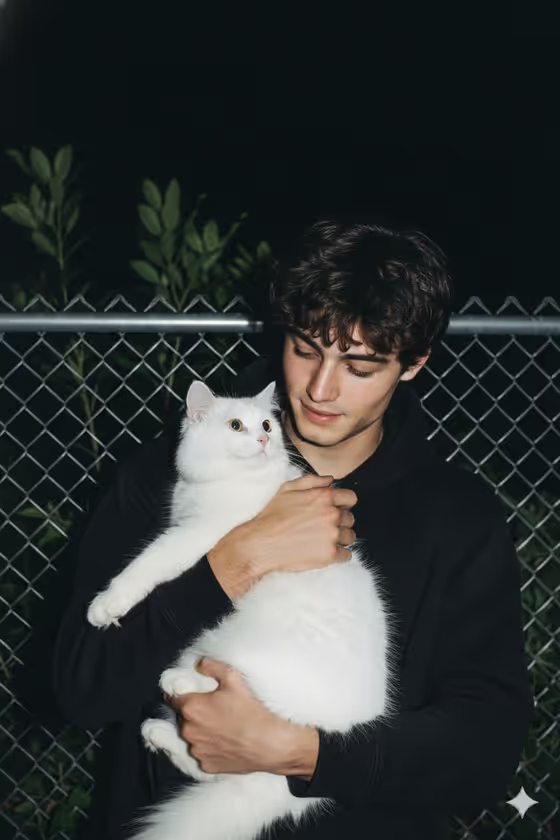
Night Flash Cat Portrait turns a subject into a raw, flash-lit night snapshot. The cover shows a young man in a black hoodie holding a large fluffy white cat against a chain-link fence, with dark green leaves behind him and a pitch-black sky. The look is high contrast with sharp shadows and a grainy, unpolished 2010s digital-camera feel.
It suits anyone who wants a candid, nostalgic portrait with a pet-and-person moment, such as a profile picture, a social post, or a keepsake image. The output is a single 3:4 image, so it works well as a vertical portrait.
What works best as input
- For the 'gentle man portrait subject' field, you can describe the subject in text or upload a reference photo, since this slot accepts a photo. Pick whichever gives you the clearest way to show who should appear.
- If you upload a photo, choose a clear, front-facing shot where the face is well lit and not hidden by sunglasses, hats, or heavy shadow.
- Use a photo of yourself or of someone who has agreed to appear in the image, and keep it respectful.
- If you type a description instead, keep it short and concrete, like the placeholder 'a gentle man', and add a detail or two about hair or expression that you want to see.
- A single-person photo works better than a group shot, so the template has one clear face to work from.
How to use it
- Open the Night Flash Cat Portrait template in Phosphene.
- In 'gentle man portrait subject', describe your subject or upload a reference photo.
- In 'Pose and scene', pick how the image is framed. The options include the default night snapshot, an intimate close portrait, a full-body editorial frame, or an environmental candid frame.
- Generate the image, then review the result and adjust your subject text or framing choice if you want a different take.
Tips for a better result
- Try the 'intimate close portrait' framing if you want the face and the cat to fill more of the picture.
- Switch to 'full-body editorial frame' or 'environmental candid frame' to show more of the fence and surroundings.
- Describe expression in your subject text, such as gentle or affectionate, to match the warm mood of the cover image.
- Run the template a few times with small wording changes in the subject field and compare results, since each generation can differ.
Common mistakes
- Uploading a blurry, dark, or heavily filtered photo, which gives the template less facial detail to work with.
- Writing a long, complicated subject description that fights the template's fixed look, instead of keeping it simple.
- Expecting a bright, polished studio result. This template is built around harsh flash, grain, and a dark night background.
FAQ
Do I have to upload a photo?
No. The subject field accepts either a text description or an uploaded reference photo, so you can choose whichever suits you.
Will the cat look like my own pet?
The template describes a large, fluffy white cat, and there is no pet photo slot. Expect a fluffy white cat like the one in the cover image.
What size is the image?
The output is a single image in a 3:4 vertical aspect ratio.
Can I change the look to daytime or a clean studio style?
The flash-lit night look with 2010s grain is fixed. You can change the subject and the pose and scene choice, but not the core visual style.