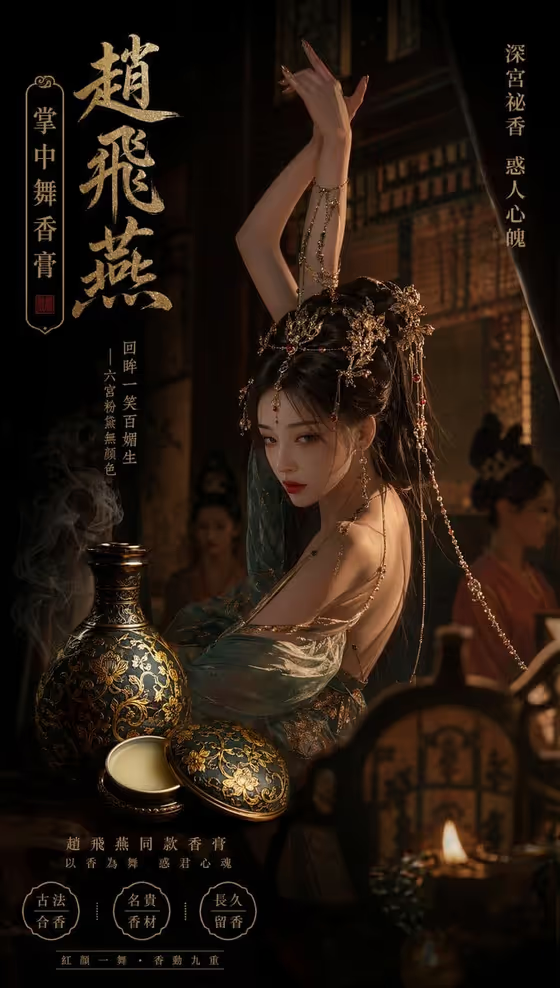
Palace Balm Advertisement turns a balm bottle, jar or similar small object into a vertical, poster-style ad. The vessel is shown as an antique bronze bottle with gold-inlaid lotus vines, set in a dim, cold imperial-court atmosphere with a mysterious, deep-palace mood.
It suits anyone presenting a balm, incense or fragrance-style product, or a concept design, who wants a moody 9:16 advertisement instead of a plain studio shot. The cover shows the idea: a dark palace interior, an ornate bottle in the foreground, and room for decorative text around the scene.
The template can also work from a description alone, so you do not need a finished product photo to try it.
What works best as input
- If you upload a photo, pick one clear picture of the bottle or object on its own, so the template can read its shape and ornament. A single well-lit view works better than a busy scene.
- Make sure the metalwork, lid and any pattern details are visible and in focus, since the template is built around keeping ornate metal detail intact.
- If you would rather type, write a short description in the first field, such as "an ornate bronze balm bottle", and add a few concrete details like shape, lid or decoration.
- Keep the subject to one product or object. Several items in one reference can confuse what the advertisement should feature.
- Use your own product or design reference, since the field asks for the exact visual reference of what you want advertised.
How to use it
- Open the Palace Balm Advertisement template in Phosphene.
- In the field labeled "ornate bronze balm bottle product or object", describe your item or upload its photo. The default idea is an ornate bronze balm bottle.
- In "Product presentation", choose how you want it framed. The default is a vertical palace composition, and the other examples include a clean studio hero, dynamic material interaction and an annotated product breakdown.
- Generate the image, then review the 9:16 result and check that the bottle detail and the palace mood match what you wanted. Adjust the fields and run it again if needed.
Tips for a better result
- Try a different Product presentation option to see the same bottle in a new layout, for example a clean studio hero for a calmer look or an annotated breakdown for a more informational feel.
- Add specific visual details to your description, like the lid style or surface pattern, so the bronze and gold inlay read clearly.
- Test a premium unbranded alternative or a personal product design to compare how different subjects sit in the same palace setting.
- Generate a few times and compare results, since small wording changes in the subject field can shift the framing.
Common mistakes
- Uploading a cluttered photo with several objects or a busy background, which makes it harder for the template to isolate the bottle.
- Leaving the subject vague, such as just "a bottle", so the ornate bronze and gold lotus character is less defined.
- Expecting the template to change the core look. The antique bronze, gold lotus vines and cold palace mood are fixed, so choose the presentation option rather than trying to restyle them.
FAQ
Do I have to upload a photo?
No. The first field accepts either a text description or an uploaded photo, so you can describe your bottle in words if you prefer.
What shape is the output?
It makes a single image in a vertical 9:16 format, like the poster-style cover.
Can I use it for something other than a balm bottle?
The field is meant for a product or object, and the template presents it as an antique bronze vessel. A small container or similar item is the best fit.
What does the Product presentation field change?
It sets how the advertisement is framed, for example the default vertical palace composition, a clean studio hero, dynamic material interaction or an annotated breakdown. The bronze, gold inlay and palace mood stay the same.