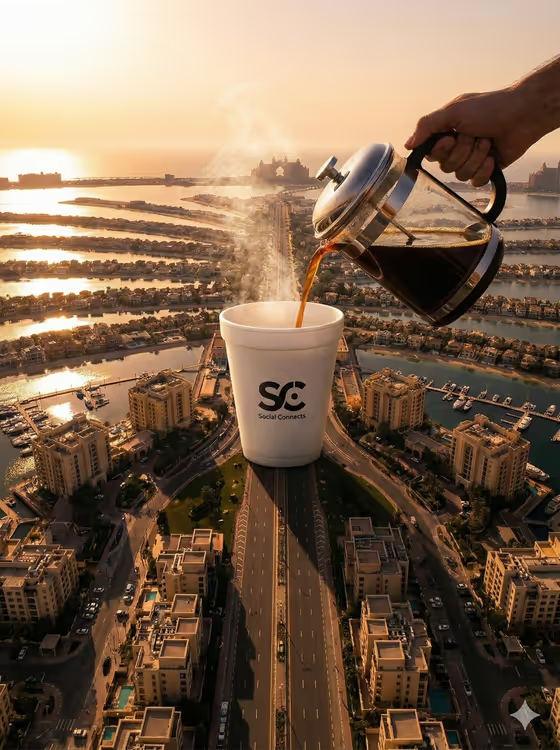
Palm Island Coffee Pour makes a surreal aerial advertisement in a 3:4 image. A hand pours steaming coffee from a glass-and-metal pot into one colossal cup that sits on the trunk of a palm-shaped island, with the miniature city, marina and long golden shadows spread out below.
It suits cafes, coffee brands and social media creators who want a forced-scale visual that makes a cup look as big as a landmark. You supply the coffee product and an aerial landmark, and the template handles the scale, steam, liquid and light.
What works best as input
- For Coffee Product, either describe the cup (for example a giant branded white coffee cup or an oversized espresso cup) or add a photo as an exact visual reference. A clear photo helps if you want a specific shape or logo kept.
- If your cup has a logo, use a photo where the logo faces the camera and is sharp and evenly lit. The template aims to keep the logo clear, so a clean reference gives it more to work with.
- For Aerial Landmark, name a place and a time of day, such as Palm Jumeirah at golden hour or a marina island at sunrise. You can also add a photo of the landmark seen from above.
- The template expects 2 or more photos, so plan to supply a product reference and a landmark reference. Choose images with a single clear subject and no clutter.
How to use it
- Open the Palm Island Coffee Pour template in Phosphene.
- Fill in Coffee Product by typing a description or adding a photo of the cup or drink you want to feature.
- Fill in Aerial Landmark with a place and lighting description, or add an aerial photo of the landmark.
- Generate the image, then check that the island, the cup, the pouring hand and the logo all read clearly before saving or sharing.
Tips for a better result
- Try the example directions to see how the scene changes: an oversized espresso cup, a monumental iced-coffee tumbler or a colossal ceramic cafe cup each give the hero object a different personality.
- Vary the landmark for different moods, such as a coastal city map at dusk or a geometric resort peninsula, while keeping the same cup for a consistent campaign.
- Be specific about lighting in the landmark field (sunrise, golden hour, dusk) because the template leans on warm coastal light and long shadows.
- If a branded cup matters, supply a photo of it instead of only describing it, so the logo has a visual source.
Common mistakes
- Leaving the fields vague, like just coffee or an island. Specific cup styles and named landmarks give the scene a clear subject and setting.
- Using a cluttered or low-resolution product photo, which makes the logo and cup shape harder to keep faithful.
- Describing several landmarks or several cups in one field. The scene is built around one cup on one island, so keep each field to a single idea.
FAQ
Do I have to upload photos?
Both fields accept text or a photo, but the template is set up for 2 or more photos. Describing each item in words is possible, while photos give you more control over how the cup and landmark look.
Can I use my own brand's cup?
Yes. Add a photo of your cup in Coffee Product so the template has an exact reference. A front-facing, well-lit shot with a clear logo works best.
Does it have to be Palm Jumeirah?
No. Palm Jumeirah at golden hour is the placeholder, but you can name another marina island, coastal city or resort peninsula in Aerial Landmark.
What format is the result?
It produces a single image in a 3:4 aspect ratio, framed as a top-down aerial advertisement.