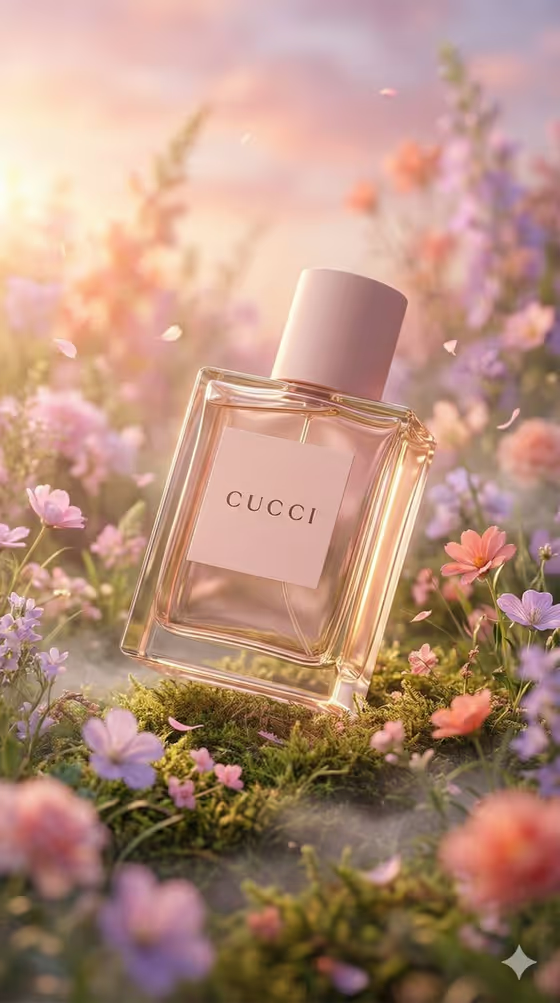
This template stages a perfume bottle in a miniature meadow of pastel wildflowers, moss, drifting petals and faint low mist. The bottle sits diagonally at the center, lit warmly from the upper left, with a soft pastel bokeh behind it, as in the cover image.
It suits fragrance brands, indie perfumers, and anyone who wants a romantic, editorial-style product shot of a bottle. The label text you enter is rendered on the glass, so the image can carry your product name.
What works best as input
- For the Perfume product field you can either describe the bottle or upload a reference photo of the real product. A clear, well-lit photo of the bottle on a plain background gives the template the most to work from.
- If you describe instead of uploading, name the glass color, shape and cap, for example 'a blush glass perfume bottle' or 'an amber niche perfume bottle'.
- Make sure the bottle is fully visible in a reference photo, with the cap and the outline of the glass in frame.
- The Bottle label text field is text only, so keep it short and in capitals, like AURELIA or VELVET BLOOM, to suit the short-label style the field expects.
How to use it
- Open the Perfume in a Pastel Meadow template in Phosphene.
- Fill in Perfume product by describing the bottle or uploading a photo of it, then pick a Meadow palette such as blush pink and lavender.
- Type your Bottle label text, keeping it short.
- Generate the image, then review the 3:4 result, checking the label text and the glass edges before you use it.
Tips for a better result
- Match the Meadow palette to your bottle. A blush bottle sits naturally in blush pink and lavender, while an amber bottle may contrast nicely with cream and pale blue or peach and coral.
- Try the same bottle with different palettes (violet and soft green, peach and coral) to compare moods for a product line.
- Short labels with fewer letters are easier to read on the glass, so favor one or two words over a long tagline.
- If you are describing the bottle, mention that it is transparent or has visible liquid so the glass reads clearly in the scene.
Common mistakes
- Entering a long label, such as a full sentence or several lines, instead of a short product name. The field is meant for a short label.
- Uploading a cluttered or dark photo where the bottle shape is hard to make out, which gives the template a weaker reference.
- Describing the bottle too vaguely, such as just 'perfume', without color, shape or material.
FAQ
Do I have to upload a photo?
No. The Perfume product field accepts either a text description of the bottle or an uploaded reference photo of the real product.
Can I change the flower colors?
Yes. The Meadow palette field lets you choose the flower and bokeh color family, for example blush pink and lavender or peach and coral.
What goes in the label text field?
Enter the short text you want shown on the bottle, such as AURELIA or PETAL NO. 5. It is a text-only field, so you type it rather than upload it.
What shape is the output?
The template produces a single image in a 3:4 aspect ratio, a portrait format.