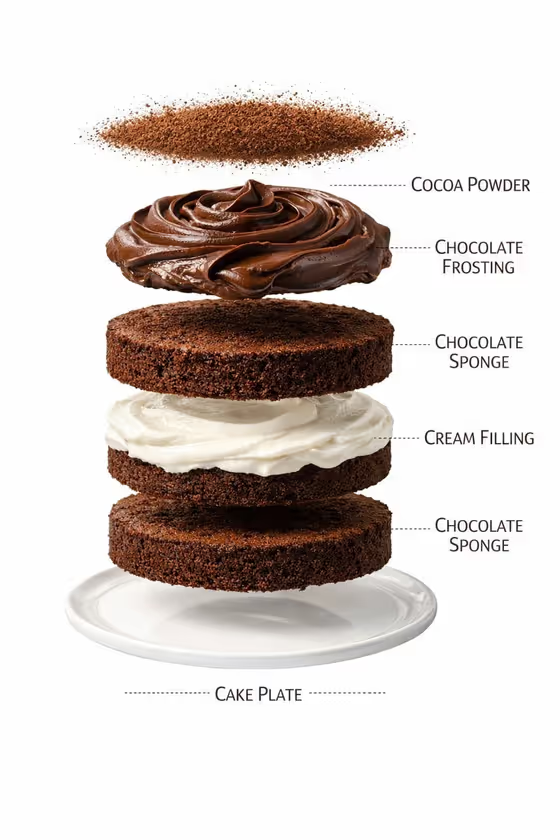
This template makes a bakery-style studio portrait of a layered cake. The cake is shown with three thick sponge layers, a smooth cream filling, a glossy frosting crown and a finishing garnish, all sitting on a clean white plate.
It suits home bakers, cafe owners, pastry students and anyone who wants a polished cake image for a menu, a social post or a recipe page. You only describe the cake, pick a filling and choose a garnish, and the framing and lighting are handled for you.
What works best as input
- This template has no photo upload. All three fields are text or choice fields, so the quality of your result depends on how clearly you word them.
- In Cake Product Name, name the flavor and the style of the cake, such as dark chocolate layer cake or pistachio cream cake. A specific name gives the sponge a clearer color and character.
- In Layer Filling, pick a filling that reads well against the sponge. White vanilla cream shows a crisp contrast with dark chocolate, while raspberry mascarpone or salted caramel cream gives a warmer tone.
- In Top Garnish, keep it to one or two items that fit the cake, like raspberries and chocolate curls or hazelnuts and praline pieces. The template aims for restrained decoration, so a short, tidy garnish works best.
How to use it
- Open the Premium Layer Cake Portrait template in Phosphene.
- Type your cake into Cake Product Name, then choose or enter a Layer Filling and a Top Garnish. All three fields are required.
- Generate the image. The result comes out as a 3:4 portrait.
- Review the cake. Check the layer count, the filling and the garnish, then adjust a field and generate again if something is off.
Tips for a better result
- Match the garnish to the flavor. Cherries and gold pearls feel right on a chocolate cake, while hazelnuts and praline pieces suit a coffee or nut cake.
- Try the same cake name with different fillings to see how the cut section changes, for example white vanilla cream versus pistachio mousse.
- Use the example values as a starting point, then swap one word at a time so you can see which change made the difference.
- Keep the cake name short and concrete. Flavor plus cake type is usually enough.
Common mistakes
- Writing a long, complicated cake description in Cake Product Name. The template already sets the layers, plate and lighting, so extra scene instructions can fight with them.
- Piling many garnishes into Top Garnish. The look is meant to be restrained, and a crowded list can make the top messy.
- Expecting text, labels or a watermark on the image. The template is set to produce none, so add any captions afterwards in your own design tool.
FAQ
Can I upload a photo of my own cake?
No. This template has no photo slot. You describe the cake in Cake Product Name and choose the filling and garnish.
How many layers will the cake have?
The template is directed to show three thick sponge layers with the filling between them, finished with a glossy frosting crown.
What size is the image?
The output is a 3:4 portrait image, shot as a centered studio portrait on a light-grey background with a white plate.
Can I change the plate or background?
Those are part of the fixed direction, so they stay a white presentation plate and a light-grey studio backdrop. You control the cake name, filling and garnish.