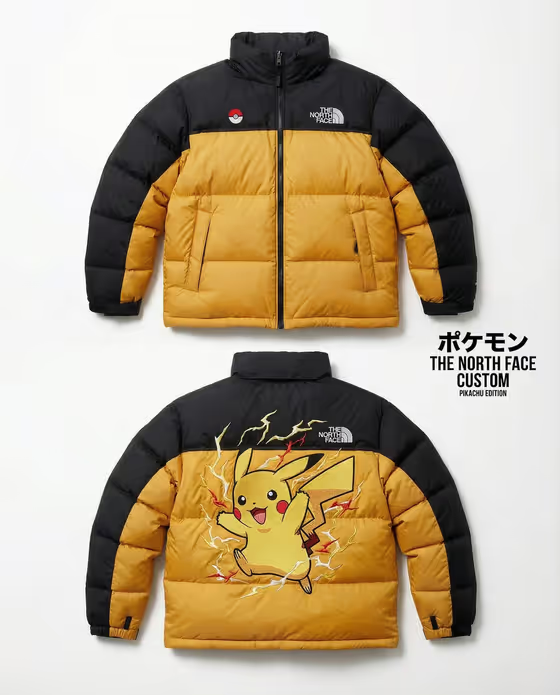
Creature Puffer Jacket turns a creature idea into a product-style fashion image. You get a quilted puffer jacket whose colors come from the creature's palette, with large raised embroidery across the back and a restrained front, shown front and back on a white background.
It suits designers sketching custom outerwear concepts, fans of a favorite character or monster who want to see it as a garment, and anyone building mood boards or mockups for a clothing idea. The output is a single 3:4 image.
What works best as input
- The template asks for two or more inputs. For the Puffer jacket slot, either describe the silhouette in words or add a garment reference photo, such as a clear shot of a jacket you like.
- If you add a jacket photo, pick one with a plain background and the full garment visible, so the shape and quilting pattern are easy to read.
- For Creature motif, write a short description of the creature, its dominant colors and personality (for example, an armored electric beetle). This slot takes text only, so describe it rather than uploading a photo.
- Mention the colors you want the jacket to pick up when they matter. The result is built from the creature's dominant palette, so naming two or three key colors keeps it focused.
- Embroidery character lets you either choose a style or add a reference. Pick the option that matches the creature's mood, such as playful and rounded for a friendly character.
How to use it
- Open the Creature Puffer Jacket template in Phosphene.
- Fill in the Puffer jacket field with a description such as a cropped streetwear puffer, or add a garment reference photo.
- Describe your Creature motif, then set the Embroidery character to bold, flowing, heavy or playful, whichever suits the creature.
- Generate the image and review both views. Check that the back embroidery reads clearly and the front stays minimal, then adjust your inputs and run it again if needed.
Tips for a better result
- Match the embroidery style to the creature. A fiery dragon suits bold and aggressive, while a moon fox suits flowing and mystical.
- Vary the jacket silhouette to change the whole feel. An oversized expedition puffer, a cropped streetwear puffer and a glossy archive puffer each give a different look with the same creature.
- Use specific creature details such as armor plates, tails, wings or glowing markings. They give the back embroidery more to work with.
- Keep the creature description focused on one subject. A single clear motif tends to translate into cleaner threadwork than a crowded scene.
Common mistakes
- Describing the jacket in too little detail, or using a cluttered garment photo, so the silhouette and quilting are unclear.
- Packing several creatures or a whole scene into the Creature motif field, which makes the back embroidery busy instead of one strong centerpiece.
- Choosing an embroidery character that fights the creature, such as heavy and armored for a delicate spirit, then wondering why the mood feels off.
FAQ
Do I have to upload a photo?
The Puffer jacket and Embroidery character slots accept either text or a reference photo. The Creature motif slot is text only, so you describe the creature in words.
Will the whole jacket be the creature's colors?
The jacket takes its colors from the creature's dominant palette, kept wearable and premium rather than cartoonish. The big embroidery sits on the back while the front stays minimal.
What does the final image look like?
A 3:4 product image with the jacket shown front and back, floating upright on a pure white background with soft studio light and visible nylon sheen.
Can I try different styles with the same creature?
Yes. Keep the creature description and change the Embroidery character or the jacket description to compare looks.