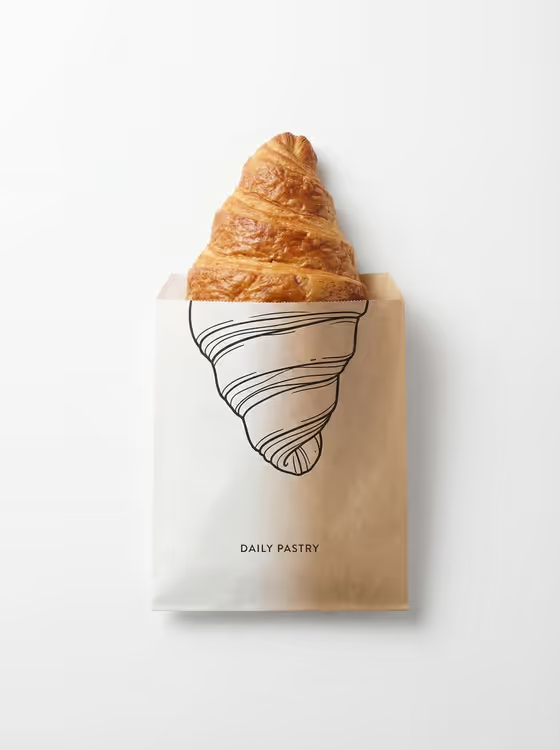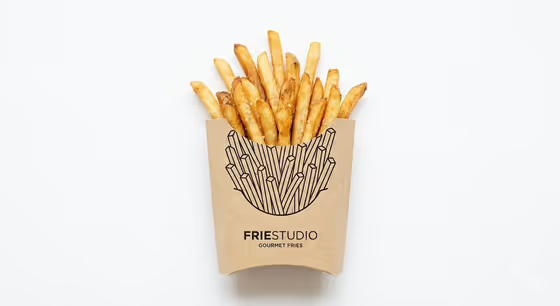
Reality Meets Package Line makes a minimal, top-down studio image where a real piece of food meets its own printed outline on the packaging. The cover shows the idea clearly: golden fries rise out of a kraft carton, and the carton carries a black line drawing of the fries that continues the shape below the edge.
It suits anyone who wants a clean product-style visual for a food concept, a menu idea, a brand mockup or a social post. You describe the food and the style of the printed drawing, and the template handles the white background, the soft shadows and the alignment between the two.
What works best as input
- For Food Product, name one clear item and its packaging together, like the examples "a croissant emerging from a paper sleeve" or "a taco rising from a folded carton". One hero item keeps the result focused.
- The Food Product field can take a photo as an exact visual reference. If you use one, pick a sharp, evenly lit shot of a single food item so the template can match its look.
- Mention the package type in your description (sleeve, carton, cup, wrapper). The printed line has to meet a real packaging edge, so naming it helps the two halves line up.
- For Printed Continuation, describe the line style only. This field is text only, so write things like "black contour drawing of the hidden half" or "minimal one-line illustration on kraft paper" rather than trying to upload an image.
How to use it
- Open the Reality Meets Package Line template in Phosphene.
- Fill in Food Product with your food and its packaging, or add a photo reference if you have one.
- Fill in Printed Continuation with the kind of line art you want printed on the pack, such as a technical ink sketch or a bold brush outline.
- Generate the image, then check that the food and the drawing meet at one clean edge and that the ink stays on the paper.
Tips for a better result
- Match the drawing style to the packaging material. "Minimal one-line illustration on kraft paper" gives a quiet, natural look like the cover, while "bold brush outline printed on the pack" feels louder.
- Keep the drawing description tied to the food itself, for example the hidden half of the item, so the outline reads as a true continuation of the real shape.
- Try the same food with different continuation styles (contour drawing, technical sketch, brush outline) to compare how the mood changes.
- Stick to a single food item per run. The template is built around one hero subject, and a crowded description can dilute the effect.
Common mistakes
- Describing several foods or several packages at once. This can lead to a confusing layout instead of one clean meeting point between food and print.
- Asking for the drawing to float, glow or spread onto the background. The template keeps the illustration printed flat on the packaging only, so those requests work against it.
- Leaving the packaging out of Food Product. Without a sleeve, carton, cup or wrapper to name, the printed line has nothing obvious to attach to.
FAQ
Do I have to upload a photo?
No. Food Product is a text field that also accepts a photo, so you can either describe the food or add a reference image. Printed Continuation is text only.
Will the drawing appear on the background?
No. The template keeps the line art confined to the paper packaging, with the food shown as real and the background left as clean white space.
What kind of food works best?
Items that visibly emerge from or sit in packaging work well, like the examples of a croissant in a sleeve, a taco in a carton or a noodle bundle in a cup.
What shape is the result?
The template outputs a single image in a 3:4 aspect ratio, framed as a top-down shot.