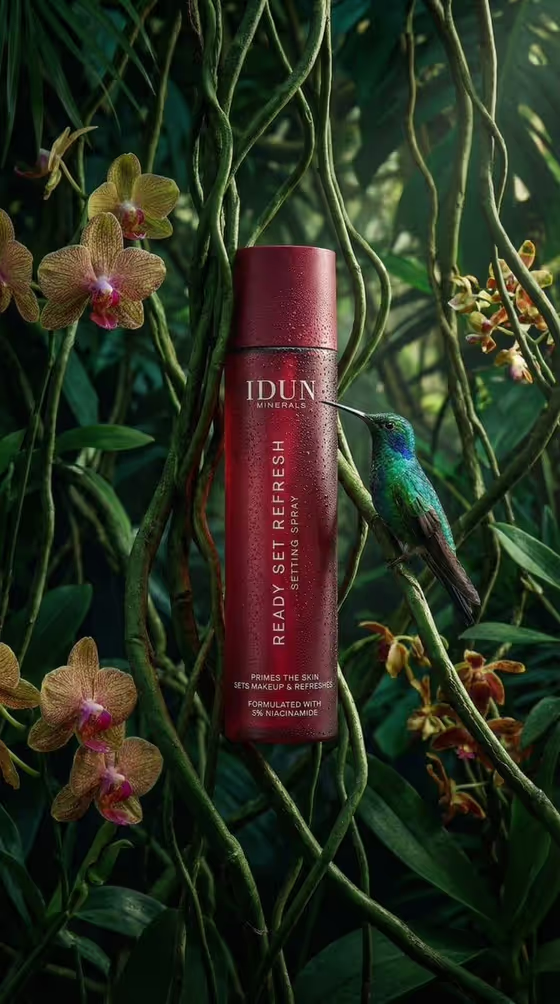
Rainforest Setting Spray turns a cosmetic bottle into a jungle campaign image. The bottle stands on a mossy bank above still, near-black water, surrounded by dense tropical foliage, with a small wildlife companion beside it and a full reflection below. The cover shows this with a burgundy spray bottle, orchids, climbing vines and a hummingbird.
It suits skincare and beauty brands, small makers and designers who want a botanical, premium product visual in a 3:4 portrait frame. You set the bottle, the companion animal, the brand name and the product copy, and the template handles the lighting, foliage and finish.
What works best as input
- For the Cosmetic bottle field, you can either upload a photo of the real product or describe the container in words, for example "a deep-green facial mist" or "a matte black botanical toner".
- If you upload a photo, use a clear shot of the whole bottle with the cap and silhouette fully visible, so the shape and colour carry over accurately.
- If you describe it instead, name the colour, shape and finish (for example burgundy, cylindrical, matte), since the template is built around a cylindrical bottle with a flush cap.
- Keep Brand name short and in capitals, such as IDUN MINERALS or MOSS & DEW. It is printed as the header on the bottle.
- For Product copy, write the product name and the supporting claim separated by a dot, like READY SET REFRESH · SETTING SPRAY. Shorter lines stay more readable on the bottle.
How to use it
- Open the Rainforest Setting Spray template in Phosphene.
- Fill in Cosmetic bottle by describing the container or uploading your product reference photo.
- Choose a Wildlife companion from the options, then type your Brand name and Product copy.
- Generate the image, then check the bottle shape, the printed text and the reflection in the water before using it.
Tips for a better result
- Pick a companion that matches the mood you want. A hummingbird or blue morpho butterfly feels airy, while a tiny emerald tree frog feels more grounded and humid.
- Choose a bottle colour that contrasts with the green scene. The cover's burgundy bottle stands out strongly against the foliage.
- Try several variations of the same bottle with different companions to build a small set of campaign visuals.
- Keep the product copy to one short name and one short claim so the vertical text stays crisp and legible.
Common mistakes
- Writing long brand names or long claims. Text printed on a slim cylinder reads best when it is brief.
- Describing a bottle that does not fit the template, such as a wide jar or a box. The scene is designed around a cylindrical spray bottle.
- Skipping the final check. Always zoom in on the printed text and the reflection to confirm they look right before you publish.
FAQ
Can I upload a photo of my real product?
Yes. The Cosmetic bottle field accepts either a text description or an uploaded reference photo of the product.
Can I upload a photo for the brand name or the wildlife companion?
No. Brand name and Product copy are text fields, and Wildlife companion is a choice from the listed options. Only the Cosmetic bottle field takes a photo.
What size is the image?
The template makes a single image in a 3:4 portrait ratio.
Does the brand name appear on the bottle?
Yes. The brand name is printed as a clean header on the bottle, and the product copy appears as the readable vertical name and supporting claim.