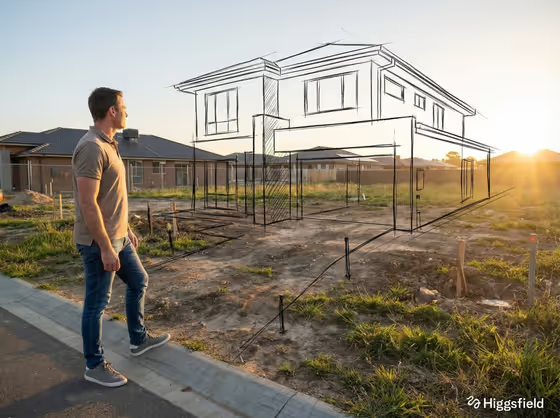
Restoration Sketch Vision makes a portrait-format image (3:4) of a person standing in a damaged or unfinished real-world space, looking at black hand-drawn construction lines that sketch out how the place could look once repaired. The cover shows the idea well: a man in a casual shirt and jeans stands at the left edge of an empty building plot while ink-style outlines of a finished house hover in perspective over the bare ground.
It suits architects, restorers, community groups, real estate and renovation pitches, or anyone who wants a single picture that says 'this is what it could become.' You describe who is observing and what the finished restoration looks like, and the template handles the sketch overlay and composition.
What works best as input
- For the Observing Person field, write a short role-based description such as 'an architect surveying a damaged hall' or 'a resident facing a ruined courtyard.' A role plus a place gives the scene a clear story.
- This field also accepts a photo as a visual reference. If you add one, pick a clear shot where the person's build and clothing are easy to see, since the template shows them full-body from a three-quarter rear angle.
- In Restoration Vision, type only the finished result, for example 'a completed roof and restored windows.' This field is text only, so describe it in words rather than uploading an image.
- Name concrete architectural elements (arches, facades, gardens, interiors, lights). Specific parts give the pencil-and-ink lines something definite to draw.
- Keep each field to one idea. A short, focused phrase tends to read more cleanly than a long list of changes.
How to use it
- Open the Restoration Sketch Vision template in Phosphene.
- Fill in Observing Person with a role and setting, or add a reference photo if you want a specific person as the observer.
- Fill in Restoration Vision with the finished state you want sketched, such as 'rebuilt arches and a revived garden.'
- Generate the image, then check that the sketch lines sit on the damaged space and the observer is standing at the left of the frame. Adjust your wording and run it again if needed.
Tips for a better result
- Match the observer to the project. 'A conservator studying an empty theater' pairs naturally with a vision like 'finished interiors and working lights.'
- Try the same observer with different visions (for example repaired facades versus a revived garden) to compare directions for one site.
- Pick visions that suit an outdoor or open scene if you want the sketch lines to read clearly against the ground and sky, as in the cover.
- If the first result feels generic, make the Restoration Vision more specific rather than longer.
Common mistakes
- Writing a vague observer like 'a person' with no role or setting, which leaves the scene without context.
- Describing the damage instead of the repaired result in Restoration Vision. The sketch should show what will exist, not what is broken.
- Cramming many unrelated changes into one field, which can make the sketch lines busy and hard to read.
FAQ
Can I upload a photo of the space itself?
The template's photo option is on the Observing Person field, as a visual reference for the observer. The damaged space comes from your text description.
Do I have to fill in both fields?
Yes, Observing Person and Restoration Vision are both required.
What will the sketch look like?
Expressive black pencil-and-ink construction lines in correct perspective, overlapping the real surfaces so the planned restoration seems to appear in the scene.
Where will the person appear in the picture?
The observer stands full-body near the left edge of the frame, seen from a three-quarter rear angle, looking toward the sketched vision.