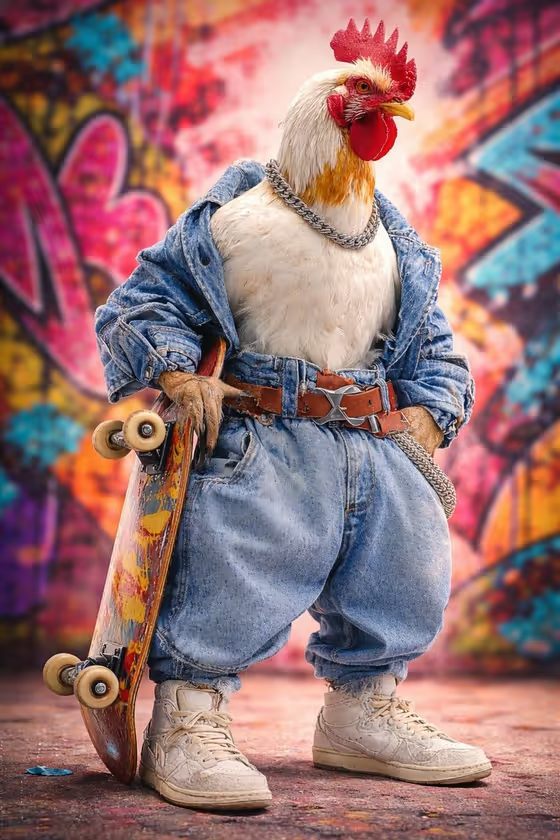
Rooster Street Skater turns an animal of your choice into an upright, human-posed skater character. In the cover, a white rooster stands in a loose denim jacket, baggy jeans, a silver chain, a leather belt and worn sneakers, with a skateboard held vertically at its side. The result is a portrait-format (3:4) image with a graffiti wall behind it and polished studio-style lighting.
It suits anyone who wants a quirky character portrait, a profile picture, a poster idea or a bit of fun with a favorite animal. You describe the animal, pick the outfit and give the skateboard a look, and the template handles the pose, lighting and realistic texture.
What works best as input
- For the Animal character subject field, be specific about species, color and attitude, like the placeholder 'confident white rooster' or 'bold red fox'. A clear description gives the model a stronger character to build on.
- This field also accepts a matching reference photo. If you upload one, choose a clear, well-lit shot of the animal where its head, markings and feather or fur color are easy to see.
- The template asks for 2 or more photos in total, so have your animal reference and any outfit reference ready before you start.
- The Street-skater outfit field can take a reference too. A photo of the streetwear you have in mind works well, and the examples show the kind of detail to aim for, such as 'wide trousers, varsity jacket and chain'.
- The Skateboard design field is text only, so describe the deck in words, for example 'black scratched deck' or 'retro checkerboard deck'. Mention color and wear to get a convincing board.
How to use it
- Open the Rooster Street Skater template in Phosphene.
- Fill in Animal character subject by typing a description or attaching a matching reference, then choose or describe your Street-skater outfit.
- Type your Skateboard design, such as 'worn colorful deck', and make sure all three required fields are complete.
- Generate the image and review it. Check that the full body is visible, the outfit matches what you asked for and the skateboard is held upright, then adjust a field and run it again if needed.
Tips for a better result
- Try different animals with the same outfit, such as a cool black duck or a bold red fox, to see how the template adapts anatomy to the upright pose.
- Add personality words to the animal description (confident, calm, mischievous) since the template aims for a confident expression.
- Pair outfit and board styles on purpose. A retro checkerboard deck with a varsity jacket reads very differently from a black scratched deck with a hoodie and beanie.
- Describe wear and texture in your board and outfit text, like scratches or faded denim, because the template emphasizes tactile detail in feathers, fabric, leather and metal.
Common mistakes
- Writing a vague subject like 'bird' or 'animal'. Without species, color or mood, the character has little to hold onto.
- Uploading a blurry or heavily cropped reference photo, which makes the animal's features harder to match.
- Cramming too many clashing ideas into the outfit field. One clear streetwear look reads better than a long list of unrelated pieces.
FAQ
Can I use any animal?
The subject field is open, so you can describe or reference the animal you want. The examples include a rooster, a duck and a fox.
Do I have to upload photos?
The template lists an upload requirement of 2 or more photos. The subject and outfit fields can take references, and the skateboard design is text only.
What will the picture look like?
It is a full-body, 3:4 image of the animal standing upright like a person, holding a skateboard vertically, lit like a clean studio fashion shot with realistic texture.
Can I change the outfit?
Yes. The Street-skater outfit field lets you choose or describe a look, such as cargo shorts with a hoodie and beanie, or reference your own streetwear.