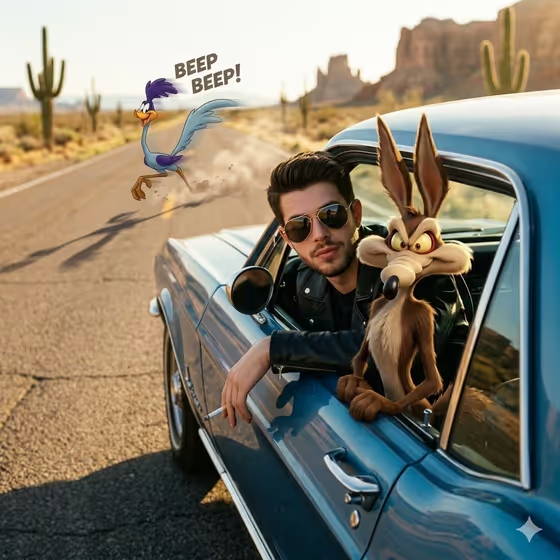
Desert Cartoon Crossover builds a photorealistic desert highway scene in which a person leans out of a vintage blue car window, with a cartoon coyote perched on the door and a cartoon roadrunner sprinting along the road behind. Only the animated characters get the exaggerated classic-animation look. The person, the car and the landscape stay photographic.
It suits anyone who wants a playful, cinematic portrait with a film-still feel: social avatars, fun profile images, or a creative one-off picture. You describe or supply the live-action subject, pick the cartoon companion, and the template handles the golden-hour lighting and composition.
What works best as input
- For the Live-action subject slot, a clear, well-lit photo of an adult works best. Face the camera, keep the face unobstructed, and avoid heavy filters so the likeness carries into the scene.
- The slot also accepts a text description. If you go that route, be specific about the adult you want, as in the examples (an adult man matching my reference, an adult woman with a distinctive presence).
- The scene dresses the subject in a black leather jacket and aviator sunglasses, so you do not need to wear them in your source photo. A head-and-shoulders or half-body shot is enough.
- Use only photos of yourself or people who have agreed to appear, and avoid photos of public figures.
How to use it
- Open the Desert Cartoon Crossover template in Phosphene.
- In Live-action subject, upload a photo of your subject or type a short description, such as the placeholder 'an adult man matching my reference'.
- In Cartoon companion, choose or describe the animated character, for example a mischievous cartoon coyote or a fast cartoon roadrunner.
- Generate the image, then review the result. Check that the subject looks right and that the cartoon characters sit naturally in the scene. Adjust the fields and run it again if needed.
Tips for a better result
- Try different Cartoon companion options. A cheeky cartoon fox or a classic animated desert mascot changes the character on the car door while the rest of the scene stays the same.
- Keep the companion description short and concrete. The template already adds the classic-animation styling, so you mainly need to name the character type.
- If a result does not capture the person well, switch to a clearer, more evenly lit source photo rather than adding more words.
- Generate a few variations and compare them. Small differences in expression and pose can make one version feel noticeably more natural.
Common mistakes
- Using a dark, blurry or heavily cropped photo in Live-action subject. The likeness comes from that input, so a weak photo gives a weak match.
- Writing a long, detailed description for the Cartoon companion. Overloaded text can muddy the character, and a simple phrase works better.
- Expecting the human or the environment to turn cartoonish. The template keeps those photorealistic and only animates the companions.
FAQ
Do I have to upload a photo?
The Live-action subject slot accepts a photo, and a typed description is also possible. A photo of the person usually gives the closest match.
Which characters can I choose for the Cartoon companion?
The examples include a mischievous cartoon coyote, a fast cartoon roadrunner, a cheeky cartoon fox and a classic animated desert mascot. You can also describe your own companion in the field.
Will the whole image look like a cartoon?
No. The person, the vintage car and the desert are meant to stay photorealistic, and only the cartoon companion gets the exaggerated classic-animation look.
What shape is the output?
The template produces a single image with a 16:9 aspect ratio.