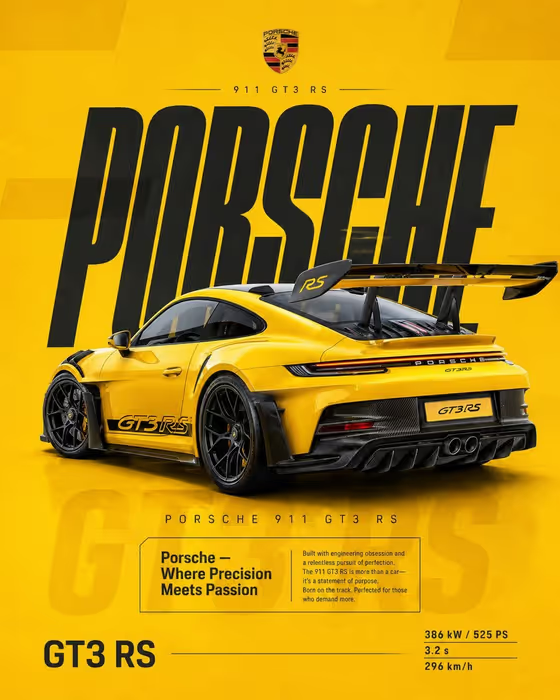
This template builds a vertical 3:4 racing poster around a single car. The cover shows a yellow track-focused sports car shot from a raised rear three-quarter angle, sitting on a flat racing-yellow background with tall condensed charcoal lettering behind it, a boxed editorial block, and a small spec column at the bottom.
It suits car enthusiasts, dealers, clubs, and designers who want a bold, print-style poster look without laying out the type by hand. You describe your car or supply a reference photo, pick a presentation style, and the template handles the staging, headline type, and spec callouts.
What works best as input
- Use a clear photo of the car as your reference, ideally from a rear three-quarter angle with the whole body in frame, since the template stages the car from that viewpoint.
- Pick an image where the car's colour, wheels, and any wing or aero parts are easy to see, so those defining details carry over.
- Avoid heavy filters, cluttered backgrounds, or other cars in the shot, which can confuse what the hero object is.
- If you type instead, be specific in the first field, for example 'a yellow track-focused sports car', and name colour, body style, and any distinctive parts.
How to use it
- Open the Yellow Racing Poster template in Phosphene.
- In the first field (yellow track-focused sports car product or object), describe your car or upload your reference photo.
- In Product presentation, choose one of the offered framings, such as a clean studio hero, or keep the default poster setup.
- Generate the image, then check the headline type, spec text, and car details, and adjust your inputs if something is off.
Tips for a better result
- Name small identifying details in your description, like wheel finish, carbon trim, or a rear wing, so they show up in the poster.
- Try each Product presentation option to see how the framing changes while the yellow poster look stays fixed.
- Use a reference photo that already matches the colour you want, since the template's look leans on gloss yellow with dark carbon accents.
- Compare two or three generations from slightly different descriptions and keep the one with the cleanest type and car edges.
Common mistakes
- Uploading a front-on or very distant photo, which makes it harder to stage the car from the raised rear three-quarter view.
- Writing a vague description like 'a fast car' with no colour or body details, which gives the poster little to anchor on.
- Expecting the printed names and spec numbers to be exactly what you want without checking, since text in generated posters should always be reviewed.
FAQ
Do I have to upload a photo?
No. The first field is a text field that also accepts a photo, so you can either describe the car or upload a reference of it.
What shape is the poster?
It is a vertical image in a 3:4 aspect ratio, suited to posters and social posts.
Can I use a car that is not yellow?
The template is built around a gloss racing-yellow look, so results are most reliable with a car that suits that scheme. Describe your car clearly and check how the colours come out.
What does the Product presentation field change?
It chooses how the car is framed, with options like a clean studio hero or an annotated product breakdown, while the overall poster styling stays the same.