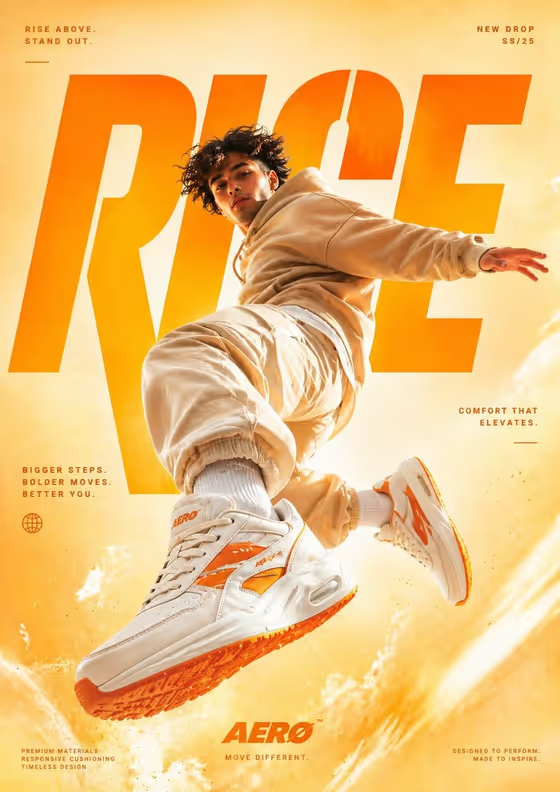
This template builds a sneaker advertisement poster around a single subject caught mid-jump. The camera sits low and looks up, so the sneakers loom large in the foreground while the rest of the outfit and a warm yellow-to-orange studio gradient fill the frame. Big headline type sits behind the subject, as in the cover, where the word RISE is partly hidden by the jumping figure.
It suits sports and streetwear brands, small shops, student campaign projects, and anyone who wants a polished 3:4 poster concept without organizing a studio shoot. You describe or upload your subject, pick a layout, and the template supplies the styling, lighting, and poster text.
What works best as input
- The first field (the athlete wearing statement sneakers subject or product) accepts either a text description or a photo upload. Use a photo when you want the result to follow a specific person or product you own.
- If you upload a photo, choose a clear, well-lit image of a person or product you have the right to use, with the whole body or the full object visible and nothing important cropped.
- If you describe instead, be concrete about who or what the hero is, for example an athlete in a particular build or a specific product concept, rather than a vague word like 'someone'.
- Keep the subject simple. The template already specifies the beige hoodie and joggers, chunky white sneakers with orange accents, and the warm gradient, so you do not need to describe those.
- Avoid photos with heavy filters or busy backgrounds, since the poster uses its own clean studio gradient.
How to use it
- Open the Airborne Sneaker Poster template in Phosphene.
- In the subject field, type a short description of your athlete or product, or upload a reference photo of it.
- Choose an option in the Poster layout field, such as single hero with title, modular editorial grid, or layered cinematic collage.
- Generate the image, then check the result for the jump pose, sneaker detail, and readable poster text, and adjust your inputs if something is off.
Tips for a better result
- Start with the single hero with title layout if you want something close to the cover: one jumping figure with the large headline behind them.
- Try the modular editorial grid or layered cinematic collage layouts to see the same campaign feel arranged differently.
- Change only one input per run, either the subject or the layout, so you can tell which change caused the difference.
- If your first result misses on the sneakers, rerun with a clearer subject description or a sharper source photo.
Common mistakes
- Describing the outfit, background, or slogans in the subject field. Those are already fixed by the template, and extra detail can clash with them.
- Uploading a small, blurry, or cropped photo, which gives the poster less to work with for the subject's look and proportions.
- Expecting the brand name, tagline, or poster copy to change. The text and AERO branding come from the template's fixed direction.
FAQ
Can I upload my own photo?
Yes. The subject field accepts a photo upload as well as a text description. The Poster layout field is a choice, not an upload.
What shape is the poster?
The output is a single image in a 3:4 portrait aspect ratio.
Can I change the headline or brand name?
The template fixes the RISE headline, the small slogans, and the AERO logo, so those are not editable fields. You control the subject and the layout.
What does the Poster layout option do?
It sets how the poster is framed. The options include single hero with title, modular editorial grid, and layered cinematic collage, while the sneaker ad look stays the same.