One Reference Image Is Enough: Consistent Characters Across a Series with ChatGPT Images 2.5
A Japanese creator was re-describing their two mascot characters in every new prompt and watching the faces drift article to article. The fix was one reference image per character plus an explicit "refer to this design" instruction. Here is the workflow, the prompt pattern, the platform-size lesson, and the text rules.
AI-assisted draft. Reviewed and edited by the Phosphene team before publication.
On this page
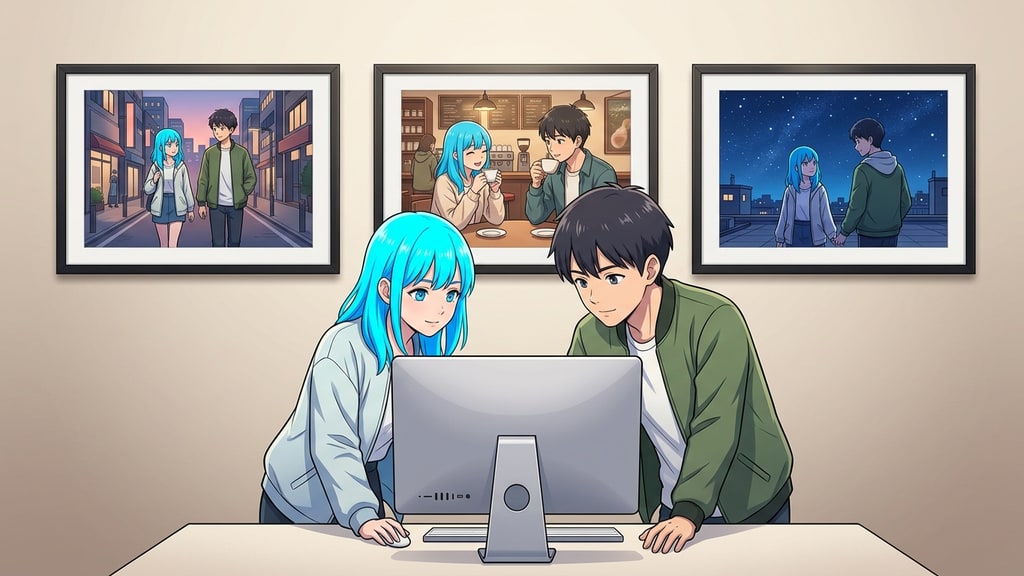
If you run a blog, a channel, or a brand with recurring characters, you know this exact pain. You write the same description every time — "neon blue hair, green jacket" — and the result is a slightly different person every time. The hairstyle shifts. The green changes depth. The face rounds out or sharpens. Each image is fine on its own. Lined up as a series, it looks like the character is being recast between posts.
A Japanese creator who maintains two mascot characters for a note.com publication hit that wall and found a fix worth stealing. The whole technique fits in one sentence: give the model one reference image per character, tell it to follow that design, and let the theme change everything else. We checked his write-up against OpenAI's own announcement for ChatGPT Images 2.5, and the details line up.
Why re-describing a character always drifts
The problem is not the prompt quality. It is that a paragraph of text is a lossy description of a visual identity. "Neon blue hair" does not pin down the color temperature, the highlights, the layer order, or the silhouette. Every generation re-interprets those unknowns, and every new interpretation is a new vote on what the character looks like.
That is fine for one-off art. It is fatal for a series, because the reader compares covers side by side. The author describes his pre-fix workflow as rebuilding the same two characters from a text description every single time, and getting a subtly different haircut, jacket shade, and face shape with each article. Nothing looked wrong in isolation. Everything looked wrong in sequence.
The fix: one reference image, treated as the identity
What changed the workflow was another creator's tip: upload one good image of the character and explicitly instruct the model to treat it as the design source. In this case, each character got one reference image — the best past render that already looked right.
The image became the source of truth. The prompt became the delta: what is different for this particular article.
His actual instruction, translated:
Refer to the character design in this image. Draw them as the same Mina and Yuto. This article is about making covers with ChatGPT Images 2.5, so compose the two of them peering at a computer screen.
Notice what the prompt does and does not do. It does not re-describe hair, clothing, or face shape. It names the characters, points at the reference, and then describes the new scene and pose. That division of labor is the whole trick: the identity lives in the image, the variation lives in the text.
The result, in his words, was the difference between "two new people show up every time" and "the same two people in a different scene." Hair color, face structure, and clothing detail held across themes that were conceptually unrelated.
This matches the capability OpenAI actually claims for the model. The 2.5 announcement says it is better at preserving subjects from reference photos across new settings and styles, and that distinctive features are more likely to carry through. The reference-fidelity upgrade is exactly what makes the one-image workflow viable instead of a lottery.
Chain edits, and watch what survives
The useful part is not just the first generation. After the reference-led cover came out, he stacked two or three follow-up edits in the same session: brighten the background, make one character look more surprised. The comparisons held — faces and outfits did not collapse into a fresh interpretation.
This is the multi-turn consistency behavior that the 2.5 announcement describes: earlier changes stay stable while new edits build on them, instead of each turn quietly resetting the image. For character work it matters more than for decor, because the identity has the most to lose from a silent re-roll.
Two pragmatic notes from the same session:
- Treat reference weight as something that can fade on long edit chains. The source only tested two or three follow-up edits, where faces and outfits held; whether much longer chains stay stable is unverified, so treat fading as a precaution rather than a measured fact. If you need a long chain of corrections, the safer move is to export the good version and re-upload it as the new reference instead of trusting the chat to remember the original.
- Check the pairing, not the smile. Judge each turn against the reference: hair color, face silhouette, clothing details. Expressions and poses should move; those three should not.
Say the platform size out loud, before generating
The author's other hard lesson is a crop problem, and it applies to any platform with a fixed cover format. note.com auto-trims cover images to its recommended 1280×670px, a 1.91:1 ratio. Generate at a square or random ratio and the platform cuts your carefully composed frame — heads, props, edges — without asking.
His fix was unnervingly simple: put the dimensions in the prompt. Asking for a "1280×670px landscape composition" up front produced a frame that survived the platform's crop untouched.
The general rule: know the target's crop before you generate, and say the dimensions in the prompt. This applies to YouTube thumbnails, feed cards, and marketplace listings just as much as blog covers. It is one sentence that saves an entire reshoot round.
Text in the image: quote it, keep it short
Image models still mangle text, and Japanese text is a notorious case. The author tested embedding part of the article title into the cover and found the usual garbling. His workaround was wrapping the target string in corner quotes in the prompt — instructing the model to place the text "AIで統一感" (a short phrase) rather than just implying it.
Wrapping the string in quotes improves the odds that the model treats it as a literal token to render instead of a description to reinterpret. It is not a guarantee, and the author says it works for a short phrase, not a paragraph. If the text matters for the design, render it separately and composite; if it is a garnish, quote it in the prompt and check the output carefully.
The one-image character workflow, as a checklist
- Pick your best existing render of each character as the reference. One good image beats three mediocre ones.
- Upload the reference, then write a prompt with three parts: refer to this design, name the character, describe only the new scene and pose.
- Generate. Compare against the reference, not against the idea in your head. Hair, face, and outfit should match; expression and pose should differ.
- If you need follow-up edits, keep chains short and export after the version you like, so the file — not the chat — becomes the next reference.
- State the target platform dimensions in the prompt before the first generation. Cropping is the silent killer of good composition.
- If the cover carries text, quote the exact string in the prompt and keep it to a short phrase.
This does not mean every model works the same way. The reference-led loop is strongest exactly where the model has real reference fidelity and multi-turn stability, which is what ChatGPT Images 2.5 was built around. On older tools, the same prompt shape still helps, but expect the drift to come back sooner and re-anchor more often.
The deeper lesson is about division of labor: let the image hold the identity and let the text hold the variation. Characters become assets you reuse instead of descriptions you gamble on. That is the same logic Phosphene applies to tag-based character identity — you define the fixed traits once, lock them into the identity group, and change only the scene, mood, or style tags between generations, so a series reads as one character living through different situations rather than a new person at every prompt.