Character Consistency Is a System, Not a Prompt
How to keep an AI character recognizable across outfits, expressions, images, and short videos without relying on prompt luck.
AI-assisted draft. Reviewed and edited by the Phosphene team before publication.
On this page
- Consistency starts with identity markers
- Separate the locked traits from the variable traits
- A better variant workflow
- 1. Make the neutral reference image
- 2. Generate expression variants before outfit variants
- 3. Change clothing after the face survives
- Character consistency in Phosphene
- Reference images and editing tools are not cheating
- From still character to talking video
- The consistency checklist
- The takeaway
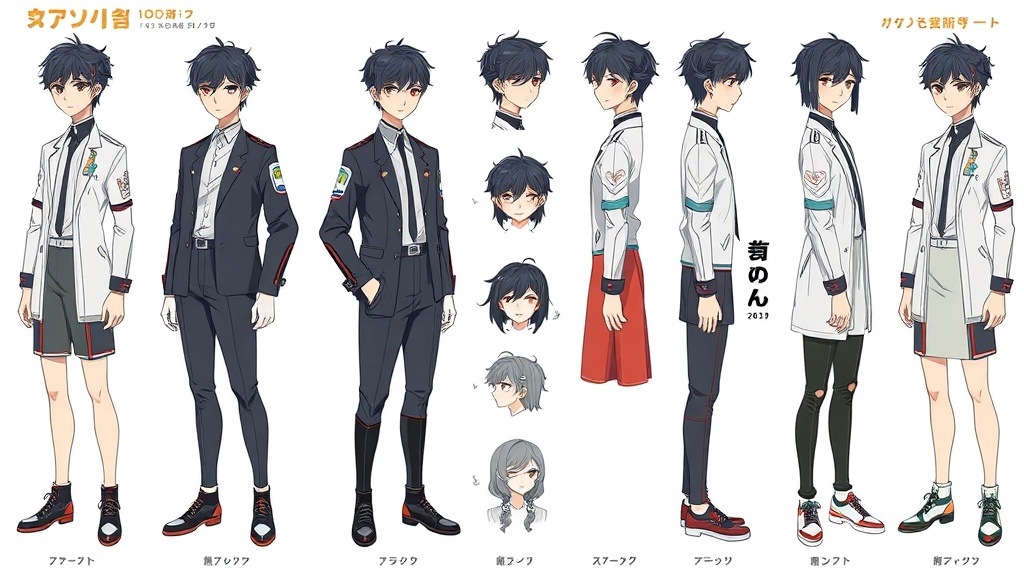
The fastest way to lose an AI character is to treat every image as a new prompt.
You get one good portrait. Then you ask for a different outfit, a stronger expression, a new pose, or a talking video. Suddenly the face shifts, the costume logic breaks, and the character becomes a cousin of the original instead of the same person.
The fix is not a magic sentence. The fix is a system for deciding which parts of the character can change and which parts must stay locked.
Consistency starts with identity markers
A character is not consistent because the prompt says "same character." A character is consistent because several visible markers survive across generations.
Good identity markers are specific and repeatable:
- hair shape and color placement
- eye color or asymmetry
- signature accessory
- silhouette
- material language in the outfit
- recurring facial proportions
- palette constraints
Weak identity markers are vague:
- beautiful anime girl
- cool cyberpunk hero
- cute mascot
- stylish fantasy character
Those phrases describe a category, not an identity. The model can satisfy them while changing the person completely.
A stronger character core looks like this:
Young courier with short silver bob hair, one amber eye and one blue eye, black cropped jacket with cyan trim, compact neon headphones, small fox emblem on the sleeve, confident but tired expression.
This gives the model anchors. More importantly, it gives you a checklist.
Separate the locked traits from the variable traits
Before making variants, divide the character into two groups.
Locked traits:
- face shape
- hair silhouette
- eye colors
- signature accessory
- key color accents
- emblem or repeated motif
Variable traits:
- outfit layer
- facial expression
- hand pose
- background
- season
- camera distance
- lighting setup
Most consistency failures happen when the creator changes both groups at the same time. If you ask for a summer outfit, new hairstyle, different emotion, new background, and full-body pose in one generation, the model has too many degrees of freedom.
Change one layer at a time.
A better variant workflow
Use this sequence for character sheets, social avatars, mascot systems, VTuber concept art, or story characters.
1. Make the neutral reference image
Start with the most boring useful version: front-facing or three-quarter view, clean lighting, readable outfit, minimal background.
This is not the final artwork. It is your control frame.
The reference image should answer:
- what does the face look like?
- what is the default silhouette?
- which details must never disappear?
- what color palette defines the character?
2. Generate expression variants before outfit variants
Expressions are the safest first test because the identity should remain almost unchanged.
Try:
- neutral
- soft smile
- annoyed
- surprised
- tired
- confident
If the face changes during expression tests, the character is not stable enough for more complex variants yet.
3. Change clothing after the face survives
Once expression variants work, move to outfit changes.
Do not ask for a completely new design. Ask for a controlled wardrobe swap while preserving the identity markers.
Example:
Keep the same character identity, silver bob hair, heterochromia, compact neon headphones, and fox sleeve emblem. Change only the outfit to a white summer T-shirt and denim shorts. Keep the face, hair, eye colors, and accessory unchanged.
The phrase "change only" is useful because it tells the model what the edit is, not just what the desired final image contains.
Character consistency in Phosphene
In Phosphene, build characters as layered tag systems rather than one disposable prompt.
A practical setup:
- Create a core identity group: face, hair, silhouette, signature colors, accessory.
- Add a wardrobe group: default outfit, seasonal outfit, formal outfit, casual outfit.
- Add an expression group: neutral, smile, angry, crying, shocked, tired.
- Add a context group: studio portrait, street scene, livestream avatar, poster key art.
Then iterate by changing one group while keeping the others stable.
For example, if the goal is an expression sheet, keep identity + wardrobe + context unchanged and only rotate expression tags. If the goal is a seasonal costume set, keep identity + expression + camera unchanged and only rotate wardrobe tags.
This is the same mental model as professional character design: a character bible first, final illustrations second.
Reference images and editing tools are not cheating
Prompt-only generation is attractive because it feels clean. But consistency often needs reference control.
Different tools expose this in different ways: character reference, style reference, image-to-image, LoRA, fine-tuning, inpainting, or natural-language image editing. The labels differ, but the principle is the same.
Use the tool that lets you preserve the locked traits while editing the variable trait.
For example:
- use image editing for expression changes
- use image-to-image for pose or outfit variations
- use a trained character reference when the same person must appear across many scenes
- use style reference separately from character reference so the art direction can evolve without changing identity
The key is not the brand of tool. The key is whether it gives you control over what stays fixed.
From still character to talking video
Once a character is stable in still images, video becomes more realistic.
Do not start with a full action scene. Start with a conservative animation test:
Same character, subtle breathing, small head turn, blinking, soft mouth movement, identity preserved, outfit unchanged, camera locked, no background changes.
If that works, increase complexity slowly:
- blink and idle motion
- head turn
- small expression change
- hand gesture
- short speaking clip
- scene movement
This order matters. If the model cannot preserve the character during a blink, it will not preserve the character during a dramatic action shot.
The consistency checklist
Before accepting a variant, compare it against the neutral reference.
Ask:
- Would a viewer recognize this as the same character without reading the prompt?
- Did the hair silhouette survive?
- Did the eye color and facial proportions survive?
- Did any signature accessory disappear?
- Did the outfit change only where intended?
- Did the style shift accidentally?
If two or more answers fail, do not keep the image as part of the character system. One bad variant can poison a visual bible because future generations often inherit its mistakes.
The takeaway
Character consistency is not won by a longer prompt. It is won by a controlled workflow.
Define the identity markers. Lock them. Change one variable at a time. Use reference and editing tools when the job demands it. In Phosphene, keep those decisions visible as tag groups so each generation has a clear purpose.
That turns character creation from a lucky single image into a repeatable asset system — the difference between a nice portrait and a character you can actually build stories, avatars, and short videos around.