The Illustrator Assistant Gets Good When You Stop Describing and Start Numbering
Adobe shipped the Illustrator AI assistant in 31.0 on 10 November. A Japanese designer reran his tests on the release build: a 480-point artboard, 2,300 lines, 72 rotated copies, four colourways, and a 1 mm overlap the assistant reported but never judged. Numbers beat adjectives, and the audit is still yours.
AI-assisted draft. Reviewed and edited by the Phosphene team before publication.
On this page
- The experiment that failed, then worked
- What a usable spec looks like
- The list of things it cannot do is part of the value
- The 1 mm overlap nobody was asked about
- Fifteen generations a day changes the workflow whether you like it or not
- Why vector output is a different category of result
- What carries over to any model
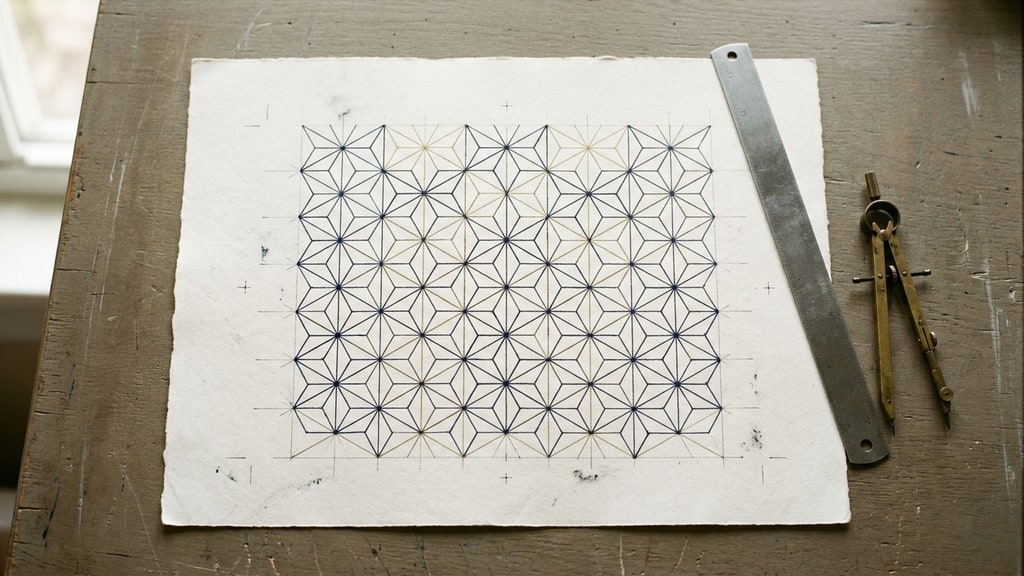
On 10 November Adobe put the AI assistant into Illustrator 31.0, still carrying the beta label. The Japanese designer behind CreativeEdge CL+ had already tested the September beta by asking it to build a manga page, and he ran a new set of tests on the release build for a report published on 11 November. The interesting result is not that the assistant can draw. It is that the assistant is dependable when the brief is a specification and unreliable when the brief is a description.
That distinction sounds like prompt advice. It is closer to a division of labour, and it decides what the tool is actually good for.
The experiment that failed, then worked
The report describes one attempt that did not work and one that did. The author asked for a traditional Japanese asa-no-ha pattern, the hemp leaf motif built from a hexagonal lattice, and explained the construction in words: subdivide the hexagon, connect the points, repeat the unit across the board. No pattern came out of it. He then rewrote the same brief so that every vertex arrived as a coordinate pair, and the assistant drew it accurately.
He says outright that he could not identify the cause of the first failure, so the honest reading is a pair of anecdotes rather than a controlled test. I still think the pair is the useful part, because the difference between the two briefs is visible in the text.
A line like "divide the hexagon into six equal parts" is not unmeasurable. You can check that the six areas match. It is under-specified in a way that costs more: several different constructions satisfy it, so a drawing can pass the check and still be the wrong shape. A list of points has one answer, and that answer can be checked by something that cannot see, which is what you want from a checker.
The processing time moved the same way. The author notes that ambiguous prompts took longer and still missed, so vagueness was not even the cheap option.
What a usable spec looks like
The pattern that came out of this is a 480 by 480 point artboard with two layers, a background fill, a base unit of thirty straight lines, and a tiling rule. The lines are 1 point wide, round caps and joins, no fill. The tiles land on a pitch of 69.282 points, which is 40 times the square root of three, with alternating rows offset by half a pitch so the hexagons interlock. Everything is clipped to the artboard at the end.
The finished board reports about 2,300 separate lines and 72 rotated copies, then four colourways with the background and line colour swapped per variant, then a batch export named after each artboard. The assistant did the whole run in a few minutes across several conversational turns. The author's comparison is an estimate, not a timed test: an experienced Illustrator user would spend tens of minutes to hours on the same construction by hand.
I have read a lot of "AI did in minutes what takes hours" claims and most of them hide the baseline. This one is at least checkable, because the numbers describing the finished board are published next to it: board size, line count, stroke width, tiling pitch, four colourways. You can rebuild the spec and find out what your own attempt costs.
The reusable part is the shape of the brief, not the motif. State the canvas in the app's units. State the origin and which way the axes point. Give the geometry as coordinates rather than relationships. Name the stroke width and colour as values. Describe the repetition as a formula. Say where the work goes when it is done. Ask for a report at the end so there is something to compare against.
That last line is doing more work than it looks. When the assistant had to report how many units it placed, the count became a cheap check on whether the repetition rule was understood at all.
The list of things it cannot do is part of the value
The report includes a verified capability list and a verified gap list, separated by what the author actually ran versus what the assistant only claimed. Confirmed working: numerically specified shapes, rotated placement computed from coordinates, mass duplication into a grid, pathfinder unite, linear and radial gradients, opacity, stroke settings, clipping masks, grouping, layer creation and naming, artboard duplication with colour variants, and export named from artboard names.
Missing: blend, radial repeat, compound paths (grouping stands in), the rotate tool around an arbitrary point (coordinate math reproduces the result), fine control of a radial gradient's centre and radius, gradients applied directly to live text, any operation on locked or hidden objects, work across documents or applications, and cleanup nobody asked for.
That last gap is the one that tells you how the assistant thinks. It leaves empty layers behind, because removing them was not in the instruction. Literal execution reads as a bug when you are used to an assistant that tidies up, and as a feature when you need the run to be predictable. I would take predictable.
The 1 mm overlap nobody was asked about
The watch dial test is where the report stops being a tool review. The assistant produced a dial with an index and a tick overlapping by about a millimetre, a white gap between the face and the ring, and an empty layer left over.
The assistant reported the overlap. It did not say whether the overlap should be fixed.
To catch that you need two kinds of reading at once. One reads the data: these two objects share a millimetre of space. The other knows what a watch face is supposed to look like, so it can tell that a tick under an index is a mistake rather than a style. The author's phrase for this is that verification ability hollows out, and he is right that a person who cannot judge the output will produce plausible-looking data in volume.
His proposed fix is the part I would underline, because it is the only durable structure in the piece. Let Illustrator's assistant concentrate on operating the application, and let something outside it, Claude or Codex with the relevant design knowledge loaded, run the evaluate-and-reinstruct loop. The maker does not grade its own work.
I would add one condition to make that loop actually bite: the outside checker needs measurable items, not opinions. Stroke width inside tolerance. Count of elements matches the spec. Nothing unpainted at export size. A rubric that can fail is worth more than a second model that agrees.
Fifteen generations a day changes the workflow whether you like it or not
Adobe's documentation caps the assistant at fifteen artwork generations per day. The report notes that the reset time is unconfirmed and that credit consumption is not visible before a run, so the only way to learn what something costs is to spend it.
The cap covers generated artwork, not every instruction. The asa-no-ha run sidestepped it by telling the assistant not to use generative vector creation and to build the pattern from drawn lines instead, which is how a construction with 2,300 line objects never touched the quota. Precise geometry and generated artwork come out of different budgets.
Even so, a metered operator removes the option that makes prose prompts attractive in the first place, which is trying five loose versions and keeping whichever looks best. At fifteen generations a day, each generated attempt has to be worth making. That pushes you toward the spec-first habit for economic reasons rather than aesthetic ones, and it is the same pressure that makes template systems work: decide the parameters once, then spend your attempts on the parts you cannot specify.
Why vector output is a different category of result
The author's own framing of the breakthrough is that the deliverable is living data. Raster generation gives you pixels with a fixed answer, and the honest complaint about every image model is that precise corrections are hard. A vector file gives you named layers and editable paths, so a one millimetre shift is a one millimetre edit.
That is a real structural advantage and it is also where people overclaim. Editable does not mean correct. A wrong construction that you can adjust is still a wrong construction until someone adjusts it, and with a daily ceiling on generated output, the adjusting is the expensive half of the job. The September beta test made the same point about layer contracts: the file was editable, and the value was in whether the layers were the ones you needed.
What carries over to any model
You do not need Illustrator 31.0 to use any of this.
Write the brief as parameters and keep the adjectives for a final pass. Ask for the plan before the run, because a wrong interpretation is cheap to catch in a plan and expensive to catch in a finished file. Require a self-report at the end, then verify it, since a self-report is a signal rather than proof. Keep the thing that generates separate from the thing that judges.
The report's own verdict is that the assistant's practical value is still unproven, and I would not argue with that. It is a beta, the credit cost is opaque, and one designer's tests are one designer's tests. What is proven is narrower and more useful: give it numbers and it builds, give it adjectives and it guesses, and nobody in the loop is checking unless you put them there.
If you are working the same problem from the raster side, the September beta test covers the layer contract for a manga page, and targeted editing covers the equivalent discipline when the output is pixels instead of paths.