A Video Model That Edits Stills: Character-Locked Image Editing with MiniMax H3 in ComfyUI
Cloud image editors reject or quietly rewrite a surprising share of ordinary requests: multiple people in frame, a specific costume, a borderline atmosphere. A Japanese ComfyUI workflow sidesteps the wall by repurposing MiniMax H3, a video model, as a still-image editor. One reference image pins the character while clothes, expression, and background change.
AI-assisted draft. Reviewed and edited by the Phosphene team before publication.
On this page
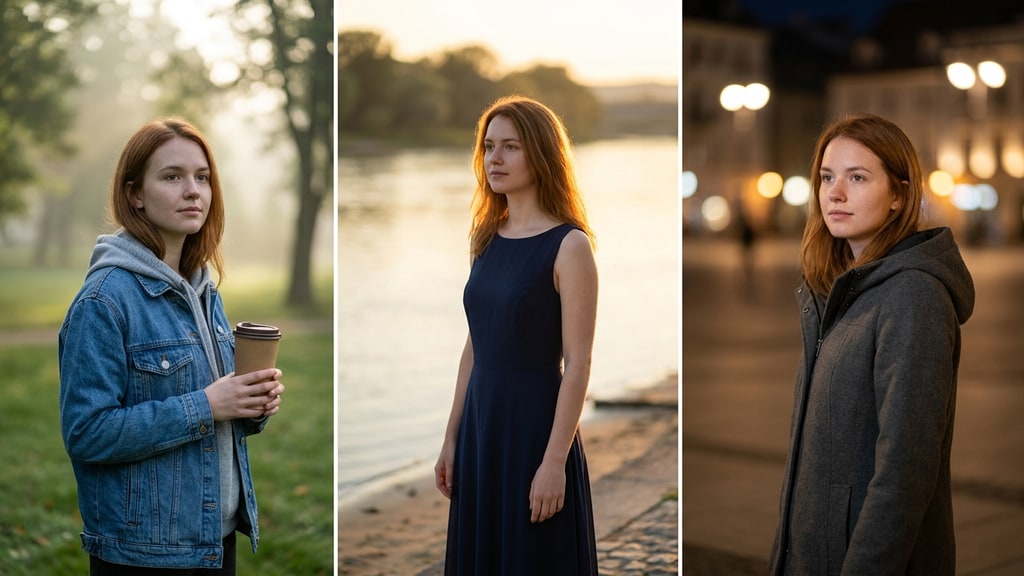
You have a character you like and you want the same face, same hair, same silhouette in a different outfit, a different expression, a different background. That is the most common editing request in thumbnail and cover art, and it is where cloud image editors get annoying fast.
The quality ceiling on Google's Nano Banana and ChatGPT image editing is genuinely high. The catch is the moderation layer sitting in front of it. Rejection does not require anything explicit. A crowd in frame, a particular costume, a vibe that reads as borderline: the editor refuses or, worse, silently rewrites the request into something blander. Meanwhile the character you carefully preserved drifts on every re-roll.
A Japanese ComfyUI creator who goes by Ai-Hakase published a workflow that attacks the problem from a strange direction: run a video model instead of an image model.
The trick: a video model that can't do length=1
MiniMax H3 is a video generation model. Its frame counts follow a 17n+5 lattice: 5, 22, 39, and so on. There is no length=1 mode. Ask for a still and the API politely ignores you.
The workflow treats that limitation as a feature. It renders the minimum clip, five frames, from a reference image plus a short prompt, then extracts a single frame and saves it as a PNG. From the user's side it looks like image editing. Underneath it is a video pipeline wearing an image editor's clothes.
That sounds like an expensive workaround until you think about what video models are actually trained to be good at. H3's reference integration, the Ref2VA path, exists to keep identity stable while the prompt changes scene and behavior. A video model that cannot hold a face across frames is useless, so identity preservation is the exact capability the model optimizes. Point that strength at a still and you get the edit you wanted in the first place: the character stays the character while everything around them changes.
Why it feels different from cloud editing
Ai-Hakase's own tests show the practical difference. The reference image acts as the source of truth, and the short Japanese instruction is the delta: change the outfit, change the expression, move the scene. The model follows the instruction without reinterpreting who the person is.
Text rendering deserves a separate paragraph, because it is the first thing that breaks. In the article's low-resolution test samples, kanji and fine lettering collapse into mush. The fix is resolution. Set the megapixel custom size to 2 and the large size to around 1980, and text comes out clean while generation stays fast. If the picture will carry readable copy, budget for that setting before you start, not after the first failed pass.
The workflow details worth stealing
The full package is member-gated, but the structural decisions are public and they are the useful part.
Split the reference instead of stacking it. Cramming everything into one reference sheet makes the model hesitate. Two to four separate sheets, each showing one angle or one attribute region, hold up better. Each sheet is loaded through its own Load Image node plus a LayerUtility resize, and you enable only the ones you need by un-bypassing them. Fewer active references means fewer competing signals.
Fast weights baked in. The workflow runs on a Fused Turbo build, the int8 ConvRot checkpoint that has the speed already baked into the weights, instead of layering a Turbo LoRA on afterward. One less knob, and the first render is already the fast one.
A small VLM absorbs the prompt formatting. You write short, loose Japanese and the language model rewrites it into the structured edit prompt the pipeline needs. OpenRouter is optional glue for higher-quality rewriting without hosting a big model locally, and the workflow ships with a free-tier API setting. If you do not want to think about API keys at all, the local path still runs.
The author is also honest about scope. VDN and part-mask inpaint exist in the package but are experimental side paths, not the main route. The star of the show is whole-image re-posing: same person, new context, done in one pass.
What this means for your own setup
You do not need to pay for the membership to act on the idea. Three takeaways survive on their own.
First, a video model can be a better still editor than the image editors you already subscribed to, specifically when identity consistency is the job. The reference-fidelity strength transfers almost directly.
Second, local execution changes the iteration loop. Cloud moderation rejects based on heuristics you cannot see, and a silent rewrite is worse than an error because it looks like success. A pipeline you run yourself fails loudly or not at all, and every rejection you eliminate is iteration speed.
Third, treat the reference image as the asset, not the prompt. The prompt describes the change; the reference holds the character. Once the identity lives in a file you control, you can chain outfit swaps, expression passes, and scene changes without re-describing the person each time. That division of labor, identity in the image and variation in the text, is the same pattern Phosphene uses when you lock a character's fixed traits into tags and vary only scene and mood between generations.
The thumbnail workflow is a nice side effect. The real upgrade is having an editor that stops second-guessing your intent.