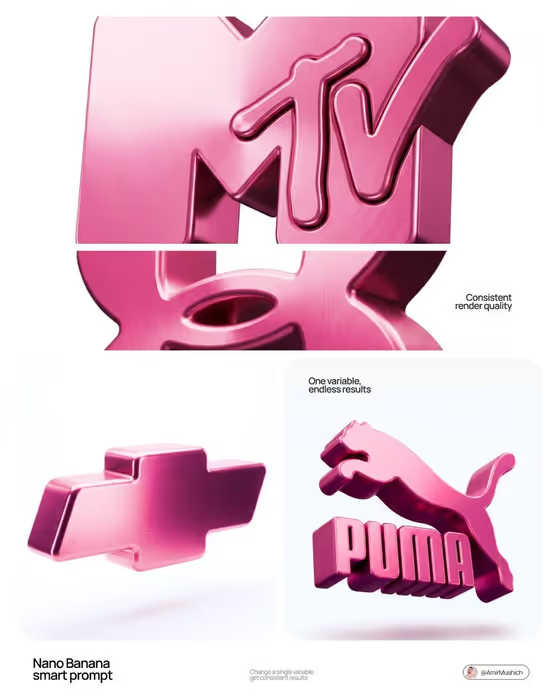
This template takes a brand logo and recasts it as a thick, rounded 3D sculpture in glossy pink metal. The cover shows the idea clearly: flat logos become solid, brushed-metal objects floating on a clean white background with a soft shadow underneath.
It suits designers, founders, and social media managers who want a polished product-style visual of a logo without building a 3D scene by hand. The output is a 3:4 image, so it works well for posters, carousels, and brand presentation slides.
What works best as input
- Use a clear, flat version of the logo as your reference photo, ideally on a plain background. The template simplifies the logo to its core shape, so clean edges give the best result.
- Pick logos with a bold, simple silhouette. The cover examples (a stacked wordmark, a bow-tie badge, a leaping animal with lettering) all read well when turned into one solid piece.
- You can add a photo in either Brand Identity field. Use it for an exact visual reference when a written description would not capture the logo's shape.
- If you describe instead of upload, be concrete about the brand and its mark, for example the shape, any lettering, and the overall feel, rather than only a general category.
- Avoid logos with fine detail, tiny text, or thin hairlines, since the form is meant to be thick and rounded.
How to use it
- Open the 3D Pink Metallic Logo template in Phosphene.
- Fill in both Brand Identity fields. Add your logo as a photo or describe the brand identity, using the placeholder examples such as a modern lifestyle brand as a guide to the level of detail.
- Generate the image and wait for the 3:4 result to appear.
- Review it for logo accuracy, pink metallic color, and the floating-on-white look. Adjust your references or descriptions and generate again if needed.
Tips for a better result
- Give both Brand Identity fields the same logo reference so the shape stays consistent and recognizable.
- Try a few different logos or logo versions (full wordmark versus icon only) to see which converts into the best solid form.
- If the logo is complex, supply a simplified version of it. The template already simplifies to the core shape, so starting simple helps.
- Use the generated image as a consistent set: running several brands through the same template gives matching renders, as the cover collage shows.
Common mistakes
- Uploading a busy, low-contrast, or heavily cropped logo image, which makes the shape hard to read and the 3D form less recognizable.
- Using only a vague brand description when the logo has a very specific shape. Add a photo reference instead.
- Expecting other colors or materials. This template is built around pink metallic only, with a white background and no pedestals or stands.
FAQ
Do I need to upload a photo?
The upload requirement is 2 or more photos, and both Brand Identity fields accept a photo or a text description. A clear logo image gives the most accurate shape.
Why are there two Brand Identity fields?
The template asks for the brand identity twice, and both are required. Filling both with the same logo reference keeps the result consistent.
Can I change the color or background?
The template is designed for a pink metallic object floating on pure white, so those parts are fixed. Your input controls which logo or brand is turned into the 3D form.
What size and format is the result?
The output is a single image in a 3:4 aspect ratio.