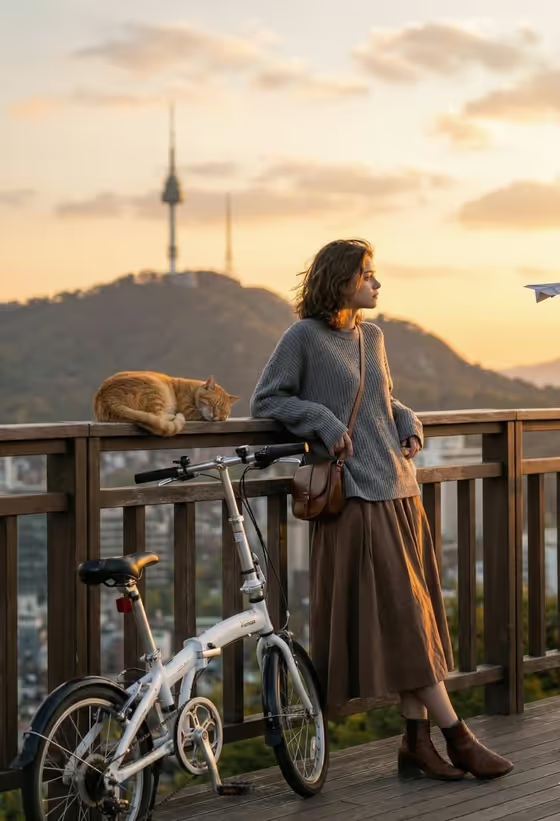
Golden Viewpoint Portrait places your subject on a wooden viewpoint balcony at sunset, leaning on the railing beside a white folding bicycle and a sleeping orange cat. The result is a 3:4 image with warm light, a pastel sky with soft clouds, and a soft-focus city and hillside behind her.
It suits anyone who wants a calm, dreamy travel-style portrait without being on location. The outfit, props and setting are already written into the template, so you only decide who the subject is and how the shot is framed.
What works best as input
- For the subject field (labelled relaxed woman portrait subject), you can either type a short description or upload a reference photo, since the field accepts both.
- If you upload a photo, pick one with a clear, well-lit view of the face and hair so the person is easy to recognize in the finished scene.
- Use a photo of yourself or someone who has agreed to be pictured. Keep the description respectful and simple.
- If you describe instead of upload, keep it short and concrete, such as a relaxed woman or an editorial portrait subject, rather than listing outfit details the template already sets.
How to use it
- Open the Golden Viewpoint Portrait template in Phosphene.
- In the subject field, type a short description or upload your reference photo.
- Open the Pose and scene field and choose how you want the shot framed, for example an intimate close portrait, a full-body editorial frame or an environmental candid frame.
- Generate the image, then check the face, the railing, the bicycle and the cat, and adjust your inputs and run it again if something is off.
Tips for a better result
- Try the same subject with different Pose and scene choices. A full-body frame shows the bicycle and the whole balcony, while a close portrait puts more focus on the face and the warm light.
- Keep the subject description minimal. The sweater, long skirt, boots and crossbody bag are already part of the template, so extra clothing details may conflict with them.
- Use a reference photo with soft, even lighting so the golden sunset look applies cleanly instead of fighting harsh shadows.
- Generate a few versions and compare them, since small differences in pose and expression can change the whole mood.
Common mistakes
- Describing a completely different setting or time of day in the subject field. The balcony, sunset and city backdrop are fixed by the template.
- Uploading a blurry, heavily filtered or tiny photo, which gives the template little to work with when recreating the person.
- Overloading the subject field with outfit, props and background details that the template already defines.
FAQ
Do I have to upload a photo?
No. The subject field accepts either a typed description or an uploaded reference photo, so you can use whichever suits you.
Can I change the outfit, bicycle or cat?
Those elements are part of the template's fixed direction, so they stay the same. You control the subject and the framing.
What does the Pose and scene field do?
It sets how the finished image is framed, with options like an intimate close portrait, a full-body editorial frame or an environmental candid frame.
What shape is the output?
The template produces a single image in a 3:4 portrait aspect ratio.