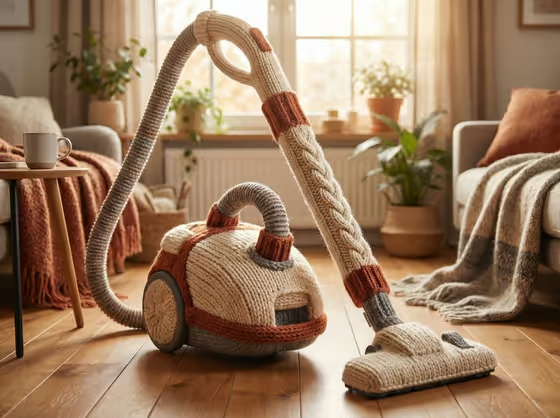
This template reimagines a product or everyday object as if it were hand-knitted from chunky wool. In the cover example, a vacuum cleaner becomes a soft craft piece with visible stitches, a cable-knit pattern on the tube, ribbed cuffs and a cozy living room behind it.
It suits product makers, designers and social content creators who want a playful, tactile version of a product. You name or show the object, pick a creative direction, and the template rebuilds it as wool while keeping it recognizable as a working object.
What works best as input
- For Featured product or object, you can upload a photo or describe the object in text. A clear, single subject gives the best chance of a recognizable knitted version.
- Pick a photo where the object's outline and key parts are easy to see, since the template preserves the source's defining composition, material treatment and lighting.
- If you type instead, be specific, like the placeholder 'a premium beverage bottle' or 'a compact consumer device'. Naming the object type helps the result keep its functional shape.
- Objects with distinct parts (handles, hoses, wheels, grips) show off the cable knit and ribbing details well, as the vacuum cleaner on the cover does.
How to use it
- Open the Hand-Knitted Wool Object template in Phosphene.
- In Featured product or object, upload a photo of your product or type a short description of it.
- In Creative direction, choose or write a style such as Clean editorial, Cinematic dramatic, Playful colorful or Quiet premium.
- Generate the image, then review the 3:4 result and check the stitch detail, the yarn colors and whether the object still reads as itself.
Tips for a better result
- Try different Creative direction options on the same object. Playful colorful pushes the yarn colors, while Quiet premium should feel calmer and more restrained.
- Objects with moving or grippable parts tend to give the template more to work with, since it adds cable knit on grip areas and ribbing where flexibility is needed.
- If the first result loses the shape of your product, use a cleaner photo or a more precise description of the object.
- Generate a few versions and compare backdrops. The template can place the object in a cozy lifestyle setting or a clean wool-texture studio.
Common mistakes
- Using a cluttered photo with several objects, which makes it unclear what should be knitted.
- Writing a vague description like 'a thing' or 'a gadget' instead of naming the object and its key features.
- Leaving Creative direction generic and then expecting a very specific mood. Choose or describe the direction you actually want.
FAQ
Do I have to upload a photo?
No. Featured product or object accepts a photo, but you can also describe the object in text.
What kind of objects work well?
Distinct, recognizable products such as a bottle, a device, an accessory or an appliance like the vacuum in the cover example.
What will the result look like?
A 3:4 image of your object rebuilt from chunky wool, with visible stitches, cable patterns, ribbing and warm, soft lighting.
Can I change the mood of the image?
Yes. The Creative direction field lets you choose or describe a style, for example Clean editorial or Playful colorful.