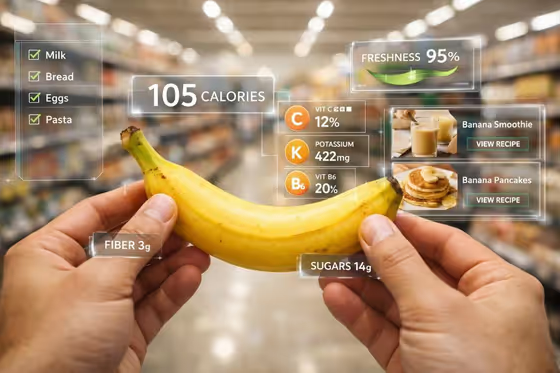
AR Fruit Aisle turns a fruit or produce item into a first-person supermarket scene. Two hands hold the product in sharp focus while translucent glass panels float around it with nutrition numbers, a freshness readout, and small shopping cards, as in the banana cover with its calorie count, vitamin badges, and recipe tiles.
It suits food bloggers, grocery and health brands, nutrition coaches, and anyone who wants a health-tech style visual for a fruit or similar product. The output is a 3:4 image, so it fits portrait posts and product mockups.
What works best as input
- In the First-Person Subject Product field, describe the fruit plainly, such as "a ripe banana bunch" or "a crisp red apple". Name the item and a visible quality like ripe, crisp, or bright.
- This field also accepts a reference photo. If you add one, pick a clear shot of the fruit on its own, well lit, with the whole item visible and little clutter around it.
- Keep the subject to one product or one natural group, like a carton of strawberries. The scene is built around two hands holding it, so very large or awkward items work less well.
- Health Data Focus and Shopping Assistant Cards are choice fields without photo upload. Pick the option that matches what you want shown around the fruit, such as vitamins and fiber or recipes and a shopping checklist.
How to use it
- Open the AR Fruit Aisle template in Phosphene.
- Fill in First-Person Subject Product by typing a short description of your fruit, or by adding a reference photo of it.
- Choose a Health Data Focus option for the nutrition and freshness cards, then choose Shopping Assistant Cards for the supporting panels.
- Generate the image, then check that the fruit is the right one, the panels are readable, and the hands look natural. Adjust your inputs and run it again if needed.
Tips for a better result
- Match the two card choices to your goal. Use calories, vitamins, fiber, sugars, and freshness for a classic nutrition look, or antioxidants, hydration, origin, and ripeness for a produce-quality feel.
- Try different Shopping Assistant Cards options for different audiences. Recipes and smoothies suit food content, while price comparison or sustainability score suits retail concepts.
- Be specific about the fruit's look, such as a bright citrus fruit or a ripe banana bunch, so the colors and shape are clear against the blurred aisle.
- Generate the same fruit with several card combinations to build a small set of variations from one subject.
Common mistakes
- Describing several unrelated products at once. The scene centers on one item held in both hands, so a crowded description can muddy the result.
- Using a cluttered or dark reference photo. The fruit should be easy to see, otherwise the generated product may not match what you intended.
- Expecting exact nutrition values. The panels are a visual design element, so check any numbers before using the image anywhere that needs accurate data.
FAQ
Do I need to upload a photo?
No. The First-Person Subject Product field takes a text description, and it also accepts a reference photo if you want to base the fruit on a real one.
Can I use something other than fruit?
The template is built for fruit and similar produce held in a supermarket aisle, so it works best with items like bananas, apples, strawberries, and citrus.
Can I change what the panels show?
Yes. Health Data Focus controls the nutrition and freshness cards, and Shopping Assistant Cards controls the supporting panels like recipes, checklists, or price comparison.
What shape is the image?
The output is a single image in a 3:4 portrait aspect ratio.