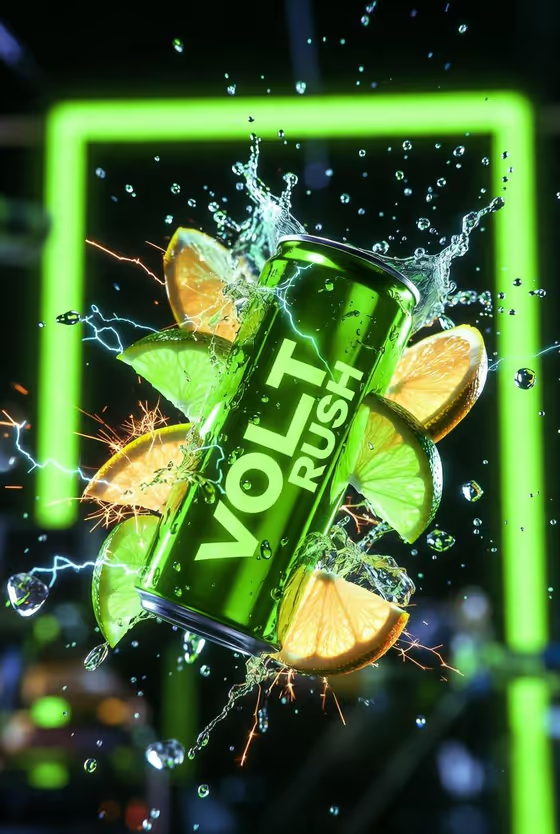
Electric Lime Energy Burst turns an energy drink can into a high-speed advertising shot. The can is tilted at a sharp diagonal and frozen mid-air as it breaks through citrus slices, water droplets and sparks, with the label kept crisp at the center of the frame.
It suits drink brands, small beverage startups and social media managers who want a dark, neon-lit campaign image in a 3:4 portrait format. The look is glossy aluminum, green neon rim light and a shallow-focus background, as in the cover image.
What works best as input
- In the Energy drink product or can field, you can type a description or upload a matching reference. A clear product photo helps the can's design carry through.
- If you upload a photo, pick one where the can is fully visible, evenly lit and not cropped, so the packaging is easy to read.
- If you type instead, be specific about color and branding, like the placeholder example 'VOLT RUSH neon-green can' or 'citrus performance can'.
- Match the can's color to the green neon mood. Greens and lime tones sit naturally with the rim lighting this template uses.
- Keep the Energy burst choice simple and concrete, such as 'lime slices, juice and sparks' or 'electric arcs and crushed ice'.
How to use it
- Open the Electric Lime Energy Burst template in Phosphene.
- In Energy drink product or can, describe your drink or upload a reference photo of it.
- Set the Energy burst field to the effect you want around the can, for example lime slices, juice and sparks.
- Generate the image, then check that the label, the diagonal tilt and the burst elements look the way you want. Adjust the fields and run it again if needed.
Tips for a better result
- Try different Energy burst options, like 'electric arcs and crushed ice' or 'citrus ribbons and glowing mist', to get a different feel from the same can.
- Name the flavor in your product description (electric lime, citrus) so the burst elements feel connected to what the drink tastes like.
- If the first result is close but not right, change only one field at a time so you can see what each choice does.
- Use the 'my flavor burst' style of wording to describe your own effect when the preset ideas don't fit your product.
Common mistakes
- Writing a vague product description like 'energy drink'. Without color, flavor or style details, the can can end up generic.
- Uploading a cropped, dark or heavily angled product photo, which makes the packaging harder to reproduce cleanly.
- Stacking too many effects into the Energy burst field. A focused idea tends to read better than a long list.
FAQ
Do I have to upload a photo?
No. The product field accepts either a text description or a matching reference photo. The Energy burst field is a choice or description only, not a photo.
What shape is the image?
It is a 3:4 portrait image, which suits posters, social posts and product ads.
Will the can's label stay readable?
The template is directed to keep the package face crisp while the splashes and particles fly around it. Results can vary, so review the output and regenerate if the label looks off.
Can I use it for drinks that aren't lime flavored?
Yes. The Energy burst field lets you describe other effects, such as citrus ribbons, crushed ice or electric arcs. The green neon lighting stays part of the look.