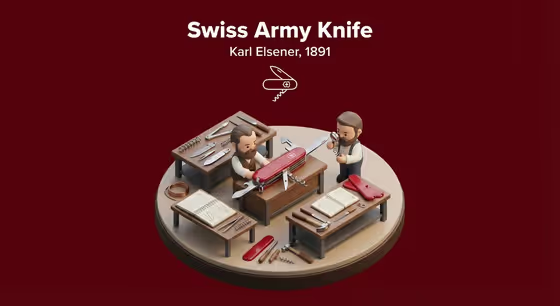
Breakthrough Diorama turns a single invention into a miniature isometric workshop scene. You name the invention and the moment it all came together, and the template stages it on a raised round base with tiny inventors, period tools, notebooks and prototypes, topped with a bold title block, a year or inventor line, and a simple line icon.
It suits students, teachers, history fans, designers and anyone who wants a collectible-style image about how a classic invention happened. The cover example, a Swiss Army knife with a deep red backdrop, shows the look: soft polished materials, two small figures at work benches, and clean text above the scene. The output is a 3:4 image.
What works best as input
- In the Invention Product field, you can type a description or add a reference photo. Use a photo only when you want the diorama to match one exact object, such as a specific model or design.
- If you type instead, be concrete about the object, for example 'the first practical telephone' or 'an early electric light bulb'. A specific noun gives the template more to build on than a broad idea like 'old technology'.
- For a reference photo, pick a clear shot of the invention on its own, with the whole object visible and little clutter. This helps the scene keep the real shape and materials.
- The Breakthrough Moment field is text only, so describe the decisive event in a short phrase, such as 'the filament glowing reliably' or 'the first controlled flight'. Think of it as the one moment the little inventors are reacting to.
- Keep both fields short and focused on one invention and one moment. Mixing several inventions or events in one entry can muddy the scene.
How to use it
- Open the Breakthrough Diorama template in Phosphene.
- In Invention Product, type the invention you want, or add a reference photo if you need an exact look.
- In Breakthrough Moment, describe the instant of success in a short phrase, such as 'the calculating mechanism completing a result'.
- Generate the image, then review the scene, title block and icon. If something is off, adjust your wording and run it again.
Tips for a better result
- Start from the built-in examples, like the powered airplane or the mechanical computer, then swap in your own invention once you see how the phrasing works.
- Make the breakthrough moment visual and observable. 'The filament glowing reliably' gives the tiny inventors something clear to react to, while an abstract phrase gives them less to act out.
- If you know the inventor or year, naming the invention clearly helps the title block and the year or inventor line feel accurate to the subject.
- Try the same invention with different breakthrough moments (a first test versus a final success) to get different staged scenes.
Common mistakes
- Describing a vague category instead of a specific invention. 'A machine' will give a generic scene, while 'a pioneering mechanical computer' gives a focused one.
- Typing a long story in the Breakthrough Moment field. Keep it to one decisive moment so the diorama reads clearly.
- Using a cluttered or partial reference photo in Invention Product, which can make it harder for the template to preserve the object's real shape.
FAQ
Do I have to upload a photo?
No. The Invention Product field accepts either a text description or a reference photo, so you can just type the invention. The Breakthrough Moment field is text only.
What does the finished image look like?
It is a 3:4 image of a miniature isometric workshop on a raised base, with tiny inventors, tools, notes and prototypes, plus a bold title, a year or inventor line, and a simple line icon on a solid background.
Can I choose any invention?
You can name whatever invention you like in the Invention Product field. Clear, specific descriptions such as 'the first powered airplane' tend to give the most focused result.
What should I write for the breakthrough moment?
Write a short phrase for the decisive event, like 'the first successful voice transmission'. It is the moment the scene is staged around.