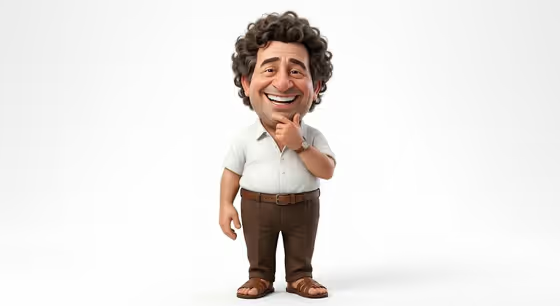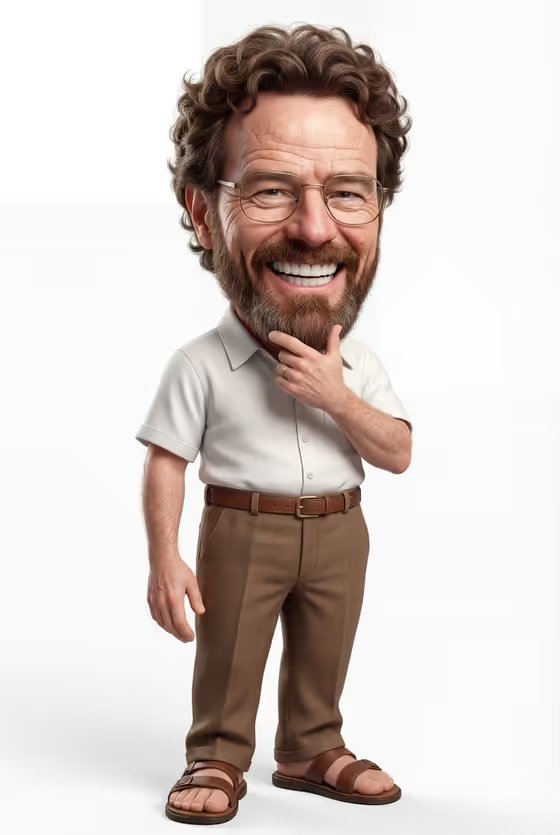
This template turns a subject into a semi-realistic 3D caricature: an oversized head, a big toothy grin, voluminous curly hair, and a small body in a short-sleeved white button-up, brown high-waisted pants with a belt, and sandals. The cover shows the look clearly, a friendly full-body figure with one hand resting on the chin, set against a clean white background in a 3:4 frame.
It suits anyone who wants a collectible-style character portrait of a person, an original character, or a personalized figure. You describe the subject in the first field or add photo references, then pick how the character is staged. The outfit, pose, and white-background caricature style stay fixed, so the main thing you control is who the character is and how the shot is framed.
What works best as input
- The template asks for 2 or more photos, so gather a few clear pictures of the same subject rather than a single snapshot.
- Choose photos where the face is well lit, in focus, and fully visible. The caricature exaggerates the head and smile, so a readable face gives it more to work from.
- Include different angles or expressions if you can (for example one front-facing and one slightly turned), so the likeness is consistent across the references.
- Only use photos of yourself, people who are happy to be portrayed, or characters and products you own. Keep the references respectful of the person shown.
- If you describe the subject instead of, or alongside, uploading, be specific. The field accepts a person, an original character, a collectible figure, a name, or a phrase, such as 'an original character' or 'my exact character reference'.
How to use it
- Open the Caricature Character Study template in Phosphene.
- In the first field (the cheerful caricature subject), describe who or what the caricature should be, and add your reference photos so the exact look carries over.
- In Character staging, pick how the shot is framed, such as a collectible character portrait, a full-body character scene, or an environmental story moment.
- Generate the image, then review the head size, smile, and likeness against your references before deciding whether to run it again with a tweaked description.
Tips for a better result
- Be concrete in the subject field. A short but specific description (age feel, hair, glasses, facial hair) gives the oversized-head style more recognizable detail.
- Try different Character staging options with the same subject. A collectible portrait and a full-body scene read quite differently even though the outfit and white-background style stay the same.
- If the likeness feels off, add or swap in a photo that shows the face more clearly rather than adding more text.
- Keep the subject simple. One person or character per generation fits the single full-body pose shown on the cover.
Common mistakes
- Uploading only one photo or very small, blurry images. The template expects 2 or more, and weak references make the caricature less recognizable.
- Trying to change the outfit, pose, or background in the subject field. Those are fixed by the template, so describe the subject instead of redesigning the clothes.
- Using a busy, dark, or heavily filtered photo where the face is hard to see, which gives the caricature little to exaggerate accurately.
FAQ
Do I have to upload photos?
The template lists 2 or more photos as its upload requirement. The subject field also accepts a text description, but photos help the result match the exact person or character.
Can I change the outfit or pose?
No. The white button-up shirt, brown high-waisted pants with a belt, sandals, and the hand-on-chin pose are part of the fixed direction. You change the subject and the staging.
What kind of subjects work?
The field mentions a person, an original character, a personalized collectible figure, an object, a name, or a phrase. Use subjects you own or have permission to portray.
What shape is the image?
The output is a single image in a 3:4 aspect ratio, a vertical frame that fits a full-body figure like the one on the cover.