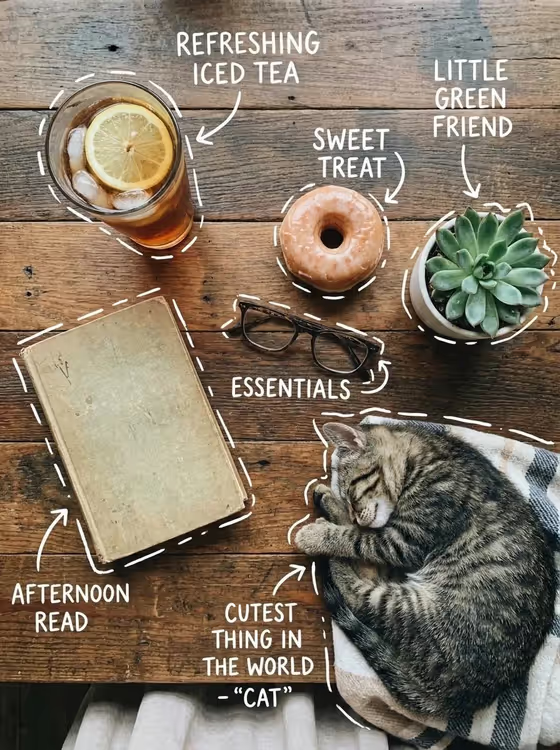
This template builds a top-down flat lay of everyday objects on warm rustic wood, then adds white hand-drawn outlines, arrows, and short playful labels beside each item. The cover shows the idea: an iced tea, a donut, a succulent, glasses and a book, with a sleeping cat curled in at the edge of the frame.
It suits anyone who wants a cozy, share-ready lifestyle image: a tabletop moment for a social post, a small product set shown in a friendly way, or a themed collage of favorite things. The result is a 3:4 portrait image.
What works best as input
- In the Object collection or product set field, list a few coordinated items you want in the scene, such as 'iced tea, donut, book, glasses and succulent'. Three to five objects keeps the spacing clean and the labels readable.
- You can type a description or upload a reference photo of an arrangement in that field. If you use a photo, pick one taken from above with the objects clearly separated.
- Choose items that feel like they belong together (coffee, pastry, journal, pen and flowers, for example) so the flat lay reads as one cozy theme.
- Use simple, concrete nouns rather than long sentences. Short names give the handwritten labels something clear to work with.
How to use it
- Open the Cozy Annotated Flat Lay template in Phosphene.
- In Object collection or product set, type the items you want or upload a reference arrangement.
- In Cozy edge companion, pick or describe the soft detail entering from the edge, such as a sleeping tabby cat on a blanket or a knitted throw with a candle.
- Generate the image, then check that every object is present, the labels are legible, and the edge companion sits naturally in the frame.
Tips for a better result
- Swap the edge companion to change the mood. A small dog resting beside a scarf feels different from an open sketchbook with dried flowers or a knitted throw with a candle.
- Match the object list to the companion. Reading items pair well with a blanket or candle, while a cat or dog suits snacks and drinks.
- Keep the list varied in shape and color (round donut, tall glass, flat book) so the top-down layout looks balanced.
- If a result feels crowded, regenerate with fewer objects so the annotations have room.
Common mistakes
- Listing too many objects. A long list crowds the frame and can make the white labels overlap or become hard to read.
- Writing vague items like 'some stuff' or 'things on a table'. Name each object so it can be drawn and labeled clearly.
- Uploading a cluttered or angled photo as the reference. Objects that overlap or are shot from the side make the overhead arrangement harder to follow.
FAQ
Do I have to upload a photo?
No. The Object collection or product set field accepts a typed description or an uploaded reference arrangement. The Cozy edge companion field is a choice or description only, not a photo.
Can I change the cat to something else?
Yes. The Cozy edge companion field lets you choose other details, such as a small dog resting beside a scarf, an open sketchbook with dried flowers, or a knitted throw with a candle.
Can I decide what the labels say?
The labels are generated as short playful handwritten notes placed near each object. You influence them through the object names you provide, rather than writing the exact text yourself.
What shape is the final image?
The output is a single image in 3:4 portrait format, shot from directly overhead on warm wood.