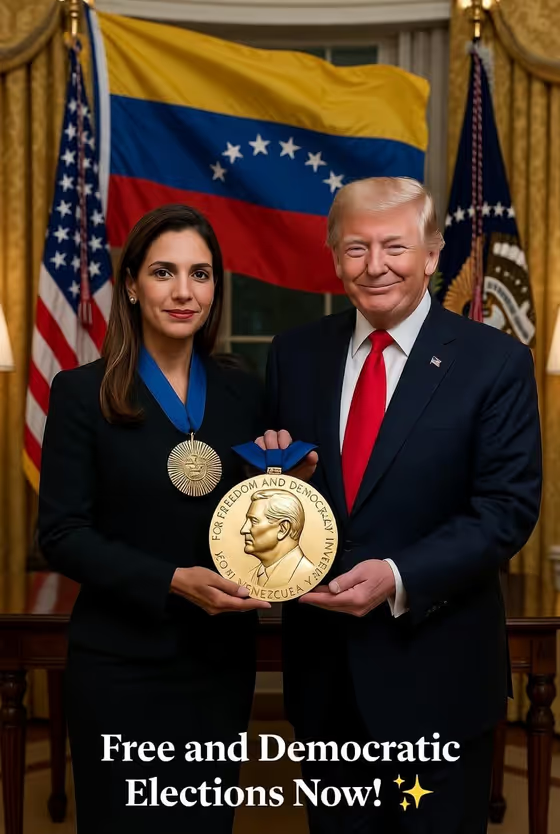
This template builds a dignified, solemn indoor ceremony scene in a 3:4 portrait frame. Two figures stand together as one presents a medal to the other, with softly blurred flags behind them, restrained institutional architecture, and warm, respectful documentary lighting.
It suits people who want a symbolic, ceremonial portrait, for example a fictional or illustrative scene about hope, recognition, or democracy. The single "Ceremony subjects" field accepts a written description or a reference photo, so you decide who or what the scene is built around.
What works best as input
- If you use a reference photo in the "Ceremony subjects" field, pick a clear image where the face is well lit, in focus, and not heavily cropped.
- Only use photos of people who have agreed to appear in the scene. Avoid using someone's likeness in a way that could mislead viewers into thinking the scene is a real event.
- If you describe the subjects in text instead, be specific about how many people there are and how they relate to each other, such as "two community leaders in a symbolic medal ceremony".
- The field's own examples show useful variations: a pair of leaders, a solitary figure, a small group, or "my referenced subject in the same composition".
How to use it
- Open the Democracy Medal Ceremony template in Phosphene.
- In the "Ceremony subjects" field, describe who is in the scene or attach a reference photo, using the placeholder "two political leaders in a symbolic medal ceremony" as a model.
- Start the generation and wait for the 3:4 image to finish.
- Review the result for composition, expressions, and the medal, then adjust your subject wording and generate again if you want a different take.
Tips for a better result
- Keep the subject description short and concrete. The template already supplies the flags, architecture, lighting, and solemn mood, so you mainly need to define the people.
- Try the example variations, such as a solitary figure or a small group, to see how the same ceremonial composition changes.
- If an attempt looks off, rewrite the subject line with a different count or relationship (for example one presenter and one recipient) and regenerate.
- Treat the output as a symbolic illustration and label it clearly if you share it publicly.
Common mistakes
- Writing a long, multi-part description in the subject field, which can clash with the scene the template already sets up.
- Using photos of real people without their consent, or presenting the finished image as an authentic news photo or documentary record.
- Expecting readable text, exact medal inscriptions, or precise flag details to come out perfectly every time, since fine lettering in generated images can be inconsistent.
FAQ
Can I upload a photo for this template?
Yes. The "Ceremony subjects" field accepts a photo reference as well as a text description, and a clear, well-lit photo of a person who has agreed to be included works best.
What kind of scene does it create?
A solemn indoor ceremony in portrait format, with one figure presenting a medal to another, softly blurred flags in the background, and cinematic, natural-looking lighting.
Do I have to describe the background and flags myself?
No. The ceremony setting, flags, architecture, and lighting are built into the template. You only fill in the "Ceremony subjects" field.
Is this meant to look like a real event?
It is a symbolic, generated illustration. If you share it, make clear that it is AI-made and not a record of a real ceremony.