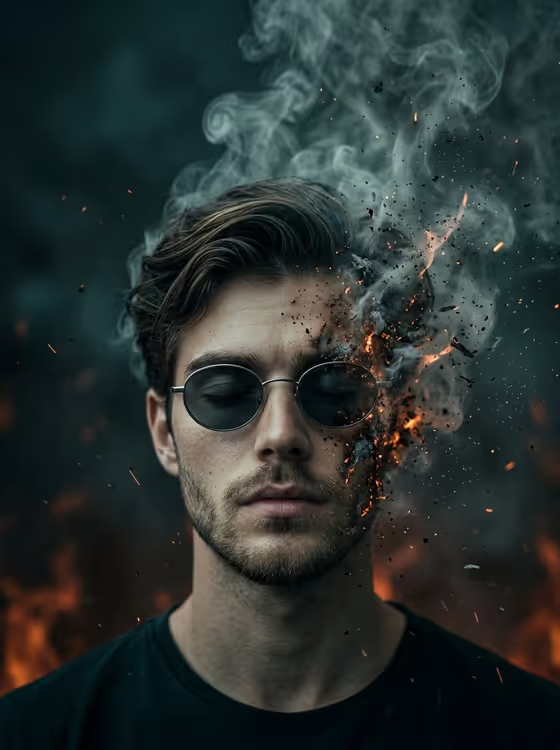
Ember Dissolve Portrait makes a dark, cinematic image of a calm figure with closed eyes and oval sunglasses. One side of the face breaks apart into smoke, ash and glowing embers while sparks drift upward into swirling smoke above the head. The output is a 3:4 image in a low-key teal and charcoal palette with warm orange fire glowing behind the subject.
It suits anyone who wants a moody, introspective portrait for a profile picture, album or poster art, or a dramatic editorial-style visual. You can describe your subject in text or upload a reference photo, then choose how the portrait is framed.
What works best as input
- The first field, 'calm young man portrait subject', accepts either a short text description or a photo reference. If you upload, pick a clear picture of one person so the template has a single subject to work from.
- A well-lit, front-facing or slightly angled photo with the whole face visible gives the best base, since the effect depends on facial detail and skin texture.
- If you type instead, keep it short and concrete, like the placeholder 'a calm young man' or a similar one-line description of the person you want.
- Only use photos of yourself or people who have agreed to it, and avoid busy backgrounds or heavy filters that could compete with the dark, smoky look.
How to use it
- Open the Ember Dissolve Portrait template in Phosphene.
- In 'calm young man portrait subject', type a short description of your subject or upload a photo reference.
- In 'Pose and scene', choose how the portrait should be framed, such as an intimate close portrait, a full-body editorial frame or an environmental candid frame.
- Generate the image, then review the 3:4 result and adjust the subject or framing choice if you want a different take.
Tips for a better result
- Try the different options in 'Pose and scene'. A close portrait puts the dissolving face front and center, while wider frames show more of the fiery background.
- Keep the subject description simple. The template already sets the sunglasses, closed eyes, smoke and embers, so extra detail in the subject field is best spent on who the person is.
- Run the same subject with different framing choices to build a small set of matching dark portraits.
- If the first result is not what you wanted, change one input at a time so you can see which one made the difference.
Common mistakes
- Writing a long scene description in the subject field. The smoke, embers and lighting are fixed, so use that field only for the person.
- Uploading a small, blurry or heavily shadowed photo, which gives the template little facial detail to work with.
- Expecting a bright or colorful result. This template is built around a dark teal and charcoal look with fiery orange accents.
FAQ
Can I use a photo, or do I have to type a description?
The subject field accepts both. You can describe the person in text or upload a reference photo. The 'Pose and scene' field is a choice, not an upload.
What does 'Pose and scene' change?
It sets how the portrait is framed, with options such as an intimate close portrait, a full-body editorial frame or an environmental candid frame. The sunglasses, closed eyes and dissolving effect stay the same.
What size is the image?
The template produces a 3:4 portrait-format image.
Can I change the sunglasses or the smoke and ember effect?
No. Those parts, along with the dark lighting and color palette, are fixed so the result keeps the template's signature look.