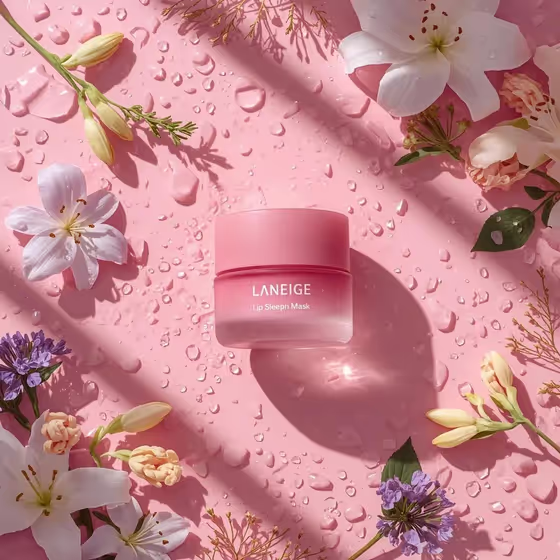
This template makes an overhead beauty flat lay of a single skincare product standing in the center of a wet, water-beaded surface, framed by flowers and leaves along a diagonal. The result is a 3:4 image with soft diffused light, sparkling droplets and gentle natural shadows, like the pink jar surrounded by lilies and purple blossoms in the cover.
It suits skincare shop owners, small beauty brands, and anyone who wants a polished product visual without setting up a shoot. You describe the product, pick a surface color, and choose the flowers, and the template handles the composition and lighting.
What works best as input
- For the Skincare product field, you can type a description or upload a reference photo. If you upload, use a clear shot of the jar, bottle or tube with the label and shape easy to read.
- The template asks for 2 or more photos, so you can use both the Skincare product and Flower arrangement fields as photo inputs, such as a product shot and a reference of the flowers you want.
- If you type the product, be specific about shape, material and color, like "a frosted face cream jar" or "a translucent serum bottle", rather than just "skincare".
- For the Flower arrangement, name the blooms and any greenery, for example "peonies and green leaves" or "orchids and baby's breath". A short mix of two or three kinds works better than a long list.
- Dewy surface color is a choice field and does not accept a photo. Pick a tone that complements the product, such as soft lavender or warm peach.
How to use it
- Open the Dewy Floral Skincare Flat Lay template in Phosphene.
- Fill in Skincare product by typing a description or adding a reference photo, then choose a Dewy surface color.
- Fill in Flower arrangement with the blossoms and leaves you want, either as text or a reference photo.
- Generate the image and review it. Check that the product sits centered, the flowers follow a diagonal, and the droplets look natural, then adjust your inputs and run it again if needed.
Tips for a better result
- Pick a surface color that contrasts gently with the product. A pale pink jar on vibrant pastel pink gives a tonal look like the cover, while mint or lavender gives more separation.
- Match flower colors to your brand palette. Purple blossoms and lilies suit pink, while daisies and yellow sprigs suit mint or peach.
- Try the example products, such as a pastel cleansing balm or a translucent serum bottle, to see how different shapes and finishes catch the light.
- Keep the flower description simple so the arrangement stays uncluttered and leaves breathing room around the product.
Common mistakes
- Writing a vague product description like "a cream". Without shape, color and material, the product can look generic.
- Listing too many flower types. A crowded arrangement works against the clean, balanced diagonal framing the template is built for.
- Uploading a blurry or heavily cropped product photo, which makes it harder to keep the jar crisp and recognizable.
FAQ
Can I use a photo instead of typing the product?
Yes. The Skincare product field accepts either a text description or a reference photo, and so does Flower arrangement.
Do I have to upload photos?
The template lists 2 or more photos as its upload requirement, but the product and flower fields also accept typed descriptions. Use photos where you want more control over the look.
What shape is the final image?
The output is a still image in a 3:4 portrait ratio.
Can I change the layout of the flowers?
The layout is fixed: the product stays centered with botanicals arranged diagonally. You control which flowers and leaves appear, and the surface color.