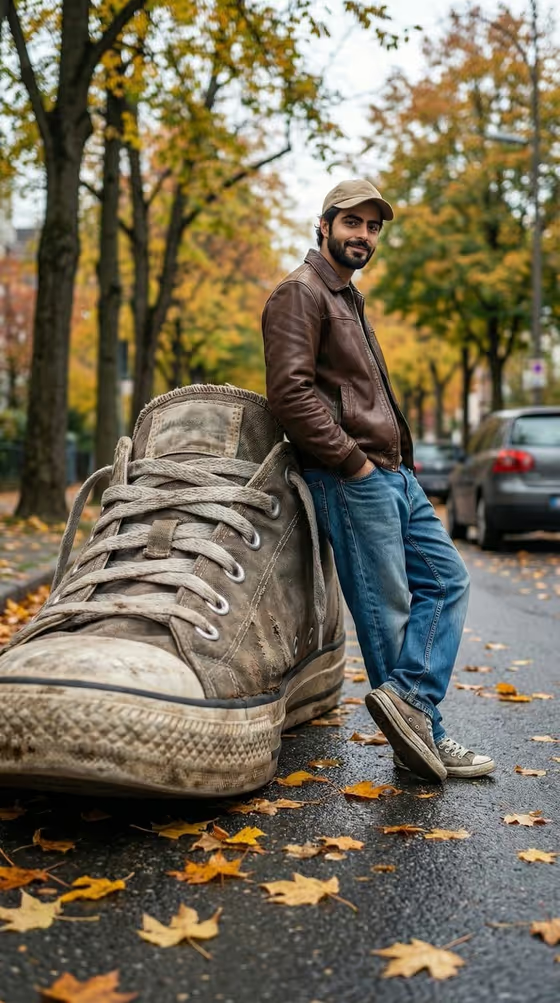
Giant Sneaker Perspective creates a forced-perspective street photo in which an oversized sneaker rises like a wall beside a person leaning casually against it. The scene is set on an autumn road with yellow and orange leaves, tall trees in the background and a softly blurred parked car, shot from a low angle so the scale trick reads clearly.
It suits anyone who wants a playful, surreal portrait for social posts, product ideas or creative projects. You choose the giant item in the Oversized shoe or sneaker field, and the template builds the believable scale, shadows and street atmosphere around it.
What works best as input
- The Oversized shoe or sneaker field is required and is a text field that also accepts a photo. You can describe the item or attach a reference image of it.
- If you describe it, be specific about material and wear. The cover example shows a worn canvas-style sneaker with visible dirt, laces and a rubber sole, so details like that carry through.
- If you attach a photo of a shoe or product, pick one with the whole item visible, even lighting and a clear outline so the shape and texture can be matched.
- Stick to one object per generation. The prompt is built around a single enormous item in the foreground.
How to use it
- Open the Giant Sneaker Perspective template in Phosphene.
- In the Oversized shoe or sneaker field, type what you want to tower over the scene, or attach a reference photo of the item.
- Generate the image. The output is a 3:4 portrait frame.
- Review the result, checking that the scale, contact point and shadows look believable, then adjust your description and generate again if needed.
Tips for a better result
- Try the placeholder-style wording such as "a worn oversized sneaker" first, then vary the material, color or condition to see how the texture changes.
- The template examples also suggest other objects, like a premium consumer product or a sculptural design object, if you want the same giant-versus-tiny effect with something other than a shoe.
- Mention surface details like scuffs, fabric wear or a rubber sole, since the scene is built to show realistic textures up close.
- Keep your description short and visual. The street, autumn leaves, lighting and low camera angle are already handled for you.
Common mistakes
- Leaving the Oversized shoe or sneaker field vague or empty. It is required, and a clear description gives a much more convincing giant object.
- Describing several different objects at once, which muddies the single towering foreground item the scene depends on.
- Using a reference photo where the item is cropped, tiny in the frame or poorly lit, which makes its shape and texture harder to reproduce.
FAQ
Do I have to use a sneaker?
No. The field accepts any oversized item you describe or show, and the examples include a premium consumer product and a sculptural design object. A sneaker matches the scene shown on the cover.
Can I upload a photo?
Yes, the Oversized shoe or sneaker field accepts a photo as well as text, so you can reference a specific item. It is a single field, so there is one input to fill.
What shape is the final image?
The template outputs a still image in a 3:4 portrait ratio.
Can I change the autumn street setting?
The street, autumn leaves and low-angle camera are part of the template's fixed direction. Your control is the giant object you put in the Oversized shoe or sneaker field.