Edible City Diorama turns a place name and a list of foods into a miniature skyline built entirely from ingredients. Walls, roofs, windows, streets and landscape are all made from food, then photographed like a tilt-shift macro shot with soft light and shallow depth.
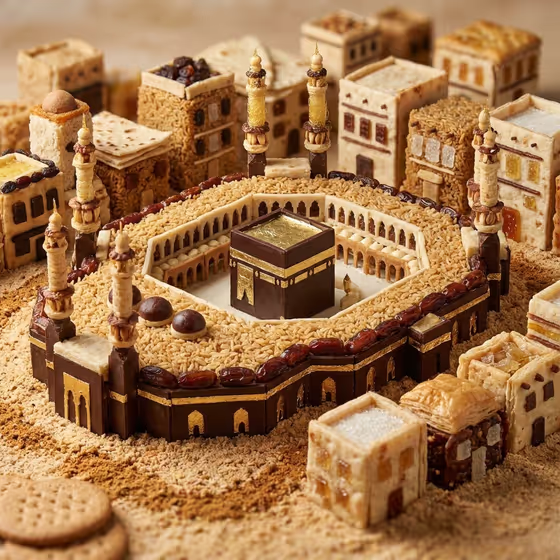
It suits food bloggers, travel fans, restaurant and event creators, and anyone who wants a playful image that links a destination to its cuisine. The cover shows how far it can go: a landmark rebuilt from chocolate, rice grains, dates and pastry, surrounded by small food-built houses.
What works best as input
- In City or Country Name, write a place with recognizable architecture, such as a famous landmark city. The more distinctive its buildings, the easier it is for the result to read as that place.
- In Cuisine Material Subject, list three or four foods that belong together, like the examples 'sushi, rice, seaweed, and citrus' or 'pasta, tomatoes, bread, and basil'.
- Choose foods with different textures (grains, pastry, glossy sweets, leaves). Varied textures give walls, roofs and streets their own look, as in the cover where rice grain, dark chocolate and baked layers each play a role.
- The Cuisine Material Subject field can accept a photo, so you can attach a picture of the ingredients you want used. Only do this if you have a clear photo of the foods themselves; otherwise a short text list works fine.
- Match the cuisine to the place if you want a coherent result, for example local dishes for a local skyline. Mixing unrelated cuisines is possible but gives a less focused scene.
How to use it
- Open the Edible City Diorama template in Phosphene.
- Type your place in City or Country Name, such as a city you love or want to feature.
- Fill Cuisine Material Subject with the foods that should act as building materials, or pick wording from the examples and adjust it. Add a photo of the ingredients here if you have one.
- Generate the image, then review the 16:9 result. Check that the skyline looks like the place and that the food textures are readable, and adjust your two fields to try again.
Tips for a better result
- Be specific with ingredients. 'Dates, rice, dark chocolate and pastry' gives the model more to build with than just 'sweets'.
- Try the same city with different cuisines to compare looks, or the same cuisine across several cities for a themed series.
- Name materials that suit different parts of a building, such as something crisp for roofs, something glossy for glass, and something granular for ground or streets.
- Keep each field short and clear. A focused list of foods tends to work better than a long paragraph.
Common mistakes
- Entering a vague place like 'a city' or a very obscure location, which leaves the skyline with no recognizable local forms to copy.
- Listing too many unrelated foods, which can make the scene messy and hide the architecture.
- Writing a dish name only (like 'dinner') instead of the actual ingredients that could serve as masonry, roofs and streets.
FAQ
Do I need to upload a photo?
No. The two required fields are text. Only Cuisine Material Subject can take a photo, and you can use it to show the ingredients you want used.
What shape is the output?
It produces a single image in 16:9 widescreen format, styled as a tilt-shift macro photograph.
Can I use a country instead of a city?
Yes, the first field is labeled City or Country Name, so you can enter either. A place with well-known buildings usually reads more clearly.
Does it use real food?
No. The image is AI-generated and only looks like a food-built miniature. Treat it as an illustration, not a recipe or build guide.