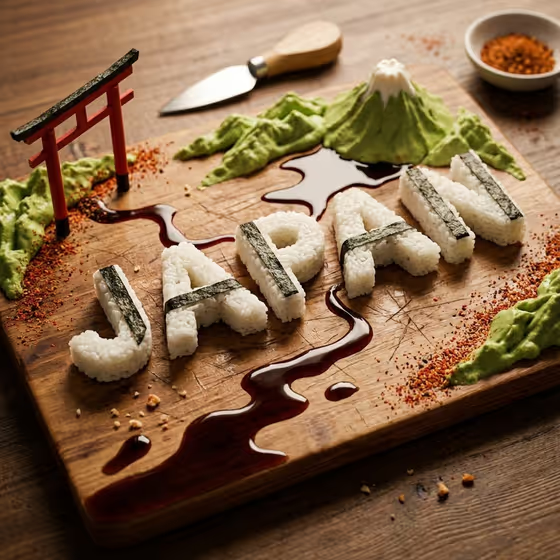
Edible Country Map Board turns a country and a cuisine into a food sculpture on a wooden charcuterie board. The land, mountains, rivers and coastlines are built from ingredients, and the country name is formed from food as part of the same scene. The cover example shows Japan with rice-block letters wrapped in nori strips, green relief hills, a snow-capped peak, sauce rivers and a small torii gate.
It suits food bloggers, restaurant and catering teams, travel or culture content creators, and anyone who wants a playful geography-meets-cuisine image. Everything is text-driven, so you only describe the place, the edible materials and the name you want shown.
What works best as input
- There is no photo upload here. All three fields (Food map product or place, Edible terrain system, Rendered country name) are filled with text or a choice, so put your effort into clear wording.
- In Food map product or place, pair a country with its cuisine and main ingredients, like the examples "Japan in sushi rice and nori" or "Mexico in corn and salsa". Naming the food gives the map a clear material identity.
- For Edible terrain system, pick or describe how land features should be built, such as rice blocks with nori trim and sauce rivers, or cheese terrain with herb valleys. Match these materials to the cuisine you chose so the board feels cohesive.
- For Rendered country name, use a short word in capitals, like JAPAN or ITALY. Shorter names tend to be easier to form from food and read clearly on the board.
How to use it
- Open the Edible Country Map Board template in Phosphene.
- Fill in Food map product or place with your country and cuisine, then choose or describe the Edible terrain system that fits those ingredients.
- Type the text you want shown in Rendered country name, then generate the image.
- Review the 3:4 result for readable lettering and a tidy board. If something is off, adjust your wording and generate again.
Tips for a better result
- Keep the terrain ingredients consistent with the cuisine. The cover works because rice, nori, wasabi-green relief and soy-style sauce all belong to Japanese food.
- Try different terrain systems for the same country, such as pastry relief with fruit waterways versus vegetable mosaic with puree coastlines, to get very different looks.
- Mention a few signature ingredients in the first field so the map picks up recognizable colors and textures.
- The template adds one culturally relevant garnish by itself, so you do not need to describe it. Spend your words on materials instead.
Common mistakes
- Writing a long sentence in Rendered country name. A short, all-caps name is more likely to come out readable as food lettering.
- Choosing terrain ingredients that clash with the cuisine, which can make the board look random instead of themed.
- Leaving the first field vague, like just a country name with no food. Without ingredients, the map has less to build from.
FAQ
Can I upload a photo for this template?
No. All three fields take text or a choice, and none of them accept a photo.
What shape is the output?
The template produces an image in a 3:4 aspect ratio.
Can I use a place that is not a country?
The fields are open text, so you can describe your own place and cuisine, as the example "my chosen place and cuisine" suggests. Results are best when the name is short and the ingredients are clearly described.
Why does my name text look slightly different from what I typed?
The name is built out of food, so letter shapes can vary. Using a shorter, capitalized name and regenerating usually helps.