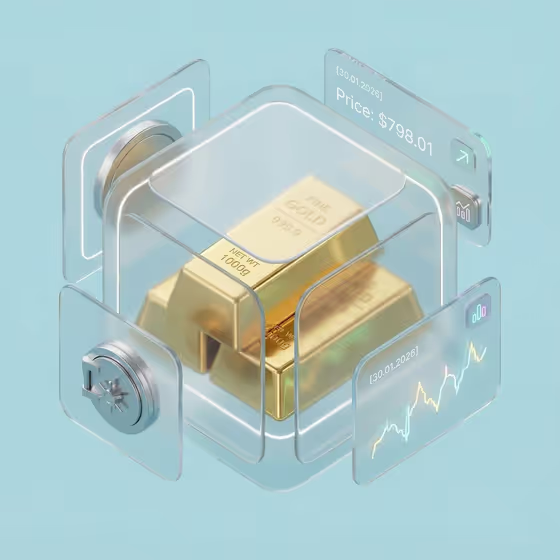
This template builds a glassmorphic, isometric market dashboard around a single asset. Your subject sits at the center inside frosted, rounded glass forms, with floating translucent panels around it that show a price readout, a small neon trend chart, a vault-style detail and tiny market icons, all on a solid powder-blue background.
It suits anyone who wants a polished visual for a market update, investor note, newsletter header or product concept. The cover shows gold bars, but the Market product or asset field also takes other things such as silver bullion coins or a digital currency token.
What works best as input
- For the Market product or asset field, name the asset specifically, for example "engraved gold bars" or "silver bullion coins", so the center of the scene is clear.
- This field accepts a matching reference photo, so if you upload one, pick a clean shot of a single asset or a tidy stack with the shape easy to read.
- Use a photo with even lighting and no busy background, since the template places the asset on its own powder-blue scene with glass and reflections.
- In the Report date field, write the label you want shown on the panels, such as "January 30, 2026" or "Quarter One Review". It appears in quotes in the prompt, so keep it short and exact.
- For Dashboard metric set, pick the set that matches your story (price, trend and micro-chart, or allocation, return and risk) so the panels show relevant data.
How to use it
- Open the Glass Gold Market Dashboard template in Phosphene.
- Fill in Market product or asset by typing a description or by uploading a matching reference photo.
- Choose a Dashboard metric set and enter your Report date, then generate the image.
- Review the 3:4 result, check that the date and asset look right, and adjust your fields and regenerate if needed.
Tips for a better result
- Try a different asset from the examples, such as a digital currency token, to see how the same glass dashboard layout adapts to a new subject.
- Switch the Dashboard metric set to something like allocation, return and risk to change what the floating panels suggest.
- Use a date style that fits the context, such as "Today's Market" for a daily feel or "Quarter One Review" for a periodic report.
- Keep the asset description concrete and visual (material, shape, engraving) so the gold or metal reflections have something clear to work with.
Common mistakes
- Leaving the asset vague, like "my financial asset", which gives the template little to render at the center of the glass forms.
- Writing a long sentence in Report date. It is meant to be a short label shown on a panel, so long text may come out cramped or unreadable.
- Uploading a cluttered or low-light photo as the reference, which makes the central asset harder to read inside the glass.
FAQ
Do I have to upload a photo?
No. The Market product or asset field accepts typed text, and a matching reference photo is optional.
What does the finished image look like?
It is a 3:4 image with your asset at the center of frosted rounded glass, surrounded by floating panels with a date-stamped readout, a neon micro-chart and small icons on a powder-blue background.
Can I use something other than gold?
Yes. The examples include silver bullion coins and a digital currency token, and you can describe your own asset.
Can I change the date shown?
Yes. Enter any short label in Report date, such as a calendar date or a phrase like "Today's Market".