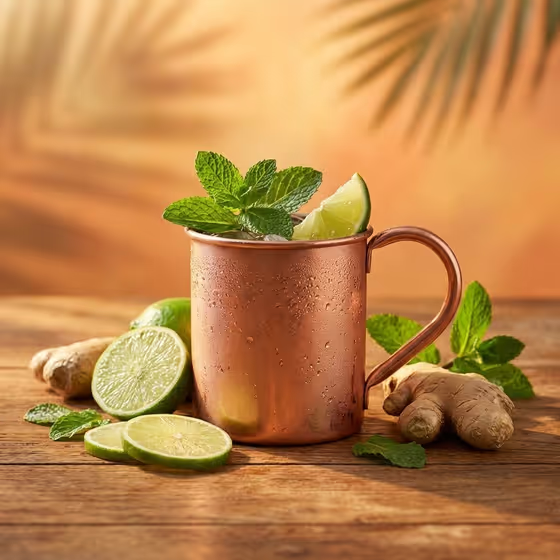
Golden Hour Cocktail turns a drink idea into a polished studio-style product photo. The result is a 3:4 image shot from a slightly top-down angle, with the drink in its proper glass, soft golden light, a warm orange backdrop, and palm-leaf shadows falling across the scene.
It suits bartenders, home mixologists, café and bar owners, recipe bloggers, and anyone who wants a summery drink visual for a menu, post, or invitation without setting up a real shoot. You choose the drink and the garnish, and the template handles the lighting and mood.
What works best as input
- Both fields, Cocktail Product and Recipe Garnish, accept either a text description or a photo reference. Use whichever is easier for you, and you can mix the two.
- For Cocktail Product, be specific about the drink, like the examples "an Aperol spritz" or "a passionfruit martini". Naming the exact cocktail helps the template pick the traditional glass for it.
- If you add a photo of a glass or drink as a reference, choose a clear, well-lit shot where the glass shape and the liquid color are easy to see.
- For Recipe Garnish, list the actual ingredients you want arranged around the glass, such as "lime, mint, and crushed ice" or "pineapple, cherries, and coconut". Concrete items work better than vague words like "fresh stuff".
- The template asks for 2 or more uploads, so plan to supply a reference or description for both the drink and the garnish.
How to use it
- Open the Golden Hour Cocktail template in Phosphene.
- Fill in Cocktail Product with the drink you want, or add a glass reference photo. Then fill in Recipe Garnish with the ingredients to arrange around the glass.
- Generate the image and wait for the 3:4 result to finish.
- Review the picture for the right glass, the garnish you listed, and the condensation and palm shadows. If something is off, adjust your wording and generate again.
Tips for a better result
- Match the garnish to the drink. A mojito with lime, mint, and crushed ice looks coherent, while a tropical rum punch pairs naturally with pineapple, cherries, and coconut.
- Name colors and textures in your garnish, like "passionfruit and citrus peel" or "orange slices and rosemary", so the arrangement around the glass reads clearly.
- Try the same garnish with different drinks, or the same drink with different garnishes, to build a consistent set of images for a menu or feed.
- Since the backdrop is warm orange, drinks with bright or contrasting colors, such as green mint or red cherries, tend to stand out well against it.
Common mistakes
- Writing a vague drink like "a cocktail". Without a specific name, the template has little to go on for the glass and the look of the liquid.
- Listing too many garnish items. A short, focused list keeps the arrangement around the glass clean instead of crowded.
- Using a dark or blurry reference photo. If the glass or drink is hard to make out, the result may not reflect what you intended.
FAQ
Do I have to upload a photo?
Each field accepts a text description or a photo reference, so you can describe things in words, add references, or combine both. The template lists the input as 2 or more photos, so supply something for both fields.
What size is the image?
The output is a 3:4 image, which suits vertical placements like posts and menu cards.
Can I choose the glass?
The template uses the proper traditional glass for the drink you name. If you want a specific glass, add a glass reference photo to the Cocktail Product field.
Can I change the background or lighting?
No. The warm orange backdrop, golden-hour light, and palm-leaf shadows are fixed by the template. You control the drink and the garnish.