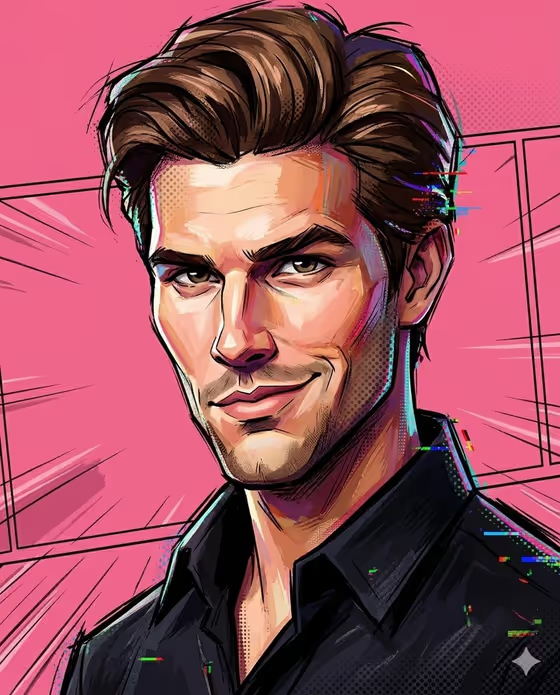
Painted 3D Caricature turns a portrait subject into a sculpted, hand-painted caricature. The look in the cover image is a man with exaggerated, slightly asymmetric facial geometry, bold ink lines, painted shadows, halftone dots and small color glitches, set against a solid pink studio background.
It suits anyone who wants a stylized avatar, a collectible-style portrait or a playful profile image with a comic-inspired finish. Because the template asks for two or more photos, it works best when you have a few clear references of the same subject.
The style keeps general identity cues such as skin tone and hairstyle while deliberately breaking realism, so expect an expressive interpretation rather than a faithful likeness.
What works best as input
- Upload at least two photos of the same subject, since the template expects 2+ uploads. Using different angles or expressions gives the style more to work from.
- Pick photos where the face and hairstyle are clearly visible, because the template keeps cues like skin tone and hairstyle while distorting the geometry.
- Use sharp, evenly lit images. Heavy filters, strong shadows across the face or tiny faces in a crowd make the features harder to read.
- In the first field (portrait subject character subject) you can describe the subject in text or add the exact visual reference, for example 'an original character' or 'my exact character reference'.
- Only use photos of yourself or people who have agreed to be portrayed, and keep the subject a private individual rather than a public figure.
How to use it
- Open the Painted 3D Caricature template in Phosphene and upload two or more photos of your subject.
- Fill in the 'portrait subject character subject' field with a short description of who or what is being drawn, or rely on the uploaded reference.
- Choose a value for 'Character staging', such as a collectible character portrait, a full-body character scene or an environmental story moment.
- Generate the image, then review the 3:4 result for the painted brushwork, halftone texture and recognizable hair and skin tone, and run it again if you want a different take.
Tips for a better result
- Start with the collectible character portrait staging if you want something close to the cover image: a frontal, expressive pose on a solid pink background.
- Try full-body character scene or environmental story moment to see how the same painted style reads in a wider composition.
- Keep the subject description short and concrete, such as hairstyle or clothing, so it supports the photos instead of competing with them.
- Compare results from different photo sets of the same person. Expressions in the references tend to shape the expressions in the caricature.
Common mistakes
- Uploading only one photo. The template is set up for two or more, and a single reference gives less to work with.
- Expecting a photorealistic likeness. The style intentionally distorts facial geometry and asymmetry, so some exaggeration is part of the look.
- Writing a long, conflicting description in the subject field, which can pull the result away from the fixed painted 3D caricature style.
FAQ
How many photos do I need?
The template asks for two or more photos, so upload at least two of the same subject.
Will the result look exactly like me?
Not exactly. The style keeps general cues such as skin tone and hairstyle but deliberately exaggerates and distorts features.
What does the Character staging option change?
It sets how the image is framed, for example a collectible character portrait, a full-body scene or an environmental story moment, without changing the core painted look.
What shape is the output?
The template produces a single image in a 3:4 aspect ratio.