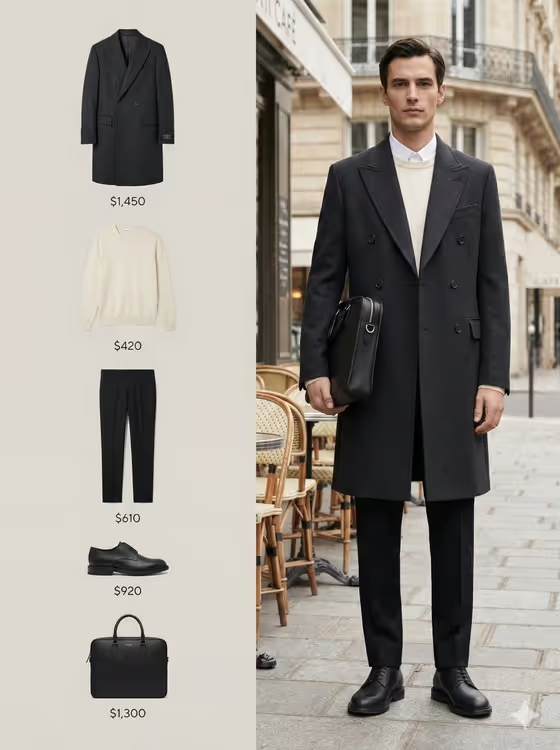
Split Paris Editorial turns a single subject into a two-panel fashion campaign. One side is a street scene on a Parisian cafe terrace with the figure caught mid-step, and the other is a clean product-style layout of the garments and accessories he is wearing, with small price labels beside each item.
It suits anyone who wants a magazine-style lookbook image: people building a styling portfolio, creators making fashion-themed posts, or anyone curious how a tailored coat, knit, trousers, shoes and bag would read as an editorial spread. The output is a 3:4 image, and the template's own direction is black and white with strong contrast and a cinematic, archival feel.
What works best as input
- Use the first field, "tailored man portrait subject", to either type a short description (the placeholder is "a tailored man") or upload a photo as the visual reference for the person.
- If you upload a photo, pick a clear, well-lit shot where the face is sharp and unobstructed, since the template builds the whole editorial around that person.
- A photo that shows your build and posture (waist-up or full length) gives the model more to work with for the mid-step, tailored look than a tight selfie.
- If you describe instead of upload, keep it brief and visual, such as "a tailored man" or "an editorial portrait subject", rather than writing a long backstory.
- Use a photo of yourself or of someone who has agreed to it, and avoid using the likeness of public figures.
How to use it
- Open the Split Paris Editorial template in Phosphene and find the "tailored man portrait subject" field.
- Describe your subject in text or upload a photo as the reference, then choose an option in the "Pose and scene" field (for example intimate close portrait, full-body editorial frame, or environmental candid frame).
- Generate the image and wait for the 3:4 split-frame result to appear.
- Review the output: check that the street-side figure looks right and that the product panel reads cleanly, then adjust your subject or scene choice and run it again if needed.
Tips for a better result
- Try each "Pose and scene" option on the same subject. A close portrait emphasizes the face and tweed texture, while a full-body frame shows off the complete outfit.
- Use the example phrasing as a starting point, such as "a candid everyday subject" for a looser feel or "an editorial portrait subject" for a more polished one.
- Because the look is built on contrast and texture, subjects with defined features and clear lighting in the reference tend to carry the dramatic tonal style better.
- Run a couple of variations with slightly different subject descriptions and compare which framing suits your project best.
Common mistakes
- Writing a long, detailed paragraph in the subject field. The template already defines the outfit, mood and setting, so keep the field about who the subject is.
- Uploading a dark, blurry or heavily cropped photo, which gives the template little to build the portrait from.
- Expecting color output. The template is designed around a black-and-white campaign look, so plan for a monochrome result.
FAQ
Do I have to upload a photo?
No. The subject field accepts either a text description or an uploaded photo reference, so you can type something like "a tailored man" instead.
What does the finished image look like?
It is a 3:4 split-frame editorial in black and white: a figure on a Parisian street on one side and a monochrome product layout with small price indicators on the other.
What does the "Pose and scene" field change?
It controls how the image is framed. Options include a full campaign frame, an intimate close portrait, a full-body editorial frame, or an environmental candid frame.
Can I change the outfit?
The tweed jacket, trousers, Chelsea boots and structured bag are part of the template's fixed direction, so the template is built around that look rather than a custom wardrobe.