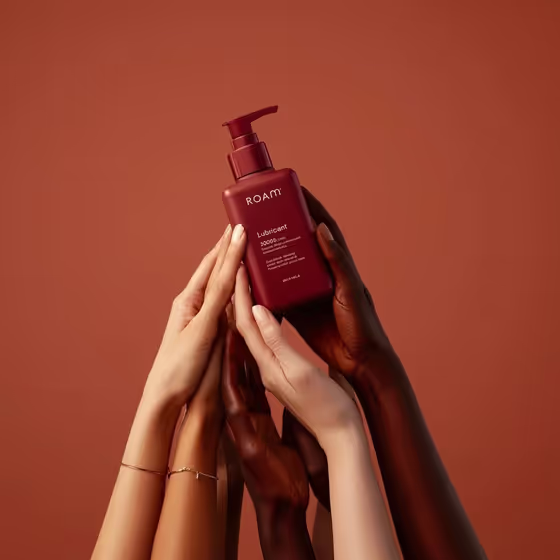
Hands Around Product places your bottle at the center of a minimalist skincare shot, with several hands of different skin tones reaching up and arranged around it. The backdrop is a warm, single-color terracotta, lit softly so the shadows stay smooth and the bottle gets a glossy, editorial finish.
It suits skincare, beauty and personal care brands, and anyone who wants a polished campaign-style image of a pump bottle or a similar premium object without organizing a studio shoot. The output is a 3:4 image, a good fit for product pages and social posts.
What works best as input
- Use the Pump-bottle product field to either upload a photo of your bottle or describe it in text, since this slot accepts both.
- If you upload a photo, pick one where the whole bottle is visible, in focus and evenly lit, so the pump, shoulder and label are all clear.
- Choose a photo with a plain or uncluttered background so the bottle's outline is easy to read.
- If you describe it instead, include color, finish and shape, for example 'a matte red pump bottle', as in the placeholder.
- The examples include 'a premium consumer product' and 'a sculptural design object', so you can try items beyond skincare if they suit a held-up, hero-product look.
How to use it
- Open the Hands Around Product template in Phosphene.
- In the Pump-bottle product field, upload a photo of your bottle or type a short description of it.
- Generate the image. The template adds the terracotta backdrop, soft studio lighting and the group of hands around your product.
- Review the result, checking the bottle shape, label area and hand positions, then adjust your input and generate again if you want a different look.
Tips for a better result
- Be specific about finish and color in a text description (matte, glossy, deep red) so the bottle matches your brand.
- Try the other example styles, like a sculptural design object, to see how the same hands-and-terracotta setup works on non-skincare items.
- If a first result changes details of your bottle, re-upload a cleaner, sharper reference photo and generate again.
- Keep your description to one clear product. The prompt repeats the product in the scene, so a short, unambiguous phrase works better than a long one.
Common mistakes
- Uploading a blurry, cropped or heavily angled photo, which gives the generator little to work with and can distort the bottle.
- Writing a vague description like 'a bottle' with no color, material or shape, which leaves too much to chance.
- Describing several different products at once, when the template is built around one hero item held by the hands.
FAQ
Do I have to upload a photo?
No. The Pump-bottle product field accepts either a photo or a text description, so you can type something like 'a matte red pump bottle' instead.
Can I use it for products other than pump bottles?
The field's examples include a premium consumer product and a sculptural design object, so other items can work, though the template is designed around a pump-bottle skincare look.
Can I change the background color?
The terracotta backdrop, lighting and hand arrangement are fixed parts of this template. Your input controls the product shown.
What shape is the image?
The output is a 3:4 image, a vertical format.