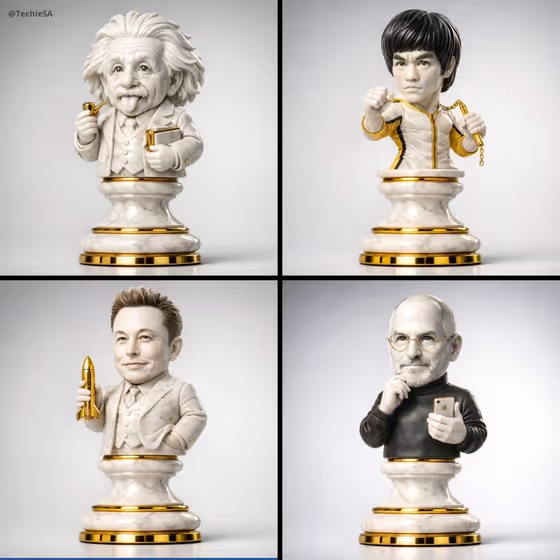
Iconic Chess Collectible turns a recognizable figure into a premium chess-piece sculpture. The figure rises from a classic chess base, with clothing and accessories simplified into a clean sculptural form, then photographed against a neutral gallery backdrop with soft studio reflections and grounded shadows.
It suits anyone who likes collectible-style product imagery: fans making a tribute piece, designers mocking up display-shelf concepts, or creators who want a distinctive portrait in a marble-and-metal look. You choose the figure, the chess piece and the material finish, and the result is a single 3:4 image.
What works best as input
- In the Iconic figure field, describe the figure by their most recognizable traits, such as their hairstyle, outfit and signature accessory. The sculpture works best when those features are easy to read in a simplified form.
- If you add a reference photo to the Iconic figure field, pick one with a clear, well-lit face and upper body so the outfit and pose can carry into the sculpture. Avoid busy backgrounds or heavy filters.
- Stick to a respectful, tribute-style approach. Use figures you have a good reason to depict, and only use photos of people you have permission to use.
- Mention one standout prop in your description (a held object or a distinctive garment). Small accessories help the figure stay unmistakable once it is turned into stone and metal.
How to use it
- Open the Iconic Chess Collectible template in Phosphene.
- Fill in Iconic figure by typing a description or adding a reference. The placeholder 'a legendary rock musician' shows the level of detail that works.
- Pick a Chess piece (King, Queen, Knight or Bishop) and a Material finish such as white marble and polished gold or porcelain and rose gold.
- Generate the image, then check that the figure's key features, the chess base and the material all look the way you intended. Adjust your inputs and run it again if something is off.
Tips for a better result
- Try the same figure across different Chess piece options. A Knight or Bishop silhouette changes the overall feel of the collectible.
- Swap the Material finish to change the whole mood. White marble and polished gold looks classic, while black marble and antique brass or emerald stone and silver feels moodier.
- Make your figure description specific. 'A classic film detective' gives a general look, while adding a coat, hat or magnifying glass gives the sculpture clearer details to simplify.
- Make a matching set by keeping the same Chess piece and Material finish and changing only the figure, so the collectibles look like a series.
Common mistakes
- Writing a vague figure description with no distinguishing traits, which leaves the sculpture generic and harder to recognize.
- Cramming too many accessories or outfit details into the description. The template simplifies features into a sculptural form, so a few strong cues work better than a long list.
- Uploading a blurry, dark or heavily cropped reference photo, which gives the sculpture less to work from.
FAQ
What does the finished image look like?
It is a single photoreal image in 3:4 format of a chess-piece collectible on a neutral gallery background, with studio reflections and dramatic grounding shadows.
Do I have to upload a photo?
The Iconic figure field accepts either a text description or a reference, so you can describe the figure in words. The Chess piece and Material finish fields are choices, not photo inputs.
Can I change the material?
Yes. Material finish lets you pick options such as white marble and polished gold, black marble and antique brass, emerald stone and silver, or porcelain and rose gold.
Which chess pieces can I choose?
The Chess piece field offers King, Queen, Knight and Bishop, and each one changes the silhouette of the base the figure rises from.