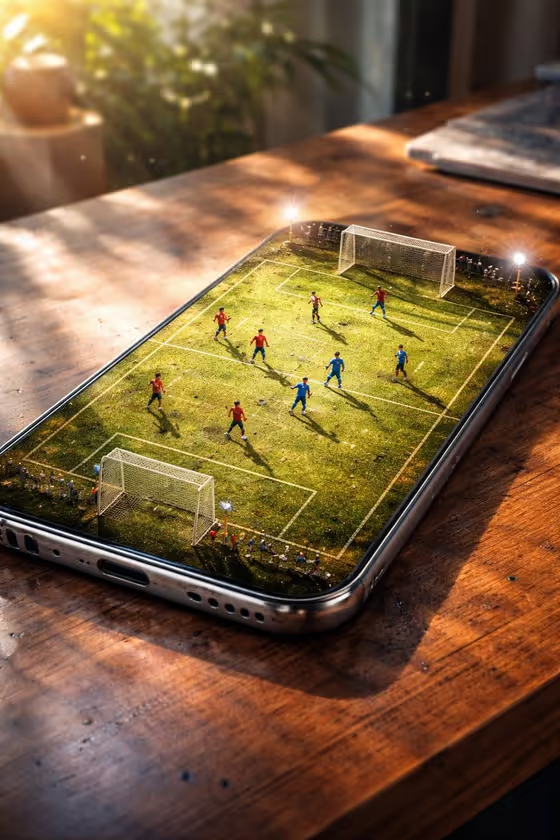
Pocket Screen Stadium turns the screen of a phone or other device into a tiny, working arena. You pick the miniature sport, and the device sits on a table surface of your choice, shot close and slightly tilted, as in the cover image of a football pitch glowing on a phone resting on warm wood.
It suits anyone who wants a playful, product-style image: sports fans, creators making social posts, or people who like miniature-world visuals. The result is a single 3:4 image with toy-scale players, soft side light and realistic details like fingerprints and scratches on the glass and frame.
What works best as input
- The Phone or device field accepts either a short text description or a photo of the device, so use whichever you have. A clear product-style photo helps if you want a specific model to carry over.
- If you upload a photo, show the whole device from the front or at a mild angle, with even light and little glare, so the shape and edges are easy to read.
- If you type instead, be concrete, for example "a silver smartphone", "a compact tablet" or "a vintage handheld console". Colour and device type matter more than long descriptions.
- The Miniature sport and Table surface fields are choice fields, so there is nothing to upload for them. Pick the options that match the mood you want, such as Football match on a Warm wooden table.
How to use it
- Open the Pocket Screen Stadium template in Phosphene.
- Fill in Phone or device by typing a description or adding a photo of the device.
- Choose a Miniature sport and a Table surface from the options.
- Generate the image, then check the screen, the players and the reflections. Adjust a field and run it again if you want a different look.
Tips for a better result
- Try different sports with the same device to see how the arena changes, for example Basketball game, Tennis rally or Ice hockey face-off.
- Switch the table surface to change the whole mood. A Dark stone desk feels moody, while a Minimal white tabletop looks clean and commercial.
- Vary the device type, such as a compact tablet or a vintage handheld console, for a different screen shape and a different arena layout.
- Keep the device description short and specific so the scene stays focused on the miniature stadium.
Common mistakes
- Writing a long, busy device description or uploading a cluttered photo. This can pull attention away from the screen, which should be the star.
- Using a photo with heavy glare, cropping or a hand covering part of the device, which makes the shape harder to reproduce.
- Expecting a flat top-down view. The template is built around a slightly tilted, close perspective with shallow focus, so the result will not be a straight overhead shot.
FAQ
Do I have to upload a photo?
No. The Phone or device field accepts a text description or a photo, so you can simply type something like "a modern black smartphone".
Can I choose the sport and the surface?
Yes. Miniature sport and Table surface are both choice fields, and each offers several options such as Football match, Tennis rally, Warm wooden table and Brushed metal counter.
What shape is the output?
The template makes a single image in a 3:4 aspect ratio.
Will the phone look perfectly clean?
No, by design. The template adds fingerprints, tiny scratches, smudges and dust so the device feels real and tactile.