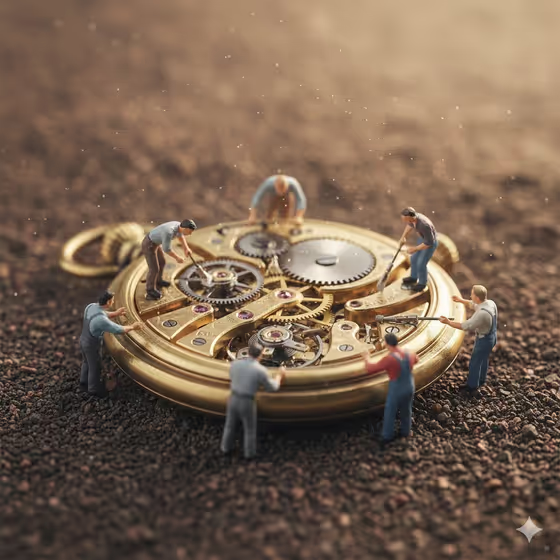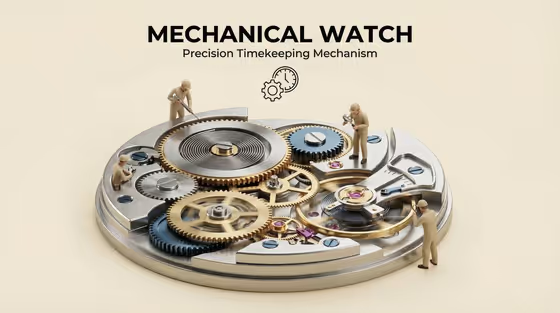
This template turns a machine or device into a cutaway diorama. The object is opened up on a raised isometric base so its inner workings are exposed, and tiny faceless technicians stand at believable scale, inspecting and servicing the parts. A bold title sits at the top center, as in the cover image, which shows a watch movement with brass gears, blue and silver parts, and miniature workers around it.
It suits designers, educators, hobbyists and anyone who wants a clean, illustrated way to show how a product or mechanism works. You choose the machine, decide which internal system to emphasize, name the piece, and set the background color.
What works best as input
- For Machine or device, name one specific object, such as an espresso machine, film camera, robotic arm or compact electric motor. A concrete name gives the cutaway real parts to show instead of generic ones.
- This field also accepts a reference photo. If you upload one, pick a clear shot of the whole machine from a plain angle so its shape and main components are easy to read.
- For Machine name, keep the title short and in capitals, like BREW SYSTEM or OPTICAL ENGINE. It is printed above the base, so a few words work better than a sentence.
- For Background color, describe a simple solid tone such as warm off-white, soft sky blue, deep charcoal or muted mint. The title color adjusts automatically for contrast.
How to use it
- Open the Machine Cutaway Miniature template in Phosphene.
- Fill in Machine or device with text or a reference image, then choose the Internal system you want the cutaway to focus on, such as wiring and power flow or gears and mechanical transfer.
- Enter the Machine name for the title and a Background color, then start the generation.
- Review the 3:4 image. Check that the parts, title and technicians look right, then adjust the fields and generate again if you want a different result.
Tips for a better result
- Match the internal system to the machine. Gears and mechanical transfer suits a watch or camera, while fluid and pressure paths fits something like an espresso machine.
- Generate the same machine with different internal systems to get several diorama versions that each highlight a different layer of the device.
- Try contrasting backgrounds. A deep charcoal backdrop makes metal and brass parts stand out, while warm off-white gives the clean, technical look seen on the cover.
- Use a more specific machine description, such as a compact electric motor instead of just motor, to get a more recognizable set of internal parts.
Common mistakes
- Entering a vague or broad machine like vehicle or gadget. The cutaway works best when it knows exactly which object to open up.
- Writing a long phrase in Machine name. The title is meant to be short and bold, so long text can look crowded above the base.
- Choosing an internal system that does not fit the machine, which can lead to parts that feel unrelated to the device.
FAQ
Can I upload a photo of my machine?
Yes, the Machine or device field accepts a reference photo as well as text. The other fields are text or a choice from the listed options.
What does the Internal system field change?
It sets which part of the machine the cutaway emphasizes, for example wiring and power flow, gears and mechanical transfer, fluid and pressure paths, or cooling and sensor network.
Do the technicians have faces?
No. The template uses tiny faceless technicians, shown inspecting and servicing the exposed machinery.
What shape is the final image?
The template outputs a still image in a 3:4 aspect ratio.