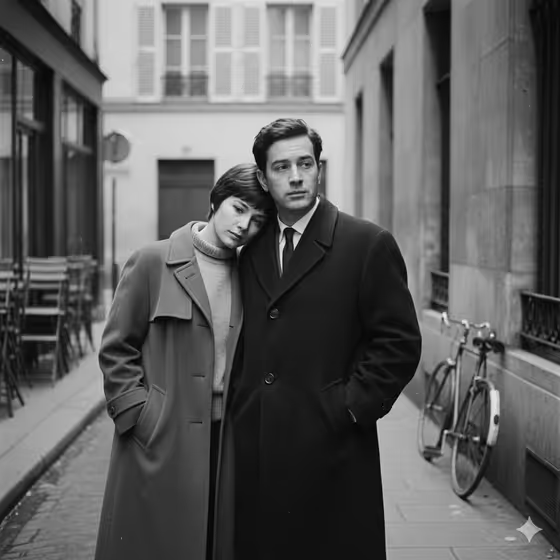
New Wave Couple turns two people into a quiet black-and-white portrait in the spirit of 1960s French New Wave cinema. The result shows a pair standing close on an empty European street, with one leaning toward the other and the other gazing past them, as in the cover image with its stone walls, shuttered windows and a bicycle against the wall.
It suits couples, close friends, or any two adults who want a moody, art-house style picture rather than a glossy one. The output is a 3:4 image focused on stillness, understated clothing and unspoken tension.
The look is deliberate monochrome with film grain and soft natural light, so it works best when you want something restrained and timeless.
What works best as input
- Each of the two slots, First person and Second person, accepts either a photo or a short text description, so you can mix them (one photo, one description) if you like.
- If you use photos, pick clear, well-lit shots where the face is easy to see. A simple background helps the template read each person cleanly.
- Because the scene is quiet and natural, photos with calm or neutral expressions tend to fit the mood better than big laughs or exaggerated poses.
- If you describe someone instead, keep it short and visual, like the placeholders: 'an introspective adult woman' or 'an adult man in side profile'.
- Keep both subjects adults, as the template is written for adult portraits.
How to use it
- Open the New Wave Couple template in Phosphene.
- Fill the First person field with a photo or a short description, then do the same for the Second person field. Both are required.
- Generate the image and wait for the 3:4 black-and-white portrait to appear.
- Review the result. If the pairing or mood is not right, adjust your inputs and generate again.
Tips for a better result
- Try the example descriptions as a starting point, such as 'an adult man in side profile' or 'an expressive adult creative', then tweak the wording to match who you have in mind.
- Use contrasting presences for the two people (one introspective, one looking away) to echo the leaning-and-gazing composition of the template.
- If your photos have very different lighting or color, expect the black-and-white treatment to even them out, but cleaner source photos still give a more consistent pair.
- Swap which person goes in which slot to see a different dynamic, since the template has one person leaning in and the other looking past.
Common mistakes
- Leaving one slot empty. Both First person and Second person are required, so the portrait needs details for both.
- Writing long, busy descriptions with bright colors, props or action. The template is built around simple clothing, minimal styling and stillness, so extra drama works against it.
- Using blurry, heavily filtered or tightly cropped photos, which makes the faces harder to read in the final image.
FAQ
Do I have to upload photos?
No. Each person slot accepts a photo or a text description, so you can describe one or both people instead.
Will the image be in color?
No. The template is set to render in deliberate black and white with film-style grain and contrast.
What will the scene look like?
Expect an empty European street or alley with stone textures, shuttered windows and quiet details like a bicycle or stacked café chairs, in soft overcast-style light.
What shape is the image?
It is generated as a 3:4 portrait-orientation image.