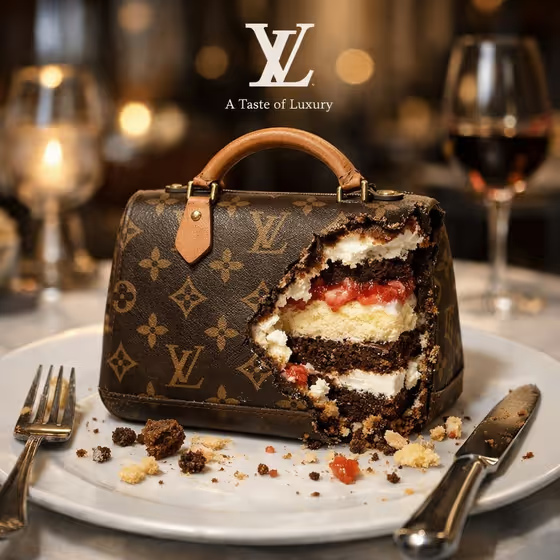
Bitten Dessert Reveal turns a plated sweet into a polished food advertisement. The dessert sits on a dish with a bite taken out, so the layered interior shows, with crumbs and a fork and knife close by. Behind it is a softly blurred upscale restaurant, and a small white brand mark with a tiny slogan sits at the top of the frame.
It suits bakers, confectionery brands, and anyone who wants a quick concept visual for a product launch or social post. You describe the dessert, pick the filling to reveal, and supply the mark and slogan. The result is a 3:4 image ready to review and adjust.
What works best as input
- For Dessert product, you can type a short description or add a reference photo. Short, concrete names like the examples (glazed doughnut, French macaron) work well.
- Choose Revealed filling from the preset options, such as vanilla cake and cream layers or dark chocolate mousse layers. This slot is a choice only, so you can't attach a photo to it.
- For Brand mark, either describe a simple logo (a minimal white monogram, a circular white emblem) or add the exact mark as a reference. The template places the mark in white at the top, so plain, high-contrast marks read best.
- Write Brand slogan as the exact line you want shown. Keep it short, since it renders as tiny text directly beneath the mark.
- The template asks for 2 or more photos, so if you use references, add one for the dessert and one for the brand mark.
How to use it
- Open the Bitten Dessert Reveal template in Phosphene.
- Fill in Dessert product and Brand mark by typing a description or adding a reference photo for each, then pick your Revealed filling.
- Type your Brand slogan exactly as you want it to appear.
- Generate the image, then check the bite, the layers, the crumbs, and the text at the top. Adjust your inputs and run it again if something is off.
Tips for a better result
- Match the filling to the dessert. A chocolate sandwich cookie paired with dark chocolate mousse layers feels more believable than an unrelated combination.
- Keep the slogan brief. Short lines like "Layers worth savoring" are easier to render cleanly in tiny type.
- Try the same dessert with different fillings to compare how the cut-open interior changes the look of the shot.
- If a reference image of your brand mark has lots of fine detail, try a simpler version of it, since the mark appears small.
Common mistakes
- Writing a long, complicated slogan. Tiny text has less room, so extra words can look cramped or come out wrong.
- Describing the dessert vaguely, such as just "cake" or "sweet". Without a clear product, the plated shot has less to build on.
- Using a dark or low-contrast brand mark. It is placed as a small white mark at the top, so a mark that does not suit white can get lost.
FAQ
Do I have to upload photos?
The Dessert product and Brand mark fields accept either a typed description or a reference photo. The template is set up for 2 or more photos, so adding references for both is the intended route.
Can I change the restaurant background?
No. The restaurant setting, the bitten dessert on a dish, and the fork and knife are fixed parts of this template. You control the dessert, filling, brand mark, and slogan.
Can I use a photo for the filling?
No. Revealed filling is a choice from the listed options, so it does not take a photo.
What shape is the image?
It is a single image in a 3:4 aspect ratio.