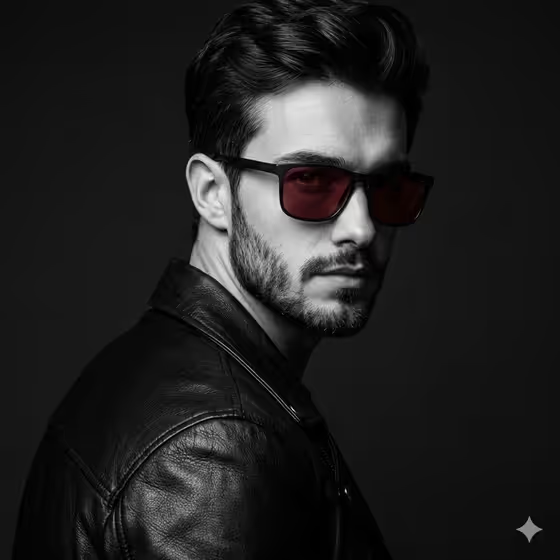
Red Lens Noir Turn makes a high-contrast black-and-white portrait in a 3:4 frame. The subject turns away over the shoulder and looks back toward the camera, and the only color left in the picture is the deep red tint of the sunglass lenses. In the cover example, a bearded man in a black leather jacket sits against a near-black background with side light shaping his face.
It suits anyone who wants a moody editorial headshot, a profile image with a single color accent, or a stylized portrait of themselves or a friend. The look relies on tactile materials like leather grain and crisp rectangular eyewear, so it works best when you want a disciplined, fashion-style frame rather than a casual snapshot.
What works best as input
- The template asks for 2 or more photos, so upload several clear shots of the same person. Different angles help the result keep the face, beard, hair and facial structure consistent.
- Choose photos with even, readable lighting and the face unobstructed. The template is built to preserve the exact face, so sharp source images give it more to work with.
- Include at least one photo where the head and shoulders are fully visible, since the final pose turns the body away while the eyes come back toward camera.
- In the Portrait Subject field, describe who it is or point to the upload, for example 'the uploaded bearded man'. Keep it to one person, because the template is built around a single subject.
- Avoid sources where sunglasses, hats or heavy shadows already hide the face. The red lenses are added by the styling, so a clear view of the eyes in your photos is more useful.
How to use it
- Open the Red Lens Noir Turn template in Phosphene and upload 2 or more photos of your subject.
- Fill in Portrait Subject with a short description or reference, such as 'the uploaded bearded man'.
- Fill in Noir Styling with the outfit and eyewear you want, for example 'black leather jacket and red-lens sunglasses'. Keep the red lenses in the description, since they are the one color accent.
- Generate the portrait, then check that the face and beard match your source, the leather and glasses frames look sharp, and only the lenses carry color.
Tips for a better result
- Try the example styling directions, like 'textured coat and crimson eyewear' or 'matte biker jacket and dark ruby glasses', to change the garment and lens shade while keeping the noir look.
- Name a texture-rich outer layer. Leather, structured tailoring or a textured coat gives the monochrome image detail to hold onto in the deep blacks.
- Keep the Noir Styling short and specific. One clear outfit plus one eyewear color reads better than a long list of accessories.
- If a result misses, run it again with a different combination of your uploaded photos. Using the clearest, best-lit images tends to help keep the likeness accurate.
Common mistakes
- Uploading only one photo or very low-quality images. The template expects 2 or more uploads, and weak sources make an exact likeness harder to hold.
- Describing multiple colors in Noir Styling. The concept depends on the red lenses being the only color, so extra colored items work against it.
- Leaving out the eyewear in Noir Styling, which removes the red accent that the whole portrait is built around.
FAQ
Will the whole photo be black and white?
Yes, the portrait is monochrome. Only the red tint of the sunglass lenses is meant to stay in color.
Can I use it with a photo of myself?
Yes. Upload 2 or more clear photos of yourself and describe yourself in the Portrait Subject field, for example 'the uploaded bearded man' adjusted to match you.
Can I change the lens color?
The template is designed around red lenses. You can vary the shade with wording like crimson or dark ruby in Noir Styling, as the examples show.
What shape is the final image?
It is a 3:4 portrait image.