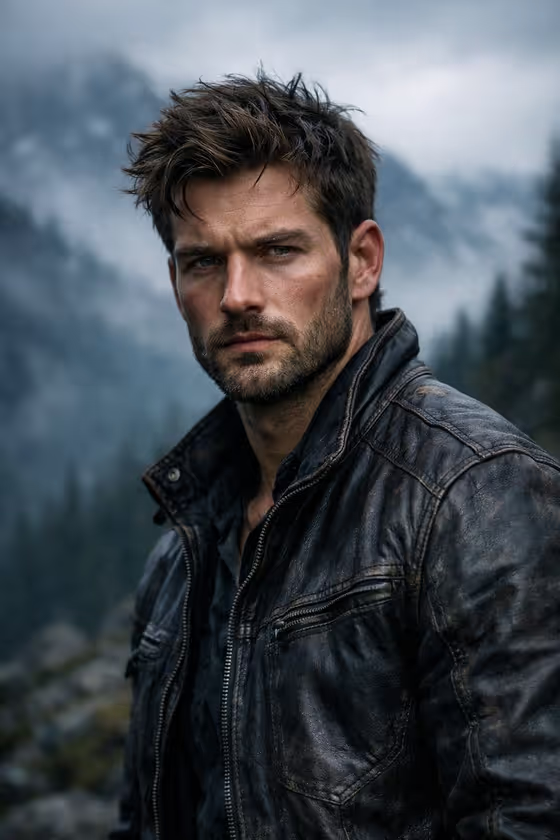
Rugged Mountain Portrait turns your subject into a moody, cinematic portrait set against fog-covered mountains and dark evergreen forest. The look is cool and desaturated, with soft overcast light, a shallow depth of field and a sharply detailed subject in front of a blurred misty backdrop.
It suits anyone who wants an outdoor adventure style portrait, such as a profile picture, a character concept or a creative project that needs a windswept, serious mood. You choose who the subject is and what they wear, and the template handles the mountain scene and lighting.
What works best as input
- The Subject field accepts either a text description or an exact visual reference, and the template is set up for 2 or more photos, so give it clear photos of the person you want to appear.
- Pick photos where the face is sharp, well lit and not hidden by sunglasses, a hat brim or heavy shadow, so the likeness has something solid to work from.
- Use different angles or expressions across your photos if you can, since several references give a fuller picture of the person.
- Only use photos of yourself or people who have agreed to be included, and avoid likenesses of public figures.
- For the Outfit field, either describe the clothing in words (for example, a technical outdoor outfit) or add a photo of the exact garment you want worn.
How to use it
- Open the Rugged Mountain Portrait template in Phosphene.
- Fill in the Subject field with a short description or add your reference photos, then fill in the Outfit field with text or a photo of the clothing.
- Generate the image. The result is a 16:9 cinematic portrait with the misty mountain setting built in.
- Review the portrait and check the face, the outfit details and the framing. Adjust your Subject or Outfit input and generate again if you want a different result.
Tips for a better result
- Be specific in the Outfit field. Material and type words such as a technical outdoor outfit or a relaxed linen ensemble give clearer clothing than a vague phrase.
- Rugged, textured fabrics tend to suit the weathered, moody atmosphere best, while very bright or busy patterns can fight the desaturated look.
- Try the example subjects, such as a resilient outdoor adventurer or a poised creative professional, to see how the description changes the character and attitude.
- Keep the Subject description short and focused on the person, since the mountain scene, fog and lighting are already handled by the template.
Common mistakes
- Using blurry, dark or heavily filtered photos, which makes it harder to keep the face recognizable.
- Writing a long scene description in the Subject or Outfit fields. The mountains, fog and lighting are already set, so extra scenery instructions can create conflicts.
- Describing an outfit with too many separate pieces and accessories, which can clutter the portrait and pull focus from the subject.
FAQ
Do I need to upload photos?
The template is marked as needing 2 or more photos, and both the Subject and Outfit fields accept a visual reference. You can also describe each one in text.
Can I change the background?
The misty mountain and evergreen forest setting is part of the template's fixed direction. This template is built for that scene.
What format is the result?
It creates an image with a 16:9 aspect ratio.
Can I choose any outfit?
Yes. The Outfit field takes a text description or a photo reference, so you can try anything from a tailored statement outfit to a bold retro look.