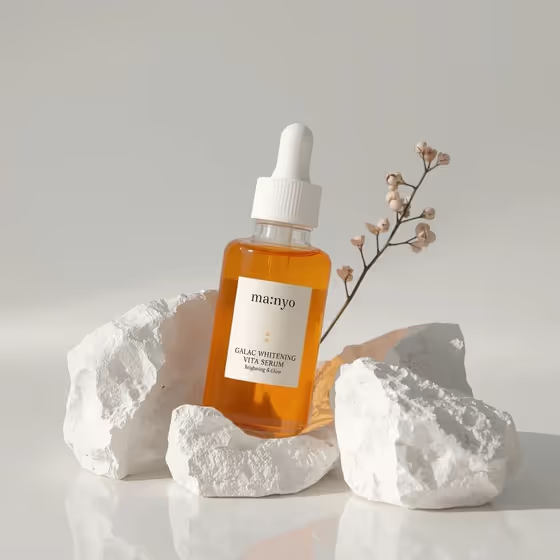
Sunlit Botanical Serum Still Life turns a skincare bottle into a minimal, premium-looking product photo. The bottle stands upright between large, textured stones on a glossy surface, with clean negative space around it and a single botanical accent, as in the cover image of an amber dropper bottle against pale stone.
It is built for skincare brands, small shop owners and content creators who need a calm, natural-light product shot for a listing, a launch post or a campaign. The output is a 3:4 image, which suits portrait-style product pages and social feeds.
What works best as input
- For the Skincare product field, either describe the item (for example, amber serum dropper bottle) or upload a reference photo of it. If you upload one, pick a shot where the whole bottle is visible and the label faces the camera.
- Use a clear, evenly lit reference with no heavy glare on the label, so the text and shape can carry over as faithfully as possible.
- If you type instead, name the bottle type and the liquid or glass color, such as frosted facial oil bottle or clear essence pump bottle. Specific words give the template more to work with than just the word product.
- Keep the reference to one product only. The template is built around a single hero bottle, so extra items in the photo can muddy the result.
How to use it
- Open the Sunlit Botanical Serum Still Life template in Phosphene.
- In Skincare product, describe your bottle or upload a reference photo of it.
- Choose a Stone and backdrop palette and a Botanical accent from the options, such as white stone and soft beige with delicate dried wildflowers.
- Generate the image, then check that the bottle shape, the label and the glow through the glass look right. Adjust your choices and generate again if you want a different mood.
Tips for a better result
- Match the palette to your product. An amber or golden liquid pairs naturally with white stone and soft beige, as in the cover, while a clear essence may stand out more against slate and mist gray.
- Try different botanical accents on the same bottle to build a small series, for example eucalyptus sprigs for one shot and small chamomile blooms for another.
- Pick the accent that suits the product story: pressed lavender stems for a calming formula, delicate dried wildflowers for a soft, light feel.
- The template is designed to keep the label readable, so start from a reference where the label text is already sharp and legible.
Common mistakes
- Uploading a blurry, dark or heavily reflective product photo, which makes it harder to keep the bottle and label accurate.
- Writing a vague product description like skincare bottle, which leaves out the shape, glass and color that define your item.
- Expecting busy scenes. The template is a minimal still life with one botanical accent and generous empty space, so it is not meant for crowded props or multiple products.
FAQ
Do I have to upload a photo?
No. The Skincare product field accepts either a typed description or an uploaded reference, so you can use whichever you have.
Can I change the stones and plants?
Yes. You choose the Stone and backdrop palette and the Botanical accent, for example travertine and warm cream with eucalyptus sprigs.
What shape is the output?
The image is made in a 3:4 portrait ratio.
Will the label on my bottle stay readable?
The template aims to keep the label readable. A clear, well-lit reference photo of the front of the bottle gives it the best chance.