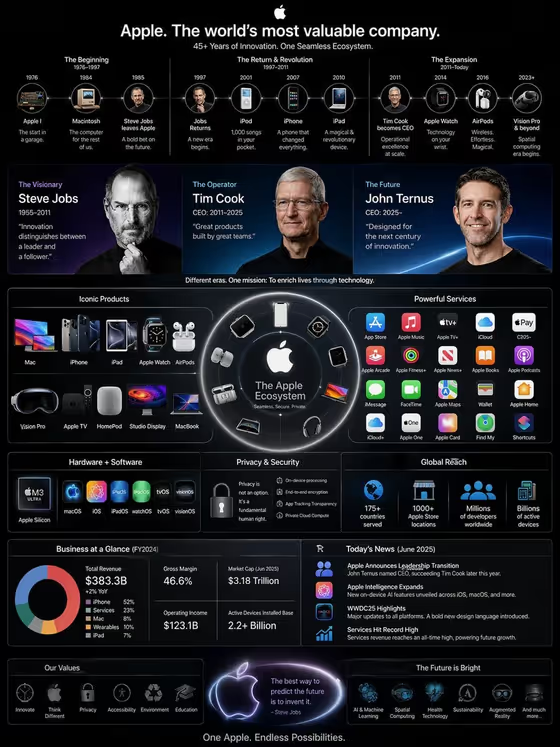
Technology Empire Infographic turns a company or product ecosystem into a single vertical 3:4 graphic in a keynote style. The layout maps three leaders across eras, flagship products, service marks, and the business pillars that connect them around a central company axis, as in the cover example with its timeline, leader panels, product ring, and revenue breakdown.
It suits anyone who needs a quick visual overview of how a company fits together: students building a case study, creators making explainer posts, or teams who want a clean ecosystem slide. The template asks for a company or ecosystem, a leadership timeline style, and a headline, then builds the dense layout for you.
What works best as input
- In the Company product or ecosystem field, you can type a description or add a matching reference. Be specific about what the map should cover, for example the hardware and services example shown in the field.
- If you add a reference, choose one that clearly shows the products or brand you want represented, so the product silhouettes and service marks come out recognizable.
- Keep the company description focused on one ecosystem. A narrow, clear subject gives the graphic a stronger central axis than a long list of unrelated businesses.
- Write the Infographic headline in short, bold capitals, like the field's examples (THE TECHNOLOGY EMPIRE or FROM VISION TO PLATFORM). Short headlines fit the title area at the top best.
- For Leadership timeline, pick the option that matches the story you want, such as founder to current leadership or three-generation succession, since the graphic shows three leaders across eras.
How to use it
- Open the Technology Empire Infographic template in Phosphene.
- Fill in Company product or ecosystem with the company you want mapped, or add a matching reference if the field allows it.
- Choose a Leadership timeline option and type your Infographic headline.
- Generate the image, then review the headline, the three leader panels, the product and service sections, and the connecting pillars before saving.
Tips for a better result
- Try different Leadership timeline choices on the same company, such as product-era milestones versus today versus the next era, to get different story angles from one subject.
- Change only the headline to test tones. A plain title like PRODUCTS, PEOPLE, SERVICES reads differently from a more aspirational one like FROM VISION TO PLATFORM.
- Use the example phrasing as a model for the ecosystem field, for instance naming both hardware and services, so the map includes both product silhouettes and service marks.
- Because the output is dense with small text, check the result at full size and regenerate if a section looks crowded or a label is unclear.
Common mistakes
- Entering a vague ecosystem such as just a single word with no context, which gives the graphic little to organize into products, services, and revenue lines.
- Writing a very long headline, which can crowd the title area and push against the timeline below it.
- Expecting every number and caption to be factually exact. Review all text and figures in the result before sharing or publishing it.
FAQ
What size and format does the result come in?
It is an image in a vertical 3:4 aspect ratio, designed as a single tall information graphic.
Do I have to upload a photo?
Only the Company product or ecosystem field accepts a photo reference, and you can also just type or choose a description there. The other fields are text or choice only.
Can I use it for any company?
You describe the company or ecosystem yourself, including generic ones like a global mobility platform or a creative software company, as the field examples show.
Should I trust the facts shown in the graphic?
Treat it as a designed visual, not a verified source. Check names, dates, and figures yourself before using the graphic anywhere public.