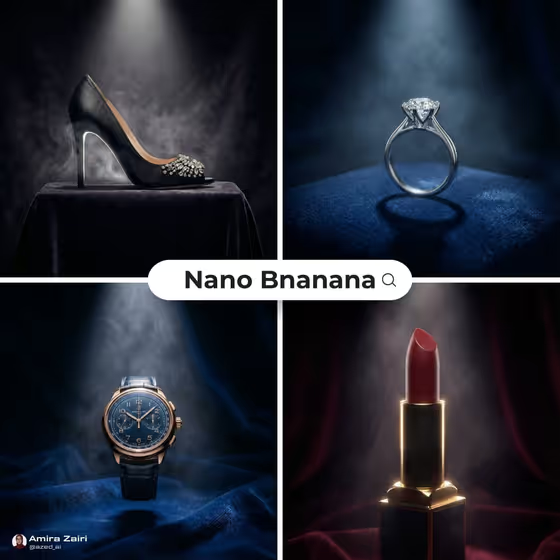
Velvet Spotlight Hero turns a product into a dramatic, square hero shot: one spotlight coming from above, a dark velvet surface, and a thin layer of mist behind it. The cover shows the idea across a heeled shoe, a diamond ring, a wristwatch and a lipstick, each lit from the top and sitting on fabric in a different color.
It suits anyone who wants a premium, editorial look for a single item, such as a small jewelry or watch brand, a beauty seller, or a creator building a luxury-style product post. You describe the product (or add a reference photo), pick a velvet color, and the template handles the lighting and staging.
What works best as input
- The Product field accepts either a text description or a reference photo, so use whichever you have. If you upload, choose a photo where the product is fully visible and not cut off.
- Use a clear, well-lit shot with the product in focus. Fine details like gemstones, watch dials or hardware show up better when they are sharp in the source.
- Keep the background simple. A cluttered or busy photo gives the template more to separate from the item.
- If you type instead, be specific about the item and its materials, for example 'a luxury wristwatch' or 'a premium perfume' rather than just 'a watch' or 'a bottle'.
- Stick to one hero product per image. The staging is built around a single isolated item.
How to use it
- Open the Velvet Spotlight Hero template in Phosphene.
- In the Product field, type a description of your item or add a reference photo of it.
- Choose a Velvet color, such as deep black, burgundy, midnight blue or emerald green.
- Generate the image, then review the square result and check that the product looks intact and the lighting reads as a single top-down spotlight.
Tips for a better result
- Match the velvet to the product. In the cover, deep blue velvet sets off a silver ring and a gold watch, while burgundy suits a red lipstick and black suits a dark shoe.
- Try the same product in two or three velvet colors and compare. The mood changes a lot between midnight blue and burgundy.
- Add material details in your product description, like 'gold-cased' or 'crystal-embellished', so the rim light has something to catch.
- If a reference photo gives a result that drifts from your item, try describing it in words instead, or the other way around.
Common mistakes
- Describing several products at once. The template isolates one hero item, so a list of objects works against the single-spotlight look.
- Writing a vague product name. 'A bag' gives much less to work with than 'a designer handbag'.
- Uploading a photo where the product is small, blurry or partly hidden, which makes it harder to keep the item looking intact.
FAQ
Do I have to upload a photo?
No. The Product field lets you either describe the product in text or add a reference photo.
Can I choose the velvet color?
Yes. The Velvet color field is a choice, with options like deep black, burgundy, midnight blue and emerald green.
What shape is the image?
The output is a square, 1:1 image.
What kind of products work best?
Small to mid-size premium items like watches, jewelry, perfume, lipstick, shoes and handbags fit the style shown on the cover.