How to Create AI Portraits That Feel Cinematic
A practical workflow for lighting, composition, and prompt structure when generating expressive AI portraits in Phosphene.
On this page
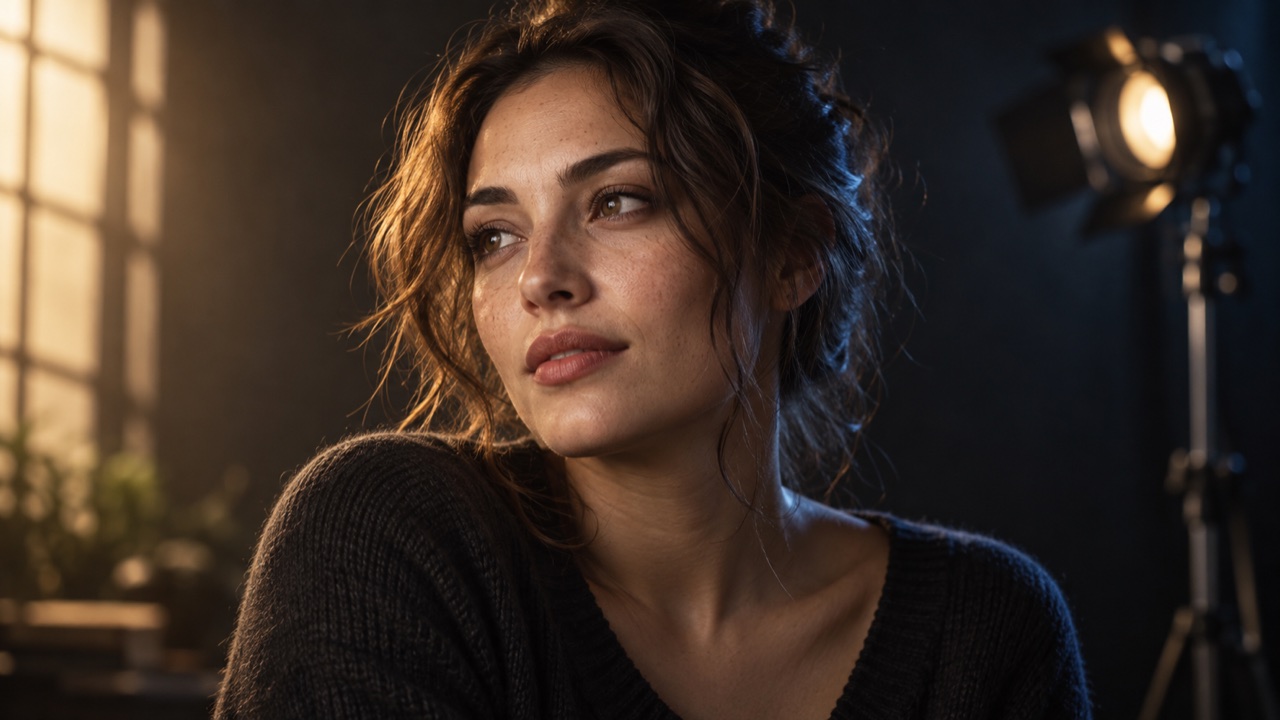
Portrait generations often look "almost right" but miss emotional clarity. A strong result usually comes from three ingredients working together:
- Subject intent (who is this person and why should we care)
- Light intent (what mood should the light communicate)
- Camera intent (how the framing influences feeling)
Start with a compact subject core
Begin your prompt with the subject in one sentence:
- age range and gender expression (if relevant)
- wardrobe style
- emotional tone
- one distinguishing trait
Example: "A thoughtful woman in a textured navy coat, faint freckles, calm but determined expression."
Add light and lens as separate blocks
Treat light and lens as two independent controls:
Lighting: soft side light, practical bokeh, subtle rim lightLens: 85mm portrait lens, shallow depth of field, medium close-up
This helps models avoid blending camera style into vague adjectives.
Use environment as signal, not noise
Keep the setting specific and minimal:
- "rain-soaked city street at dusk"
- "sunlit artist studio with floating dust"
If backgrounds become chaotic, reduce scene detail and increase subject priority.
Improve consistency in Phosphene
In Phosphene, try this flow:
- Select core subject tags first
- Add lighting/style tags second
- Generate once, then iterate with one change per round
Single-variable iteration helps you understand exactly which tag shift improved the output.
Final pass checklist
- Eyes are sharp and expressive
- Skin texture looks natural, not plastic
- Key light direction is readable
- Background supports story without stealing focus
When those four conditions are met, portraits usually feel intentional rather than random.