Generate Video Once, Publish Three Ways: The Multi-Format AI Production Pipeline
A Japanese solo creator runs live-action drama, anime, and manga from one video-first pipeline: a character bank of short generated clips, frame extraction instead of still-image generation, and a physical paneling step no model can replace.
AI-assisted draft. Reviewed and edited by the Phosphene team before publication.
On this page
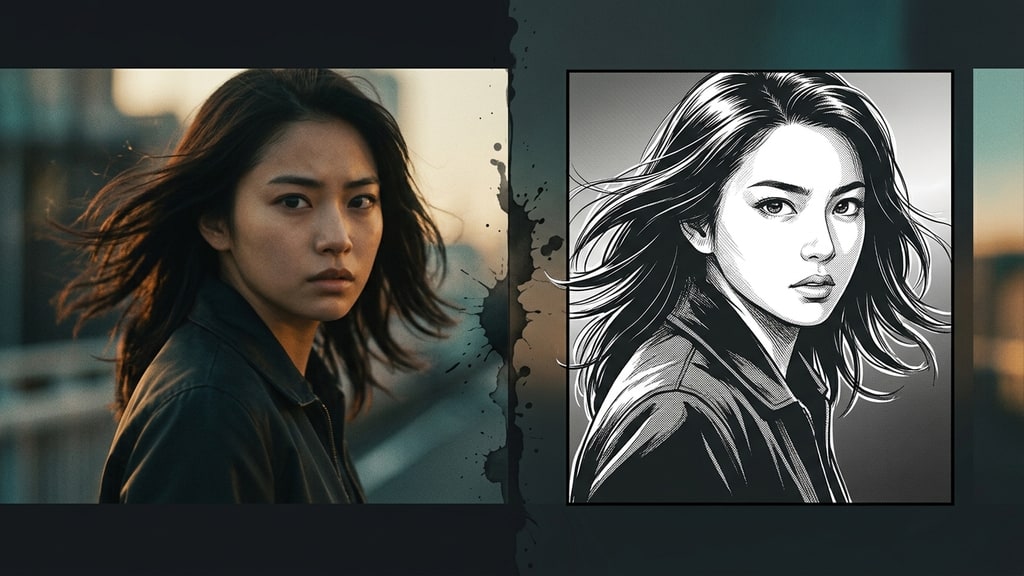
Most AI creators treat every output format as a separate project. A video project, an anime project, a manga project — each one starts from scratch, builds its own character references, and burns its own budget.
The Japanese solo creator group CreativeEdge CL+ runs the opposite model. They produce a live-action drama, an anime version, and a manga from a single video-first pipeline, and they document the whole thing in production notes written as they go. The third installment walks through the manga paneling step in detail, and the series as a whole is a working argument for one idea: generate video once, then let every other format borrow from it.
This is not a translation of their notes. It is an adaptation of the workflow, with the reasoning filled in where their posts leave it implied.
The pipeline in one paragraph
Everything starts as short generated video clips. Those clips form a character bank: a library of "moving character designs and pose collections," in the creator's words — 8, 10, and 15-second clips at 720p covering expressions, action beats, and signature props. The drama cuts clips together into episodes. The anime version reuses the same clips with anime-style illustration references layered on top. The manga skips standalone still-image generation: it extracts frames from the video and converts them into comic panels with an image model, so the panel art inherits the motion and consistency of the clips.
One asset, three products. The drama pays for the pipeline's credibility, the anime expands the audience, and the manga is the long-lived asset that keeps working after the video looks dated.
Why video frames beat generated stills for manga panels
This is the counterintuitive decision at the heart of the workflow, and it deserves attention.
If you need a manga panel of a character firing a gun, the obvious move is to generate a still image of it. The creators deliberately do not. Their stated reason: still-image generation does not produce the kinetic energy of a moving frame. A panel cut from real generated motion carries weight and direction that a posed illustration lacks — the momentum of the action is already baked into the composition.
There is a second, quieter reason that shows up across the series: video generation maintains character consistency across a whole clip, while still generation has to be re-negotiated for every single image. Extract frames from one consistent clip and the character, costume, and lighting match across every panel. Generate each panel separately and you fight identity drift from panel one.
The tradeoff is real. You pay video-generation credits for every clip, and a single panel may come from a 15-second clip you mostly discard. But the consistency dividend compounds: the same clips feed the drama, the anime, and the manga, so every format shares the same character identity without any per-format rework.
The character bank is the real product
The creators call the bank a collection of "moving character settings and pose books," and that framing is more honest than it sounds. Hundreds of these small clips accumulate into a library that every future episode and page can draw from.
Each clip is deliberately small: 720p, 8 to 15 seconds, one emotion or action per clip. That granularity matters. A short clip is easier to steer, cheaper to retry, and simpler to slot into a panel. A character bank built this way also compounds — the more clips you accumulate, the less new video you need to generate for each new page, which is exactly how the creators plan to hit their target of twenty manga pages per month on a tight credit budget.
If you are building your own bank, the clip roster writes itself: joy, anger, sadness, surprise for dialogue scenes; the signature poses and props for action; and a few neutral full-body clips for layout and reference work.
The manga conversion step
Converting a video frame into a manga panel is done with a text-to-image model, and the prompt is almost embarrassingly simple. The base prompt used across the project is roughly: convert this into a Japanese monochrome manga drawn with a G-pen.
That is the whole trick. The model handles line weight, hatching, and the monochrome treatment; the creator keeps the prompt minimal and spends the saved effort on the parts of the comic that a model genuinely cannot handle — panel structure, speech bubbles, and sound effects.
The workflow keeps cleanup in a separate tool. Backgrounds are stripped out wherever possible, with the creators noting that they deliberately design frames so backgrounds are not needed at all. When removal is required, a dedicated editor handles it — and, in their accounting, the cheaper cleanup tool is preferred over the conversion model because both consume credits but the editor's cleanup costs less. It is a small line item, but it is the kind of cost discipline that keeps a solo pipeline alive.
Paneling is the step AI cannot own
Here is the part the series insists on most strongly: panel layout and speech-bubble placement are done by hand, in a dedicated comic app. The creators are explicit that these are not tasks to hand to a model — the layout of a page is a reading-experience decision, not a generation task. Lettering, by contrast, is where they allow machine help: speech bubbles and sound effects can be lettered by hand or generated with an image model and composited in, whichever comes out better.
The concrete workflow, from their walkthrough, works in any capable comic tool:
- Build the page to a fixed spec. Their manga targets Amazon KDP (Kindle), so the canvas is 2400 × 3840 pixels at 72 dpi, grayscale, with 20 pages set up at once in book-binding mode.
- Set the page margins before anything else: 200 pixels top and bottom, 240 pixels left and right. Getting the safe area right up front avoids a full reflow later.
- Create a frame folder and cut the page into panels with the panel tool, keeping a default 8px border weight. Panel sizes and positions get fine-tuned with the object tool afterward.
- Copy each frame's image from the video extraction and paste it into the panel with paste-in-place, so the image lands exactly where the panel expects it. Scale and rotate per panel as needed.
- Repeat for every panel, then add speech bubbles and sound effects by hand — or generate the lettering with an image model and composite it in, whichever comes out better.
The margin step looks like bookkeeping, but it is the difference between a page that reads cleanly on a Kindle screen and a page where the art bleeds into the gutter. And the paste-in-place habit is what keeps a 20-page assembly from turning into 20 separate alignment problems.
Two operating principles worth stealing
Finish before you polish
The creator states the production policy bluntly: working alone, the priority is finishing before the motivation breaks, so the bar is "60 points" — good enough to ship, not perfect. Perfectionism is a single-person pipeline killer; there is no team to absorb the delay.
Pick the format that will last
The series makes a durability argument that is worth sitting with. Photoreal AI video ages badly: the model's generation-era mistakes are burned into the timeline, and higher resolution just displays those errors more clearly. Manga, by contrast, converts everything into a visual language — line, black fill, tone, panel, balloon — that is over a century old. Ten years from now, an AI manga reads as a manga. The video next to it reads as "2026 AI video."
That is a strong argument for treating the manga not as a side product but as the archival format of the project. The drama is the showpiece; the manga is the asset that survives.
The one-line takeaway
Build the character bank once, generate video into it, and let every format — drama, anime, manga, even graphic design — draw from the same clips. You get consistency for free, because every panel is a frame of the same story.
The technique does not require a particular video model or a particular comic app. It requires a shift in mental model: the generated video is not the final product, it is the raw material.
Sources
- CreativeEdge CL+ — Part 3: Simultaneous production of AI drama (live-action), anime, manga, and graphic design, with a walkthrough of the paneling workflow (Japanese original)
- CreativeEdge CL+ — Part 1: Simultaneous production workflow, manga built to Amazon KDP spec (Japanese original)
- CreativeEdge CL+ — Part 2: Character bank preparation and the film-comic approach (Japanese original)