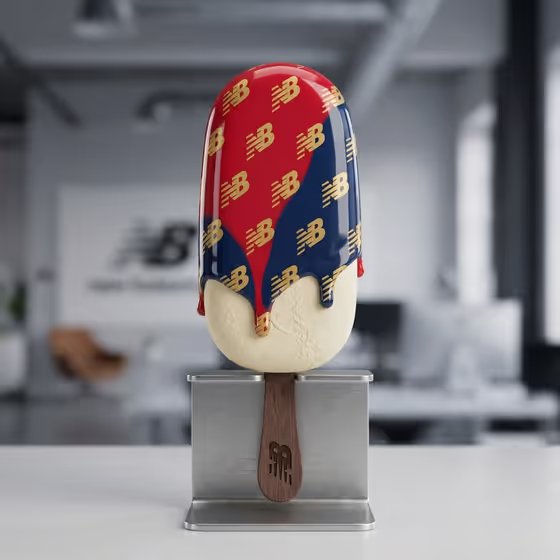
Branded Popsicle Object turns a logo into a collectible product shot. You get a single vertical popsicle with a glossy glaze dripping over a matte ice cream base, the logo repeated in a gold pattern across the coating, and the mark also appearing on the wooden stick.
It suits brand owners, designers and small business teams who want a playful object to show off a mark, whether for a social post, a campaign mockup or a merchandise idea. The result is a 3:4 image, so it fits portrait layouts well.
What works best as input
- For the Brand logo field, you can describe the logo in text or add a reference image. A clear, flat version of the logo (full mark, no cropping) gives the repeated pattern the best chance of staying faithful.
- Use a logo with a simple, bold shape. The cover shows a compact lettermark repeated many times, so marks that stay readable at small sizes tend to work better than very fine, detailed ones.
- If you describe the logo in words instead, be specific about its shape, letters and style. The field's examples range from 'my official brand logo' to 'a fashion monogram' or 'a playful café emblem', so say what kind of mark it is.
- Pick a glaze color that contrasts with the gold pattern. The cover pairs red and navy glaze with gold marks, which keeps the logo easy to read.
How to use it
- Open the Branded Popsicle Object template in Phosphene.
- In Brand logo, add your logo as a reference or describe it in text. Check the field's help text and examples if you are unsure what to enter.
- In Glaze color, choose or enter the color you want, for example 'Signature cobalt glaze' or 'Pistachio green and gold'.
- Generate the image, then review it. Check that the logo repeats cleanly on the glaze and appears on the stick, and adjust your inputs if something looks off.
Tips for a better result
- Try two-tone or multi-color glaze ideas such as 'Terracotta, teal and warm ivory'. The cover shows how two glaze colors can flow into each other as they drip.
- Match the glaze to your brand palette so the object reads as part of your identity. Using your signature color as the main glaze is a safe starting point.
- Run the same logo with several glaze colors to build a small set of variations, then compare which one makes the gold pattern stand out most.
- If a first result handles the logo loosely, simplify your logo description or use a cleaner reference and generate again.
Common mistakes
- Using a busy or low-contrast logo. Small details can blur when repeated across a curved glaze, so a simpler mark usually holds up better.
- Leaving the Brand logo field vague. A very generic description gives the template little to work with, so say what the mark looks like.
- Choosing a glaze color too close to gold. The pattern is meant to read clearly on the glaze, so very similar tones can make it hard to see.
FAQ
Can I upload my logo as an image?
Yes. The Brand logo field accepts a photo or reference image, and you can also describe the logo in text instead.
Do I have to choose a glaze color?
Yes, Glaze color is a required field. You can enter a single color or a combination, like the examples shown in the field.
What shape and size is the result?
The output is a single image in a 3:4 portrait ratio, showing one vertical popsicle on a stand.
Will the logo appear on the stick too?
The template is designed so the logo is repeated across the glaze and marked on the stick, as in the cover example. Results can vary, so review the image and regenerate if needed.