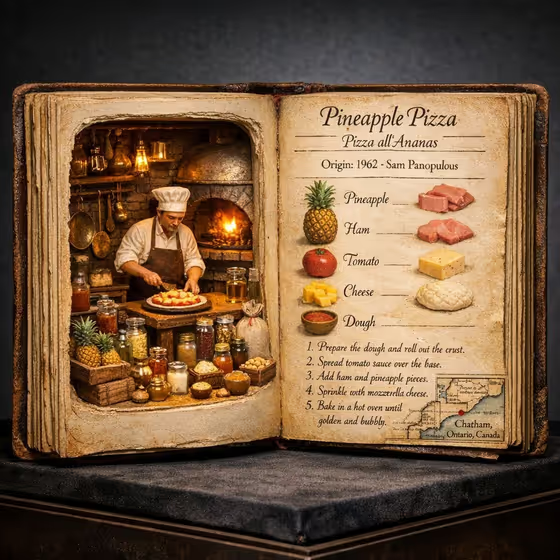
Culinary Origin Codex turns a dish name into a 3:4 image of an oversized antique cookbook lying open on dark velvet. The left page is a hollow diorama with a tiny period kitchen, a cook at work and jars of ingredients lit from inside. The right page is aged parchment with the dish title, an origin line, ingredient illustrations, numbered recipe steps and a small map.
It suits food writers, restaurant menus, cooking classes, social posts or anyone who wants a museum-style piece about a favorite dish. There is nothing to upload. You type the dish and pick how the text on the parchment is written.
The cover example uses pineapple pizza with English and native language labels, so you can see how the title, origin note and steps appear on the page.
What works best as input
- This template has no photo slot, so everything comes from the Dish design text field. Type a clear dish name such as pineapple pizza, crêpes Suzette, Margherita pizza or tiramisu.
- Use the common, recognizable name of the dish. A well-known name gives the template a better chance of building a fitting kitchen, inventor and ingredient list around it.
- The field also accepts a food reference, so you can add a short qualifier if you want a specific version of the dish. Keep it brief and focused on one dish.
- Stick to one dish per run. Listing several dishes in the same field makes the spread harder to read and the recipe less clear.
How to use it
- Open the Culinary Origin Codex template in Phosphene.
- In Dish design, type the name of the dish you want featured, for example tiramisu.
- Choose a value for Recipe language, such as English only or English and native language, to control how the dish name and recipe notes appear on the parchment.
- Generate the image, then look over the left diorama and the right recipe page. If the result is not what you wanted, adjust the dish name or language choice and run it again.
Tips for a better result
- Try the same dish with different Recipe language options. English and native language gives a more authentic feel, while English only keeps the page easiest to read.
- Pick dishes with a clear origin story or a recognizable place of origin, since the page includes an origin line and a small map.
- Dishes with a few distinct ingredients tend to give a cleaner ingredient column, as in the cover where each ingredient has its own small illustration.
- Make a set of several dishes using the same language setting to get a matching series for a menu, blog or classroom wall.
Common mistakes
- Writing a long sentence or a full recipe in Dish design. The field wants a dish name or short reference, and the recipe steps are produced for you.
- Expecting the page to be a verified historical source. The origin details and steps are part of a stylized artwork, so check facts before publishing them as real history.
- Choosing a language option without thinking about readability. Native language only may be harder for your audience to read than English with translated captions.
FAQ
Do I need to upload a photo?
No. Both fields are text or choice inputs, so you only type the dish and pick the recipe language.
What does the Recipe language setting change?
It controls how the dish name and recipe notes are written on the parchment, for example English only or English alongside the dish's native language.
What size is the image?
The output is a single image in a 3:4 aspect ratio.
Can I use any dish?
You can type any dish name you like. Well-known dishes with a recognizable origin usually fit the origin line and map best, but the result is an artistic piece, so review it before sharing.